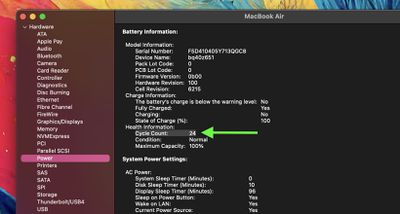
A key indicator of your MacBook's battery health is its cycle count. Keep reading to learn what it means and how you can check it for yourself.
macbook air spacegray purple battery
Modern MacBooks can last 18 hours or more on a single battery charge, but like all rechargeable batteries, the one in your Mac has a finite lifespan. Over time, its capacity to hold a charge gradually diminishes, potentially leaving you tethered to a power outlet more often than you'd like. This is where understanding your Mac's battery cycle count can be important.

Checking your Mac's battery cycle count provides valuable insight into its overall health and remaining lifespan. A cycle count represents the number of times your battery has gone through a full charge cycle, which occurs when you use 100% of its capacity – whether in one sitting or spread across multiple partial charges. By monitoring this number, you can gauge how much life your battery has left and plan accordingly, whether that means adjusting your usage habits or preparing for a potential battery replacement down the line.

Checking Mac Battery Cycle Count

Here's how to check it your Mac's battery cycle count:

  1. Click the Apple symbol () in the menu bar while holding the Option key.
  2. Select System Information from the dropdown menu.
    system info

  3. In the new window, click the Hardware list in the left sidebar if its contents aren't showing.
  4. Click Power in the expanded Hardware list.
  5. Look for Cycle Count under "Health Information" in the Battery Information section of the main window.
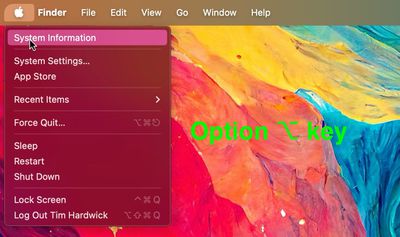
    sys info

This number represents how many times your battery has been fully discharged and recharged.

Apple designs MacBook batteries to maintain up to 80% of their original capacity at their maximum cycle count, which varies by model. Recent MacBooks typically have a maximum cycle count of 1,000, while older models range from 300 to 500. You can find your specific model's maximum on Apple's support website.

Remember, reaching the maximum cycle count doesn't mean your battery stops working. It simply indicates when you might notice a decrease in battery life. In macOS Catalina 10.15.5 and later, Apple includes an Optimized Battery Charging feature, which can help extend your battery's lifespan.

Every new Mac bought from Apple comes with a one-year warranty that includes service coverage for a defective battery. If your Mac is out of warranty and the battery hasn't aged well, Apple offers battery service for a charge.


Popular Stories

iOS 26

iOS 26.4 and iOS 27 Features Revealed in New Leak

Friday December 12, 2025 10:56 am PST by
Macworld's Filipe Espósito today revealed a handful of features that Apple is allegedly planning for iOS 26.4, iOS 27, and even iOS 28. The report said the features are referenced within the code for a leaked internal build of iOS 26 that is not meant to be seen by the public. However, it appears that Espósito and/or his sources managed to gain access to it, providing us with a sneak peek...
iOS 26

iOS 26.2 Coming Soon With These 8 New Features on Your iPhone

Thursday December 11, 2025 8:49 am PST by
Apple seeded the second iOS 26.2 Release Candidate to developers earlier this week, meaning the update will be released to the general public very soon. Apple confirmed iOS 26.2 would be released in December, but it did not provide a specific date. We expect the update to be released by early next week. iOS 26.2 includes a handful of new features and changes on the iPhone, such as a new...
iOS 26

Apple Releases iOS 26.2 With Alarms for Reminders, Lock Screen Changes, Enhanced Safety Alerts and More

Friday December 12, 2025 10:10 am PST by
Apple today released iOS 26.2, the second major update to the iOS 26 operating system that came out in September, iOS 26.2 comes a little over a month after iOS 26.1 launched. ‌iOS 26‌.2 is compatible with the ‌iPhone‌ 11 series and later, as well as the second-generation ‌iPhone‌ SE. The new software can be downloaded on eligible iPhones over-the-air by going to Settings >...
AirPods Pro Firmware Feature

Apple Releases New Firmware for AirPods Pro 2 and AirPods Pro 3

Thursday December 11, 2025 11:28 am PST by
Apple today released new firmware designed for the AirPods Pro 3 and the prior-generation AirPods Pro 2. The AirPods Pro 3 firmware is 8B30, up from 8B25, while the AirPods Pro 2 firmware is 8B28, up from 8B21. There's no word on what's include in the updated firmware, but the AirPods Pro 2 and AirPods Pro 3 are getting expanded support for Live Translation in the European Union in iOS...
macOS Tahoe 26 Thumb

Apple Releases macOS Tahoe 26.2 With Edge Light

Friday December 12, 2025 10:08 am PST by
Apple today released macOS Tahoe 26.2, the second major update to the macOS Tahoe operating system that came out in September. macOS Tahoe 26.2 comes five weeks after Apple released macOS Tahoe 26.1. Mac users can download the macOS Tahoe update by using the Software Update section of System Settings. macOS Tahoe 26.2 includes Edge Light, a feature that illuminates your face with soft...
AirTag 2 Mock Feature

Apple AirTag 2: Four New Features Found in iOS 26 Code

Thursday December 11, 2025 10:31 am PST by
The AirTag 2 will include a handful of new features that will improve tracking capabilities, according to a new report from Macworld. The site says that it was able to access an internal build of iOS 26, which includes references to multiple unreleased products. Here's what's supposedly coming: An improved pairing process, though no details were provided. AirTag pairing is already...
ipados 26 1 slide over

Apple Releases iPadOS 26.2 With Multitasking Improvements

Friday December 12, 2025 10:09 am PST by
Apple today released iPadOS 26.2, the second major update to the iPadOS 26 operating system released in September. iPadOS 26.2 comes a month after iPadOS 26.1. The new software can be downloaded on eligible iPads over-the-air by going to Settings > General > Software Update. iPadOS 26.2 continues with the multitasking improvements that were added with iPadOS 26.1. You can now drag and...
bug security vulnerability issue fix larry

Update Now: iOS 26.2 Fixes 20+ Security Vulnerabilities

Friday December 12, 2025 11:11 am PST by
Apple today released iOS 26.2, iPadOS 26.2, and macOS 26.2, all of which introduce new features, bug fixes, and security improvements. Apple says that the updates address over 20 vulnerabilities, including two bugs that are known to have been actively exploited. There are a pair of WebKit vulnerabilities that could allow maliciously crafted web content to execute code or cause memory...