Mac notebooks equipped with Apple silicon use Optimized Battery Charging, a feature that's designed to prolong the battery life and battery health of your Mac by reducing the rate of chemical aging.
Mac notebooks use lithium-ion batteries, which like all rechargeable batteries, become less effective as they get older, but their chemical age isn't determined only by time. It's also affected by factors such as temperature history and charging pattern.
For this reason, Optimized Battery Charging intelligently analyzes the battery status of your Mac and its charging pattern, and based on this information, the feature may sometimes temporarily reduce your battery's maximum charge to 80%. This happens as needed to ensure that your battery charges to a level that's optimized for your usage, thereby reducing wear on the battery and slowing its chemical aging.
You can check the battery health of a Mac that's powered by Apple silicon by following the simple steps below.
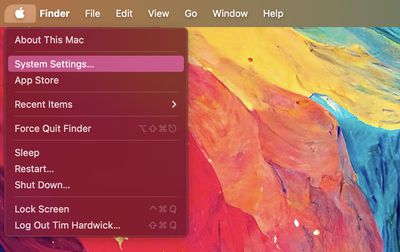
- Click the Apple symbol () in the menu bar at the top of the screen, then click System Settings....

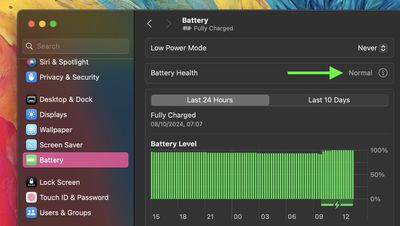
- Select Battery in the sidebar menu.
- Click the info (i) button in the Battery Health section.
Check the "Battery Condition" result. If it's Normal, then your battery health is fine. This can be the case even if the accompanying Maximum Capacity readout is no longer at 100%. That's because batteries used in Mac notebooks are designed to retain up to 80% of their original capacity at their maximum cycle count when operating under normal conditions.
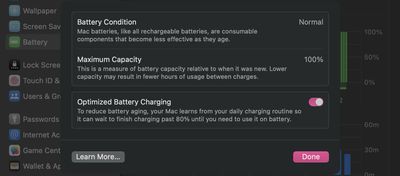
If your Mac battery's maximum capacity is less than 80%, however, this is an indication that it needs servicing, and you'll likely already be experiencing noticeably degraded battery life.
Every new Mac bought from Apple comes with a one-year warranty that includes service coverage for a defective battery. If your Mac is out of warranty and the battery hasn't aged well, Apple offers battery service for a charge.