

Bookmark Multiple Tabs in Safari on iPhone - MacRumorsOpen MenuShow RoundupsShow Forums menuVisit ForumsOpen Sidebar
Skip to Content

Bookmark Multiple Tabs in Safari on iPhone

by

In Safari on iPhone, it's not unusual for the number of tabs you have open to quickly get out of hand. Here's how to temporarily clean things up without losing your tabs.

safari tabs hand
If you have no use for all your open tabs, you can simply select one, then press and hold on the tabs button in the bottom-right corner of the screen. This will bring up an option to "Close All [x] Tabs," X being the number open.

Using the close all tabs option is one solution for restoring order to your browser session, but that's no good if you're not finished looking at the open tabs, especially if you're busy researching a project or a vacation, let's say.

You could always bookmark the open web pages for later reference. But you don't have to bookmark each tab one by one – that could take a while depending on how many are open.

Fortunately, Safari lets you bookmark multiple tabs in a just couple of taps and save them all in a new or existing bookmark folder. Here's how it works.

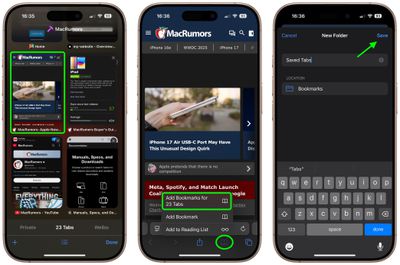
Select one of your open tabs, and in the main browsing window, long press the Bookmark icon (it looks like an open book).
safari
Once you've tapped this option, you'll be asked to save the tabs in a new bookmarks folder. You can also choose the location where you want the new folder to live.

To access your bookmarks in Safari at any time, simply tap the Bookmarks icon in the main browsing interface to reveal all of your saved favorites and folders.


Tag: Safari

Top Rated Comments

EightyEight Avatar
13 months ago
Hey MacRumors, please:
More useful article like this.
Less Gurman wild speculation.
Score: 5 Votes (Like | Disagree)
twistedpixel8 Avatar
13 months ago
“22 tabs” pfff… rookie numbers.
Score: 4 Votes (Like | Disagree)
13 months ago
On iPad this can be found by tapping the name of your tab group in the upper left.

So tap the two squares to show all open tabs, then tap the group name in the opposite side and the option to bookmark is at the very bottom of the list.
Score: 2 Votes (Like | Disagree)
13 months ago
Very useful tip. Did not know that this feature existed. Will try it out next time I have many tabs open on my phone.
Score: 1 Votes (Like | Disagree)
Reason077 Avatar
13 months ago

“In Safari on iPhone, it's not unusual for the number of tabs you have open to quickly get out of hand. “
I don’t actually have this problem on iPhone thanks to the “close tabs automatically after 1 day” feature.

I just wish there was a similar feature on macOS where I do have this problem!

I also wish macOS Safari had an option to block specific websites from opening links in new tabs. Certain websites habitually open all links in new tabs which can quickly result in dozens of tabs if you’re not careful to keep closing them.
Score: 1 Votes (Like | Disagree)
13 months ago
I, like a dummy, was trying to do this on my iPad and couldn’t figure out for the life of me why I couldn’t find a solution. I guess this only works for iPhone then…
Score: 1 Votes (Like | Disagree)

Popular Stories

iOS 27 on iPhone 17 1

iOS 27 Will Add These New Features to Your iPhone

Saturday May 2, 2026 8:43 am PDT by
Apple is expected to unveil iOS 27 during its WWDC 2026 keynote on June 8, and there are already many rumored features and changes for iPhones. The first developer beta of iOS 27 will likely be available immediately following the keynote, and a public beta typically follows in July. Following beta testing, the software update should be released to all users with a compatible iPhone in...
Apple Event Logo

Apple Just Released a New Accessory

Monday May 4, 2026 8:13 am PDT by
Apple today released a new Pride Edition Sport Loop for the Apple Watch. The band features a rainbow design with 11 colors of woven nylon yarns. The new Pride Edition Sport Loop is available to order now on Apple.com and in the Apple Store app in 40mm, 42mm, and 46mm sizes, and it will be available at Apple Store locations starting later this week. In the U.S., the band costs $49. There...
Apple MacBook Pro M4 hero

Why You Might Want to Wait to Buy a MacBook Pro

Friday May 1, 2026 3:43 pm PDT by
Apple refreshed the 14-inch and 16-inch MacBook Pro with M5 Pro and M5 Max models in March 2026, but depending on your needs and interests, you might want to skip this generation because there's something better in the works. The M5 Pro and M5 Max MacBook Pro models have faster chips, but the same design that Apple has used since 2021. An updated design with new display technology and faster ...
Related Apple News: South Africa | Politics | Mac | Technology | Entertainment
















