In the interests of enhanced privacy, some third-party iOS apps include an option to require passcode or Face ID authentication before they can be opened, even though the iPhone is already unlocked. This puts the app's contents behind an additional layer of security, but not all apps offer the same facility.
iphone passcode green
Until recently, Apple did not offer a way to individually lock sensitive apps like Photos, and iPhone users had to resort to Screen Time's App Limits as a workaround. Fortunately however that's no longer the case, because you can now create an additional security barrier for any app on your iPhone using a shortcut action that's included in iOS 16.4 and later.

Apple has added several more actions to the Shortcuts app, and the one that interests us here is Lock Screen. The Lock Screen action essentially allows you to set up a personal automation that automatically locks your iPhone when a specified app is opened.

Of course, this action should pose no access issues for you as the iPhone owner, but it does mean that anyone else trying to open the app first needs to pass facial authentication or enter your passcode even though your iPhone was unlocked when they tapped the app icon.

The following steps guide you through the process of setting up a personal automation that will instantly lock your iPhone when the app of your choosing is opened.

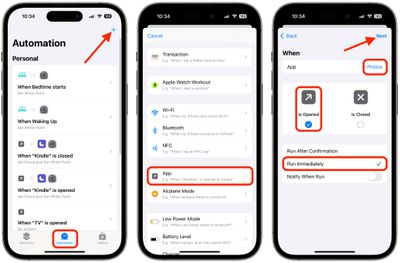
  1. Launch the Shortcuts app, tap the Automation tab at the bottom of the screen.
  2. Tap the + button in the top-right corner, then scroll down the menu of options and choose App.
  3. On the next screen, tap Choose to select an app from the list of apps, then tap Done.
  4. Make sure Is Opened and Run Immediately are selected, then tap Next.
    shortcuts

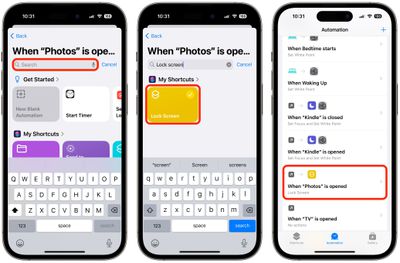
  5. Start typing "Lock Screen" into the text field and select Lock Screen when it appears in the results below.
  6. You should see your new automation "When [app] is opened, Lock screen" added to the Automations list.
    shortcuts

Your personal automation is now complete and should automatically spring into action the next time you open the chosen app.


Top Rated Comments

multipasser Avatar
36 months ago
oh waw!!!! so easy and userfriendly.

Ffs.. without a how-to not a single user will ever figure this out.
Score: 29 Votes (Like | Disagree)
klasma Avatar
36 months ago
Hopefully Apple will add this as a simple app toggle in Settings at some point.
Score: 29 Votes (Like | Disagree)
klasma Avatar
36 months ago
You’d probably also want to do this for the Shortcuts app itself, to prevent someone from disabling the automation.

Edit: And it turns out you can’t do that, see downthread.
Score: 23 Votes (Like | Disagree)
klasma Avatar
36 months ago

This workaround sounds promising -- but doesn't it just use the same spied passcode that thieves used to unlock the phone in the first place?
The use case here is when you give someone your unlocked phone, e.g. to play a game, that they don’t also get access to your sensitive data. Or when you leave your phone unlocked for a minute somewhere by accident.

This will be fun for law enforcement trying to inspect your phone, by the way.
Score: 18 Votes (Like | Disagree)
ignatius345 Avatar
36 months ago
This workaround sounds promising -- but doesn't it just use the same spied passcode that thieves used to unlock the phone in the first place?
Score: 16 Votes (Like | Disagree)
smythey Avatar
36 months ago
Must get my head around shortcuts sometime.....
Score: 15 Votes (Like | Disagree)

Popular Stories

Aston Martin CarPlay Ultra Screen

Apple's CarPlay Ultra to Expand to These Vehicle Brands Later This Year

Sunday February 1, 2026 10:08 am PST by
Last year, Apple launched CarPlay Ultra, the long-awaited next-generation version of its CarPlay software system for vehicles. Nearly nine months later, CarPlay Ultra is still limited to Aston Martin's latest luxury vehicles, but that should change fairly soon. In May 2025, Apple said many other vehicle brands planned to offer CarPlay Ultra, including Hyundai, Kia, and Genesis. In his Powe...
iOS 26

iOS 26.3 and iOS 26.4 Will Add These New Features to Your iPhone

Tuesday February 3, 2026 7:47 am PST by
We are still waiting for the iOS 26.3 Release Candidate to come out, so the first iOS 26.4 beta is likely still at least a week or two away. Following beta testing, iOS 26.4 will likely be released to the general public in March or April. Below, we have recapped known or rumored iOS 26.3 and iOS 26.4 features so far. iOS 26.3 iPhone to Android Transfer Tool iOS 26.3 makes it easier...
Apple Logo Black

Apple's Next Launch is 'Imminent'

Sunday February 1, 2026 12:31 pm PST by
The calendar has turned to February, and a new report indicates that Apple's next product launch is "imminent," in the form of new MacBook Pro models. "All signs point to an imminent launch of next-generation MacBook Pros that retain the current form factor but deliver faster chips," Bloomberg's Mark Gurman said on Sunday. "I'm told the new models — code-named J714 and J716 — are slated...
Apple MacBook Pro M4 hero

New MacBook Pros Reportedly Launching Alongside macOS 26.3

Sunday February 1, 2026 5:42 am PST by
Apple is planning to launch new MacBook Pro models with M5 Pro and M5 Max chips alongside macOS 26.3, according to Bloomberg's Mark Gurman. "Apple's faster MacBook Pros are planned for the macOS 26.3 release cycle," wrote Gurman, in his Power On newsletter today. "I'm told the new models — code-named J714 and J716 — are slated for the macOS 26.3 software cycle, which runs from...
iOS 26 Home Feature

Apple Gives Final Warning to Home App Users

Tuesday February 3, 2026 8:55 am PST by
In 2022, Apple introduced a new Apple Home architecture that is "more reliable and efficient," and the deadline to upgrade and avoid issues is fast approaching. In an email this week, Apple gave customers a final reminder to upgrade their Home app by February 10, 2026. Apple says users who do not upgrade may experience issues with accessories and automations, or lose access to their smart...