How to Receive Unique Alerts for VIP Emails on iPhone and iPad - MacRumorsOpen MenuShow RoundupsShow Forums menuVisit ForumsOpen Sidebar
Skip to Content

How to Receive Unique Alerts for VIP Emails on iPhone and iPad

by

ios 11 mail icon pn e1543485132148If you use the VIP feature in the iOS Mail app then you'll already know how they can help you keep track of important messages from your key contacts amid the daily torrent of incoming emails.

Keeping on top of VIP emails can be made even easier by ensuring you receive a specific sound or vibration alert whenever one comes through on your iPhone or iPad. That way you'll know if a new message justifies your immediate attention before you've even looked at your iOS device. Here's how to set them up.

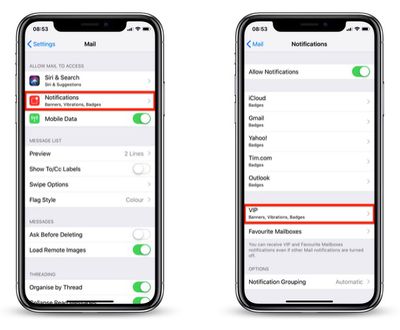
  1. Launch the Settings app on your iPhone or iPad.
  2. Tap Mail in the list.
    how to assign a sound alert to VIP emails01

  3. Tap Notifications.
  4. Tap VIP.
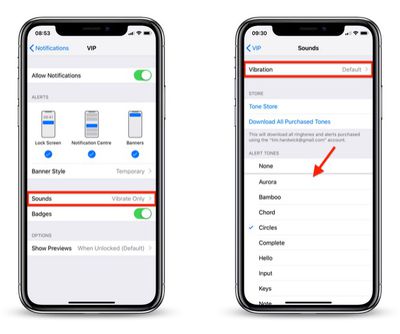
  5. Tap Sounds.
    how to assign a sound alert to VIP emails02

  6. Choose a unique sound from the list or tap Vibration to select a special vibration. The default sound alert is Ding (Classic), so be sure to choose something different.
With that done, the next time you receive an email from one of your VIPs, you'll get the unique notification alert and immediately know it's an important message.


Top Rated Comments

chino-rican Avatar
97 months ago
This assumes the following is activated: Settings > Passwords & Accounts > Fetch New Data > Push > ON; Change the desired email account to Fetch.

Otherwise, you will only get the alert if you open the Mail app and download new emails.
Score: 1 Votes (Like | Disagree)
johnnyturbouk Avatar
97 months ago
This is all very well but I tend to have my phone on silent a lot, as I work with patients. What would be an elegant and really useful feature would be if apple adopted a filter system like sanebox. Using smart machine learning to recognise the difference btwn random crap from group-on and amazon reporting offers, to say receipts. I currently have my gmail as my professional email account, me.com for family and yahoo for signing up with companies that I know willl then spam my email.
Score: 1 Votes (Like | Disagree)

Popular Stories

iOS 27 on iPhone 17 1

iOS 27 Will Add These New Features to Your iPhone

Saturday May 2, 2026 8:43 am PDT by
Apple is expected to unveil iOS 27 during its WWDC 2026 keynote on June 8, and there are already many rumored features and changes for iPhones. The first developer beta of iOS 27 will likely be available immediately following the keynote, and a public beta typically follows in July. Following beta testing, the software update should be released to all users with a compatible iPhone in...
Apple Event Logo

Apple Just Released a New Accessory

Monday May 4, 2026 8:13 am PDT by
Apple today released a new Pride Edition Sport Loop for the Apple Watch. The band features a rainbow design with 11 colors of woven nylon yarns. The new Pride Edition Sport Loop is available to order now on Apple.com and in the Apple Store app in 40mm, 42mm, and 46mm sizes, and it will be available at Apple Store locations starting later this week. In the U.S., the band costs $49. There...
Apple MacBook Pro M4 hero

Why You Might Want to Wait to Buy a MacBook Pro

Friday May 1, 2026 3:43 pm PDT by
Apple refreshed the 14-inch and 16-inch MacBook Pro with M5 Pro and M5 Max models in March 2026, but depending on your needs and interests, you might want to skip this generation because there's something better in the works. The M5 Pro and M5 Max MacBook Pro models have faster chips, but the same design that Apple has used since 2021. An updated design with new display technology and faster ...
Related Apple News: South Africa | Politics | Lifestyle | Business | Ipad