How to Listen to Apple Music on a Google Home Mini or Nest Audio Speaker - MacRumorsOpen MenuShow RoundupsShow Forums menuVisit ForumsOpen Sidebar
Skip to Content

How to Listen to Apple Music on a Google Home Mini or Nest Audio Speaker

by

When Apple Music first launched in 2015, playing it on anything other than an Apple device was impossible. Thankfully though, over the years Apple has made its streaming service available to access through third-party devices and speakers, including Amazon Echo and Google-owned speakers. This article focuses on Google devices.
nest supports apple music feature
If you have a Google Home mini or a newer Nest-branded smart speaker from Google, you can stream ‌Apple Music‌ to it pretty much seamlessly. All you need is to have your Google speaker set up and connected to your Wi-Fi network, and the Google Home app installed on your iPhone or iPad.

The following steps guide you through the setup process for streaming songs from ‌Apple Music‌ to your Google or Nest Audio speaker.

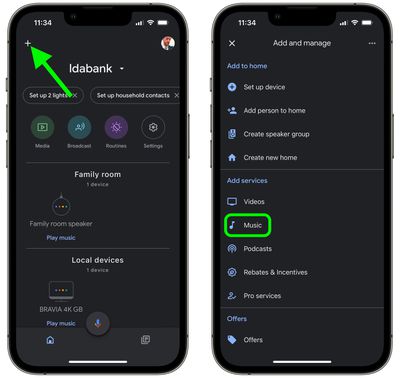
  1. Open the Google Home app on your iPhone or ‌iPad‌.
  2. Sign into your Google account if you haven't already, and tap the + button in the top-left corner.
  3. Under "Add services," tap Music.
    google home

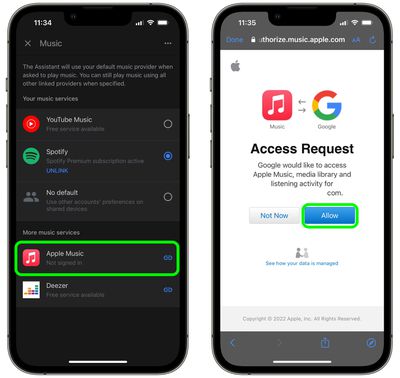
  4. Under "More music services," tap Apple Music.
  5. Tap Link Account in the pop-up prompt.
  6. When the Apple webpage opens, sign into your Apple account, and then tap Allow on the "Access Request" page that appears.
    google home

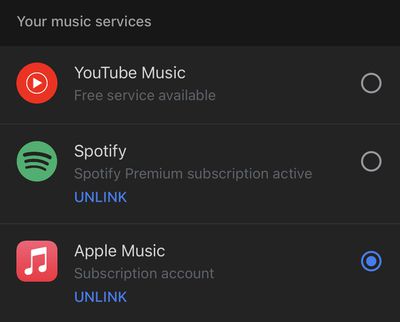
After you've followed the above steps, ‌Apple Music‌ will move up into the section called "Your music services" in the Music screen, where you can select it as the default option.
google home
Now that you're set up, to play songs in ‌Apple Music‌ on your Google Home or Nest speaker, simply say "Hey Google, play [song name] or "Hey Google, play my [playlist name] playlist." When a song is playing, you can control playback manually in the Google Home app by tapping the media toggle on the home screen.


Popular Stories

google chrome vertical tabs

Google Brings Vertical Tabs and Improved Reading Mode to Chrome

Tuesday April 7, 2026 1:27 pm PDT by
Google today updated its Chrome browser with support for vertical tabs, which are displayed in a sidebar instead of at the top of the browser. The tab layout can be changed by right clicking on any Chrome window and choosing the "Show Tabs Vertically" option. Sidebar tabs feature full page titles and make it simple to organize tab groups. Google has also added a new full-page interface...
Chrome Feature 22

Gemini in Google Chrome Gets a Skills Library for Saving Custom AI Prompts

Tuesday April 14, 2026 10:00 am PDT by
Chrome has been updated today with a Skills library that's designed to let Chrome users turn AI tasks into repeatable skills that can be used on any website. Useful prompts you create for Gemini in Chrome can be saved as a Skill that can be accessed later with a single click. If you're shopping for skincare and ask Gemini about the ingredients in a product, for example, you can save the...
gemini for mac app google

Google Launches Native Gemini AI App for Mac

Wednesday April 15, 2026 10:46 am PDT by
Google is bringing Gemini to the Mac with a new native macOS app that's available starting today. Gemini for Mac can be activated with a keyboard shortcut, and it has built-in tools for generating images, analyzing what's on your screen, reviewing files, and more. Gemini is the last of the three major AI services to have a dedicated Mac app, because OpenAI and Anthropic have had Mac apps for ...
Related Apple News: Sport | Business | Lifestyle | Iphone | Mac