How to Put an AirTag in Lost Mode - MacRumorsOpen MenuShow RoundupsShow Forums menuVisit ForumsOpen Sidebar
Skip to Content

How to Put an AirTag in Lost Mode

by

Apple's AirTags are small, coin-shaped devices that can be attached to items like keys and wallets to allow these accessories to be tracked using Bluetooth right alongside Apple devices in the Find My app.

AirTag Lost Mode Feature
AirTags can be tracked using the Items tab in ‌Find My‌, and just like your Apple devices, if one should become lost, you can put it in Lost Mode to locate it. If an AirTag is nearby, it will connect to an Apple device over Bluetooth to relay its location, and there's even a Precision Finding feature on the iPhone 11 and 12 that uses the U1 chip for finding items that are misplaced close by.

An ‌AirTag‌ that's out of range can still be tracked using the ‌Find My‌ app, but it won't rely on the Bluetooth signals from your own device. Instead, the ‌‌‌Find My‌‌‌ Network takes advantage of nearly a billion Apple devices out in the world to help you locate your ‌AirTag‌.

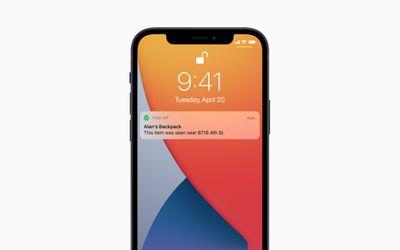
airtag notification
However, if an ‌AirTag‌ isn't nearby and there are no Apple devices in the area in which it's located, ‌‌Find My‌‌ will only be able to tell you where it was last seen on the map. In such cases, you can place the ‌AirTag‌ in Lost Mode. That way, if someone with an iPhone or Android device that has NFC comes across the item, they can help return it to you. Here's how it works.

How to Mark an AirTag as Lost

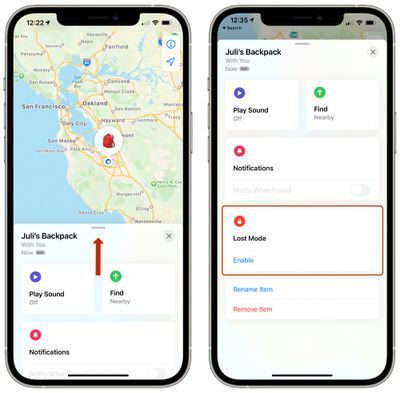
  1. Launch the Find My app on your iPhone.
  2. Tap Items.
  3. Tap the ‌AirTag‌ you want to mark as lost.
  4. Swipe down on the card and under "Lost Mode," tap Enable. airtag lost mode 1
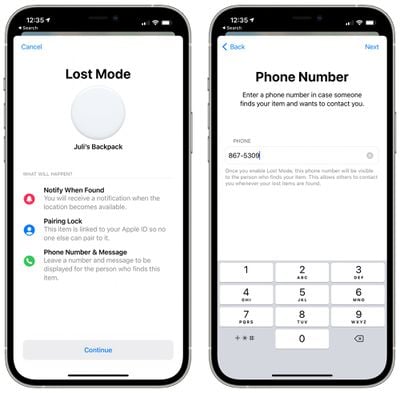
  5. Tap Continue.
  6. Enter your phone number in the input field, then tap Next. airtag lost mode 1 5
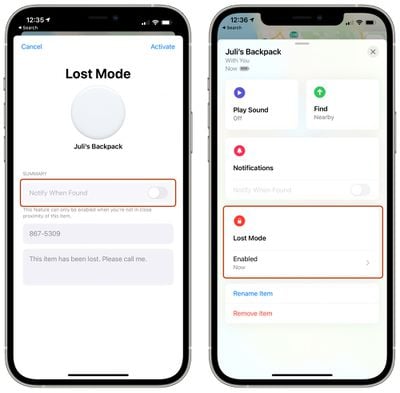
  7. Toggle the switch next to Notify When Found, and optionally customize the lost message that is shown when someone finds the item. Note that you can only customize the message and activate Notify When Found if the ‌AirTag‌ is out of range of your device.airtag lost mode 2
  8. Tap Activate.

airtag
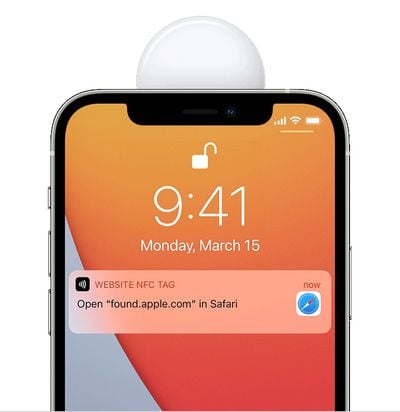
Now that the ‌AirTag‌ is marked as lost, anyone who finds it can bring it close to an NFC-enabled iPhone or Android phone and they will see a notification linking them to a website URL that contains your lost message and phone number. You may also be able to see the location relayed through someone else's device thanks to the ‌Find My‌ network.

Related Roundup: AirTag
Buyer's Guide: AirTag (Buy Now)

Top Rated Comments

Apple_Robert Avatar
64 months ago

If you are too stupid to lose a product you are utilizing to prevent you from losing its parent product, you deserve neither.
A person puts an AirTag in a piece of luggage and the Airline loses said luggage. The owner isn't stupid for attempting to take reasonable care to prevent loss from happening.

You shouldn't make such declarative statements without considering what you are saying.
Score: 7 Votes (Like | Disagree)
64 months ago
I would love to put it in my bike frame and be able to mark it as stolen rather than showing up on the iPhone of the thief’s as lost.
Score: 5 Votes (Like | Disagree)
Apple_Robert Avatar
64 months ago

If the airline... let's say, Southwest... loses the luggage... let's say, the latest Titelist titanium clubs... the person with the lost clubs has no control over said luggage, and the race is on for Southwest to track those golf clubs down, AirTagged or not.

How are AirTags solving a problem from 2020? Duh derrr
I pointed out that your all encompassing declarative statement was a poor statement. And 2020 has nothing to do with your previous statement much less this one.
Score: 2 Votes (Like | Disagree)
64 months ago
Can i disable my phone from being used to locate someones airtags?
Score: 1 Votes (Like | Disagree)
64 months ago

I would love to put it in my bike frame and be able to mark it as stolen rather than showing up on the iPhone of the thief’s as lost.
my thoughts exactly. i thought this would be great for finding my stolen stuff if it didn't alert the robber that it is getting tracked.
Score: 1 Votes (Like | Disagree)

Popular Stories

iPhone 18 Pro Deep Red Feature

iPhone 18 Pro Launching Later This Year With These 12 New Features

Wednesday March 18, 2026 7:39 am PDT by
While the iPhone 18 Pro and iPhone 18 Pro Max are not expected to launch for another six months or so, there are already plenty of rumors about the devices. It was initially reported that the iPhone 18 Pro models would have fully under-screen Face ID, with only a front camera visible in the top-left corner of the screen. However, the latest rumors indicate that only one Face ID component...
imac video apple feature

Apple Released Yet Another New Product Today

Friday March 20, 2026 2:39 pm PDT by
Apple has unveiled a whopping nine new products so far this March, including an iPhone 17e, iPad Air models with the M4 chip, MacBook Air models with the M5 chip, MacBook Pro models with M5 Pro and M5 Max chips, the all-new MacBook Neo, an updated Studio Display, a higher-end Studio Display XDR, AirPods Max 2, and now the Nike Powerbeats Pro 2. iPhone 17e features the same overall design as...
ios 26 4 pastel

iOS 26.4: Top 10 New Features Coming to Your iPhone

Friday March 20, 2026 2:44 pm PDT by
iOS 26.4 isn't the major update with new Siri features that we hoped for, but there are some useful quality of life improvements, and a little bit of fun with an AI playlist generator and new emoji characters. Playlist Playground - Apple Music has a Playlist Playground option that lets you generate playlists from text-based descriptions. You can include moods, feelings, activities, or...
Related Apple News: South Africa | Lifestyle | Education | Iphone | Buyers Guide