How to Adjust iCloud Private Relay IP Address Settings - MacRumorsOpen MenuShow RoundupsShow Forums menuVisit ForumsOpen Sidebar
Skip to Content

How to Adjust iCloud Private Relay IP Address Settings

by

As part of iOS 15, Apple introduced iCloud Private Relay, a feature of all ‌iCloud‌+ paid plans that's designed to encrypt all of the traffic leaving your device so no one can intercept it or read it.
iCloud General Feature
Private Relay works by sending web traffic to a server that is maintained by Apple to strip the IP address. Once the IP info has been removed, Apple sends the traffic to a second server maintained by a third-party company that assigns a temporary IP address and then sends the traffic to its destination, a process that prevents your IP address, location, and browsing activity from being used to create a profile about you.

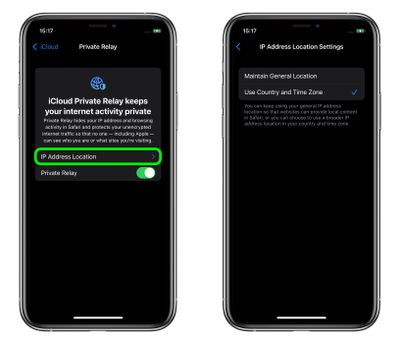
Once ‌iCloud‌ Private Relay is enabled, you can choose how the assigned IP address uses geographical information to conceal your actual location. If you still want to receive local content when you're browsing in Safari, the IP address can maintain your general location without being specific (the default setting), or if you want the relay to be more private, the IP address can simply include your country and time zone.

Whichever option you choose, here's how to set it in iOS 15.

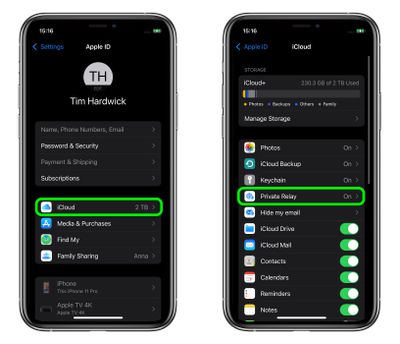
  1. Launch the Settings app on your iPhone or iPad.
  2. Tap your name at the top of the main settings menu.
  3. Tap iCloud.
  4. Tap Private Relay.
    settings

  5. Tap IP Address Location.
  6. Select Maintain General Location (the default) or Use Country and Time Zone.
    settings

Paid ‌‌‌iCloud‌‌‌+ plans also include a new Hide My Email feature that lets you create unique, random email addresses that forward to your personal inbox, and it allows for ‌‌‌iCloud‌‌‌ Mail addresses to be personalized with a custom domain name. To learn more about Hide My Email and how to enable it, check out our dedicated how-to guide.

Popular Stories

iOS 26

iOS 26.4.1 Includes These Two Changes for iPhones

Wednesday April 8, 2026 7:17 pm PDT by
Apple has released a minor iOS 26.4.1 update for the iPhone 11 and newer. While the release notes for the update only mention unspecified "bug fixes," we have since learned about two specific changes that are included in it. First, 9to5Mac spotted an Apple Developer Forums thread suggesting that iOS 26.4.1 fixes an iOS 26.4 bug that affected iCloud syncing in some apps. Second, an...
iOS 27 on iPhone 17 1

iOS 27 Will Add These New Features to Your iPhone

Saturday May 2, 2026 8:43 am PDT by
Apple is expected to unveil iOS 27 during its WWDC 2026 keynote on June 8, and there are already many rumored features and changes for iPhones. The first developer beta of iOS 27 will likely be available immediately following the keynote, and a public beta typically follows in July. Following beta testing, the software update should be released to all users with a compatible iPhone in...
Apple Event Logo

Apple Just Released a New Accessory

Monday May 4, 2026 8:13 am PDT by
Apple today released a new Pride Edition Sport Loop for the Apple Watch. The band features a rainbow design with 11 colors of woven nylon yarns. The new Pride Edition Sport Loop is available to order now on Apple.com and in the Apple Store app in 40mm, 42mm, and 46mm sizes, and it will be available at Apple Store locations starting later this week. In the U.S., the band costs $49. There...
Related Apple News: South Africa | Local News | Sport | Lifestyle | Health