

Will My iPad Run iPadOS 17?

Apple in June previewed iPadOS 17, its next major software update for compatible iPads that is expected to be publicly released in the fall. Keep reading to learn what's new and if Apple's forthcoming mobile operating system will run on your particular iPad model.
ipados 17
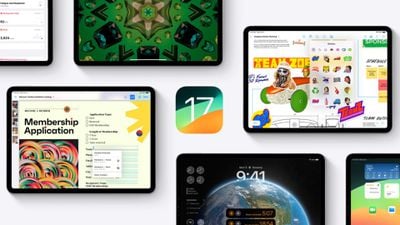
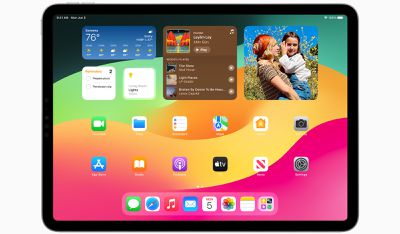
iPadOS 17 brings several new features to iPads, including updates to widgets and the Lock Screen that bring more parity with iPhones.

For the first time, iPads will support customized Lock Screens, while Home Screen widgets will be interactive. There's also now support for Live Activities, and the Health app is now available on iPad and takes advantage of the device's larger display sizes.

‌iPadOS 17‌ includes improvements across the Notes, Messages, FaceTime, and Safari apps. In the Messages app, for example, there is a new consolidated sticker drawer that brings all of a user's stickers into one place, including Live Stickers, emoji stickers, and third-party sticker packs. ‌iPad‌ users can also create their own stickers from photos.
ipados 17 widgets
Starting with ‌iPadOS 17‌, PDFs appear full width on the screen. Apple has also introduced machine learning that can identify fields in a PDF so that users can quickly add details, such as names, addresses, and emails from the Contacts app.

iPadOS 17 Compatibility

iPadOS 17 is compatible with the second-generation 12.9-inch iPad Pro, the first-generation 11-inch iPad Pro, the 10.5-inch iPad Pro, the third-generation iPad Air, the sixth-generation ‌iPad‌, and the fifth-generation iPad mini, and newer generations of all of those models. But it does drop support for a couple of iPad models that are compatible with iPadOS 16. Here's a full compatibility rundown.

iPadOS 17 drops support for the following iPads:

  • iPad Pro 12.9-inch (1st generation)
  • iPad (5th generation)

iPadOS 17 remains compatible with the following iPad models:

  • iPad Pro 12.9-inch (2nd generation and later)
  • iPad Pro 11-inch (1st generation and later)
  • iPad Pro 10.5-inch
  • iPad Air (3rd generation and later)
  • iPad (6th generation and later)
  • iPad mini (5th generation and later)

How to Identify Your iPad Model

If you're unsure which ‌iPad‌ model you have, go to Settings -> General -> About, and you'll find the Model Name listed there.

You can also find out which version of iPadOS your device is running by going to Settings -> Software Update. If an update is available for your ‌iPad‌, it will notify you here.

Want to Try iPadOS 17 Beta for Free?

Apple has already released the first ‌iPadOS 17‌ beta to developers, and in a first for the company, it is also giving non-developers the opportunity to download the beta on their iPads for free. Check out our dedicated guide to learn how it's done.


Related Forums: iOS 17, iPadOS 17

Popular Stories

iOS 26

iOS 26.4 and iOS 27 Features Revealed in New Leak

Friday December 12, 2025 10:56 am PST by
Macworld's Filipe Espósito today revealed a handful of features that Apple is allegedly planning for iOS 26.4, iOS 27, and even iOS 28. The report said the features are referenced within the code for a leaked internal build of iOS 26 that is not meant to be seen by the public. However, it appears that Espósito and/or his sources managed to gain access to it, providing us with a sneak peek...
iOS 26

iOS 26.2 Coming Soon With These 8 New Features on Your iPhone

Thursday December 11, 2025 8:49 am PST by
Apple seeded the second iOS 26.2 Release Candidate to developers earlier this week, meaning the update will be released to the general public very soon. Apple confirmed iOS 26.2 would be released in December, but it did not provide a specific date. We expect the update to be released by early next week. iOS 26.2 includes a handful of new features and changes on the iPhone, such as a new...
iOS 26

Apple Releases iOS 26.2 With Alarms for Reminders, Lock Screen Changes, Enhanced Safety Alerts and More

Friday December 12, 2025 10:10 am PST by
Apple today released iOS 26.2, the second major update to the iOS 26 operating system that came out in September, iOS 26.2 comes a little over a month after iOS 26.1 launched. ‌iOS 26‌.2 is compatible with the ‌iPhone‌ 11 series and later, as well as the second-generation ‌iPhone‌ SE. The new software can be downloaded on eligible iPhones over-the-air by going to Settings >...
AirPods Pro Firmware Feature

Apple Releases New Firmware for AirPods Pro 2 and AirPods Pro 3

Thursday December 11, 2025 11:28 am PST by
Apple today released new firmware designed for the AirPods Pro 3 and the prior-generation AirPods Pro 2. The AirPods Pro 3 firmware is 8B30, up from 8B25, while the AirPods Pro 2 firmware is 8B28, up from 8B21. There's no word on what's include in the updated firmware, but the AirPods Pro 2 and AirPods Pro 3 are getting expanded support for Live Translation in the European Union in iOS...
macOS Tahoe 26 Thumb

Apple Releases macOS Tahoe 26.2 With Edge Light

Friday December 12, 2025 10:08 am PST by
Apple today released macOS Tahoe 26.2, the second major update to the macOS Tahoe operating system that came out in September. macOS Tahoe 26.2 comes five weeks after Apple released macOS Tahoe 26.1. Mac users can download the macOS Tahoe update by using the Software Update section of System Settings. macOS Tahoe 26.2 includes Edge Light, a feature that illuminates your face with soft...
AirTag 2 Mock Feature

Apple AirTag 2: Four New Features Found in iOS 26 Code

Thursday December 11, 2025 10:31 am PST by
The AirTag 2 will include a handful of new features that will improve tracking capabilities, according to a new report from Macworld. The site says that it was able to access an internal build of iOS 26, which includes references to multiple unreleased products. Here's what's supposedly coming: An improved pairing process, though no details were provided. AirTag pairing is already...
ipados 26 1 slide over

Apple Releases iPadOS 26.2 With Multitasking Improvements

Friday December 12, 2025 10:09 am PST by
Apple today released iPadOS 26.2, the second major update to the iPadOS 26 operating system released in September. iPadOS 26.2 comes a month after iPadOS 26.1. The new software can be downloaded on eligible iPads over-the-air by going to Settings > General > Software Update. iPadOS 26.2 continues with the multitasking improvements that were added with iPadOS 26.1. You can now drag and...
bug security vulnerability issue fix larry

Update Now: iOS 26.2 Fixes 20+ Security Vulnerabilities

Friday December 12, 2025 11:11 am PST by
Apple today released iOS 26.2, iPadOS 26.2, and macOS 26.2, all of which introduce new features, bug fixes, and security improvements. Apple says that the updates address over 20 vulnerabilities, including two bugs that are known to have been actively exploited. There are a pair of WebKit vulnerabilities that could allow maliciously crafted web content to execute code or cause memory...
















