

Mac Studio vs. Mac Pro Buyer's Guide

Upon the launch of the latest Mac Pro, Apple's transition to Apple silicon across its entire Mac lineup is complete. The new ‌Mac Pro‌ features the M2 Ultra chip – the same chip offered in the refreshed Mac Studio – so why should some prospective customers buy the ‌Mac Pro‌, despite its $6,999 starting price, and which performance-focused desktop Mac is best for you?
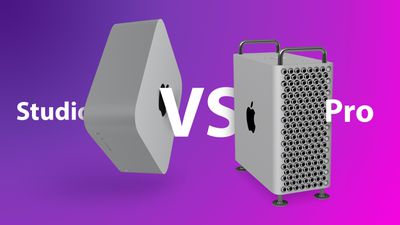
Studio v Pro Feature Purple

The ‌Mac Studio‌ starts at $1,999, substantially less than the $6,999 starting price of the ‌Mac Pro‌. When configured with the same ‌M2‌ Ultra chip as the ‌Mac Pro‌, the ‌Mac Studio‌ starts at $3,999. There are several crucial differences between the ‌Mac Studio‌ and ‌Mac Pro‌ that justify their different price points and designs:

‌Mac Studio‌ ‌Mac Pro‌
Integrated, non-upgradeable design with sealed casing Modular design with openable casing and potential for SSD upgrades
Seven PCI Express expansion slots (six available slots; one slot comes with Apple I/O card installed)
Two impeller fans Three impeller fans
Apple ‌M2‌ Max or ‌M2‌ Ultra chip Apple ‌M2‌ Ultra chip
Up to 24-core CPU 24-core CPU
10Gb Ethernet Dual 10Gb Ethernet
Up to six Thunderbolt 4 ports Eight Thunderbolt 4 ports
Two USB-A ports Three USB-A ports
HDMI port Two HDMI ports
SDXC card slot (UHS-II)
Rack-mounted version available
Starts at $1,999 Starts at $6,999

The main reason to buy the ‌Mac Pro‌ is to be able to use its seven PCIe expansion slots add the likes of digital signal processing (DSP) cards, serial digital interface (SDI) I/O cards, additional networking, and built-in storage. This also allows a user to change some of their ‌Mac Pro‌'s hardware over time, and Apple is offering additional do-it-yourself SSD upgrade kits and wheels for the device.

If you require multiple Ethernet ports, more than six Thunderbolt ports, or more than two USB-A ports to connect a large number of peripherals, only the ‌Mac Pro‌ can facilitate this. Otherwise, since the ‌Mac Studio‌ can be configured with the same ‌M2‌ Ultra chip as the ‌Mac Pro‌, there is no reason to buy the more expensive desktop machine, and most users will be better off buying the ‌Mac Studio‌ and saving $3,000.


Buy a Mac Studio if...

  • You prefer a smaller desktop machine that takes up significantly less space
  • The ‌M2‌ Max chip offers sufficient performance for your needs and you do not need the ‌M2‌ Ultra chip
  • You need a versatile, high-performance machine below the ‌Mac Pro‌'s $6,999 starting price


Buy a Mac Pro if...

  • You need the ability to upgrade the internal SSD
  • You need more than six Thunderbolt ports, more than two USB-A ports, more than one HDMI port, or more than one ethernet port
  • You need PCIe expansion slots

If you don't need the performance and number of ports that the ‌Mac Studio‌ offers, it is worth noting that Apple offers the Mac mini with the ‌M2‌ Pro chip for $1,299. This high-end ‌Mac mini‌ offers a good balance of price and performance that should be more than sufficient for many users looking for a desktop Mac.

The ‌Mac Pro‌ is targeted at professionals with distinct hardware requirements and complicated workflows, often in production environments. These customers will know they need a ‌Mac Pro‌ to meet their needs. Considering the fact that the base model is $5,000 cheaper than the ‌Mac Pro‌, the ‌Mac Studio‌ is now the best "Pro" desktop Mac for the overwhelming majority of prospective customers, with more than enough performance and versatility for most users.


Related Roundups: Mac Studio, Mac Pro
Related Forums: Mac Studio, Mac Pro

Popular Stories

iOS 26

iOS 26.4 and iOS 27 Features Revealed in New Leak

Friday December 12, 2025 10:56 am PST by
Macworld's Filipe Espósito today revealed a handful of features that Apple is allegedly planning for iOS 26.4, iOS 27, and even iOS 28. The report said the features are referenced within the code for a leaked internal build of iOS 26 that is not meant to be seen by the public. However, it appears that Espósito and/or his sources managed to gain access to it, providing us with a sneak peek...
Apple Foldable Thumb

Leak Reveals Foldable iPhone Details

Monday December 15, 2025 9:09 am PST by
The first foldable iPhone will feature a series of design and hardware firsts for Apple, according to details shared by the Weibo leaker known as Digital Chat Station. According to a new post, via machine translation, Apple is developing what the leaker describes as a "wide foldable" device, a term used to refer to a horizontally oriented, book-style foldable with a large internal display....
iOS 26

Apple Releases iOS 26.2 With Alarms for Reminders, Lock Screen Changes, Enhanced Safety Alerts and More

Friday December 12, 2025 10:10 am PST by
Apple today released iOS 26.2, the second major update to the iOS 26 operating system that came out in September, iOS 26.2 comes a little over a month after iOS 26.1 launched. ‌iOS 26‌.2 is compatible with the ‌iPhone‌ 11 series and later, as well as the second-generation ‌iPhone‌ SE. The new software can be downloaded on eligible iPhones over-the-air by going to Settings >...
apple beta 26 lineup

Apple Leak Confirms Work on Foldable iPhone, AirTag 2, and Dozens More Devices

Monday December 15, 2025 2:05 pm PST by
Last week, details about unreleased Apple devices and future iOS features were shared by Macworld. This week, we learned where the information came from, plus we have more findings from the leak. As it turns out, an Apple prototype device running an early build of iOS 26 was sold, and the person who bought it shared the software. The OS has a version number of 23A5234w, and the first...
iOS 26

iOS 26.2 Coming Soon With These 8 New Features on Your iPhone

Thursday December 11, 2025 8:49 am PST by
Apple seeded the second iOS 26.2 Release Candidate to developers earlier this week, meaning the update will be released to the general public very soon. Apple confirmed iOS 26.2 would be released in December, but it did not provide a specific date. We expect the update to be released by early next week. iOS 26.2 includes a handful of new features and changes on the iPhone, such as a new...
macOS Tahoe 26 Thumb

Apple Releases macOS Tahoe 26.2 With Edge Light

Friday December 12, 2025 10:08 am PST by
Apple today released macOS Tahoe 26.2, the second major update to the macOS Tahoe operating system that came out in September. macOS Tahoe 26.2 comes five weeks after Apple released macOS Tahoe 26.1. Mac users can download the macOS Tahoe update by using the Software Update section of System Settings. macOS Tahoe 26.2 includes Edge Light, a feature that illuminates your face with soft...
AirPods Pro Firmware Feature

Apple Releases New Firmware for AirPods Pro 2 and AirPods Pro 3

Thursday December 11, 2025 11:28 am PST by
Apple today released new firmware designed for the AirPods Pro 3 and the prior-generation AirPods Pro 2. The AirPods Pro 3 firmware is 8B30, up from 8B25, while the AirPods Pro 2 firmware is 8B28, up from 8B21. There's no word on what's include in the updated firmware, but the AirPods Pro 2 and AirPods Pro 3 are getting expanded support for Live Translation in the European Union in iOS...
Apple Logo Top Half

Early iOS 26 Software Leak Uncovers Dozens of Upcoming Apple Features

Monday December 15, 2025 3:05 pm PST by
Software from an iPhone prototype running an early build of iOS 26 leaked last week, giving us a glimpse at future Apple devices and iOS features. We recapped device codenames in our prior article, and now we have a list of some of the most notable feature flags that were found in the software code. In some cases, it's obvious what the feature flags are referring to, while some are more...

Top Rated Comments

fwmireault Avatar
49 months ago
You forgot that the Mac Pro can be configured with 800$ wheels, that’s a big advantage over the Mac Studio
Score: 112 Votes (Like | Disagree)
rpmurray Avatar
49 months ago

What if I need some cheese grated though? Where is the mac studio then??
It has all those little holes on the back. It grates extra-fine.
Score: 30 Votes (Like | Disagree)
Moonlight Avatar
49 months ago
What if I need some cheese grated though? Where is the mac studio then??
Score: 23 Votes (Like | Disagree)
goMac Avatar
49 months ago

The Mac Studio's M1‌ Ultra chip outperforms the 28-core Xeon ‌Mac Pro‌ with the highest-end graphics card
There's been a few benchmarks already showing the Mac Pro with an edge in graphics using the older Vega GPU options. It makes me skeptical that M1 Ultra will actually outperform a top end Radeon 6900 option in GPU tasks. Seems iffy it would beat a 6800 either.

The only claim I've seen of this so far has been Apple's slides, which haven't exactly held up.
Score: 21 Votes (Like | Disagree)
Makosuke Avatar
49 months ago

There are two main reasons to buy the Mac Pro over the Mac Studio. The first is for its Intel chip, since some high-level professional applications perform better on native Intel systems despite Rosetta 2.

The second reason is modularity. The Mac Pro features eight PCI Express expansion slots that be used to customize the machine's hardware for specific needs, such as by adding more storage or graphics cards. The Mac Pro's modularity also means that it is easier to change and upgrade components over time. The Mac Studio, on the other hand, is a fully integrated machine with no modularity or opportunity to add or change components.

The Mac Pro is also more versatile when it comes to ports, which users can also add via PCI Express slots, and there is support for more external displays.
I'm pretty sure that there are two other possible main reasons for buying the Mac Pro:

One is that you have a use case that needs massive amounts of RAM, in which case clearly 128GB vs 1.5TB is a very, very nontrivial difference. (Also not sure that the M-series RAM has ECC-equivalent error correction; I assume not, which is another nontrivial need for certain use cases.)

And the other is you have a use case that actually takes advantage of $10,000+ worth of GPUs--dual Pro W6900X 32GB or dual Pro W6800X Duo 64GB. The performance on the 64-core GPU with 128GB of memory, some of which is going to be used by the CPU, is not going to be on that level even if the task is well optimized for it.

The Mac Studio is awesome, and will almost certainly be my next desktop when I eventually replace my top-of-line Intel iMac. But we've got computers to run simulations at work that need well over 128GB of RAM for decent performance, operating on 40TB datasets (stored on a RAID6 array with PCIe controller, although the storage could be handled just as well externally), and if we were to run those on a Mac rather than the current commodity hardware, we'd most definitely buy a Mac Pro, not a Mac Studio. It has nothing to do with the Intel CPU or modularity. We just need the ridiculously large amount of RAM.
Score: 19 Votes (Like | Disagree)
MayaUser Avatar
49 months ago
The Mac Pro gpu will be out of this world
Score: 17 Votes (Like | Disagree)















