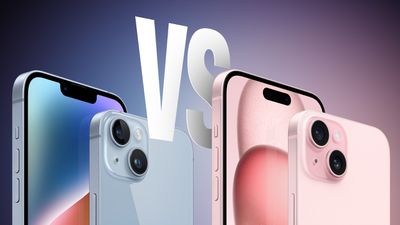
iPhone 14 vs. iPhone 15 Buyer's Guide: 20+ Upgrades Compared

The iPhone 15 and ‌iPhone‌ 15 Plus are Apple's latest standard ‌iPhone‌ models, sporting some bigger upgrades than seen in recent years, but how different really are the two successive ‌iPhone‌ generations?

iPhone 14 vs 15 Buyers Guide
In 2022, Apple unveiled the ‌iPhone‌ 14 as the successor to the popular ‌iPhone‌ 13, offering 2GB more memory, longer battery life, the Photonic Engine, Action mode, Emergency SOS via satellite, Crash Detection, and more. As devices that are more affordable than the "Pro" models, but more full-featured than the low-cost ‌iPhone‌ SE, the ‌iPhone‌ 15 and ‌iPhone‌ 15 Plus will likely be the most popular option for many customers, starting at a price of $799 for the 128GB model. The ‌iPhone‌ 14 and ‌iPhone‌ 14 Plus continue to be available from Apple for $699 and $799, respectively.

As the ‌iPhone‌ 14 and ‌iPhone‌ 15 share the overwhelming majority of their features, should you consider buying or sticking with the ‌iPhone‌ 14 to save money? Our guide helps to answer the question of how to decide which of these two ‌iPhone‌ models is best for you, and serves as a way to clearly see the differences that the ‌iPhone‌ 15 brings to the table. This article focuses on the ‌iPhone‌ 14 and ‌iPhone‌ 15, Apple's standard ‌iPhone‌ models, but to understand the differences between the ‌iPhone‌ 14 Pro and ‌iPhone‌ 15 Pro, see our other buyer's guide:

The ‌iPhone‌ 14 and ‌iPhone‌ 15 both feature the same display sizes, battery life, 12-megapixel ultra wide camera, and more. Nevertheless, the ‌iPhone‌ 15 still offers a number of substantial upgrades, such as the Dynamic Island, USB-C port, and 48-megapixel camera.

‌iPhone‌ 14 ‌iPhone‌ 15
Aluminum chassis with squared-off edges Aluminum chassis with contoured edges
Glossy glass back Color-infused frosted glass back
"Notch" TrueDepth camera array ‌Dynamic Island‌
800 nits max brightness (typical) 1,000 nits max brightness (typical)
1,200 nits peak brightness (HDR) 1,600 nits peak brightness (HDR)
2,000 nits peak brightness (outdoor)
A15 Bionic chip A16 Bionic chip
5-core GPU 5-core GPU with 50% more memory bandwidth
12-megapixel main camera with ƒ/1.5 aperture 48-megapixel main camera with ƒ/1.6 aperture
0.5x and 1x optical zoom options 0.5x, 1x, and 2x optical zoom options
24- and 48-megapixel super-high-resolution photos
Smart HDR 4 Smart HDR 5
Portrait mode with Focus and Depth Control Next-generation portraits with Focus and Depth Control
Night mode and Night mode portraits Improved Night mode and Night mode portraits
Improved audio quality on phone calls
First-generation Ultra Wideband chip Second-generation Ultra Wideband chip (connects from 3x further away)
Precision Finding for Find My friends
Lightning port USB-C port
Support for Qi wireless charging Support for Qi2 wireless charging
Setting to prevent charging above 80%
Battery manufacture date, first use, and cycle count information in Settings
Yellow, Blue, Purple, (PRODUCT)RED, Starlight, and Midnight color options Yellow, Blue, Pink, Green, and Black color options

The ‌iPhone‌ 15's upgrades over the ‌iPhone‌ 14 are fairly substantial, offering a more refined and appealing design with contoured edges, frosted back glass, and the ‌Dynamic Island‌. Features like the brighter display and USB-C port are meaningful quality-of-life enhancements that all users will be able to take advantage of. The 48-megapixel main camera, 2x optical zoom option, next-generation portraits, Smart HDR 5, and improved Night mode also make for a significant overall camera improvement for average users. Iterative changes like the A16 Bionic and support for Qi2 are also welcome refinements.

Depending on what sort of user you are, it may not be worth upgrading from an ‌iPhone‌ 13 or ‌iPhone‌ 14 model to the ‌iPhone‌ 15 unless you actively want several of the new features, but the ‌iPhone‌ 15 and ‌iPhone‌ 15 Plus seem to be an unusually large upgrade for Apple's non-Pro iPhones. As a result, a large number of users with one of these older devices may be able to justify upgrading to an ‌iPhone‌ 15 model. Those with an ‌iPhone‌ 11 or older will definitely receive a major upgrade by purchasing an ‌iPhone‌ 15.

For everyday users, it is worth noting that the switch to USB-C on the ‌iPhone‌ 15 will make any Lightning cables and accessories you have redundant, meaning you'll need to purchase a $29 adapter or use a new cable. If you're coming from a much older device, you will also likely need to buy a new power adapter. If you are unhappy about this change, then it may be worth sticking with what you have for another year, but it is worth highlighting that the switch to USB-C is beneficial in the long term since it is a standard port used across a wide range of devices.

Since the ‌iPhone‌ 15 is a mostly noteworthy upgrade, it is generally not worth buying an ‌iPhone‌ 14 model instead, unless it can be found for a significantly lower price. The ‌iPhone‌ 14 and ‌iPhone‌ 14 Plus are only a year old and still very good devices, but the ‌iPhone‌ 15 has a range of improvements that are likely to make it age better and be slightly more useful over time, which warrants its higher price.


Related Forum: iPhone

Popular Stories

iOS 26

iOS 26.4 and iOS 27 Features Revealed in New Leak

Friday December 12, 2025 10:56 am PST by
Macworld's Filipe Espósito today revealed a handful of features that Apple is allegedly planning for iOS 26.4, iOS 27, and even iOS 28. The report said the features are referenced within the code for a leaked internal build of iOS 26 that is not meant to be seen by the public. However, it appears that Espósito and/or his sources managed to gain access to it, providing us with a sneak peek...
apple beta 26 lineup

Apple Leak Confirms Work on Foldable iPhone, AirTag 2, and Dozens More Devices

Monday December 15, 2025 2:05 pm PST by
Last week, details about unreleased Apple devices and future iOS features were shared by Macworld. This week, we learned where the information came from, plus we have more findings from the leak. As it turns out, an Apple prototype device running an early build of iOS 26 was sold, and the person who bought it shared the software. The OS has a version number of 23A5234w, and the first...
Apple Foldable Thumb

Leak Reveals Foldable iPhone Details

Monday December 15, 2025 9:09 am PST by
The first foldable iPhone will feature a series of design and hardware firsts for Apple, according to details shared by the Weibo leaker known as Digital Chat Station. According to a new post, via machine translation, Apple is developing what the leaker describes as a "wide foldable" device, a term used to refer to a horizontally oriented, book-style foldable with a large internal display....
iOS 26

Apple Releases iOS 26.2 With Alarms for Reminders, Lock Screen Changes, Enhanced Safety Alerts and More

Friday December 12, 2025 10:10 am PST by
Apple today released iOS 26.2, the second major update to the iOS 26 operating system that came out in September, iOS 26.2 comes a little over a month after iOS 26.1 launched. ‌iOS 26‌.2 is compatible with the ‌iPhone‌ 11 series and later, as well as the second-generation ‌iPhone‌ SE. The new software can be downloaded on eligible iPhones over-the-air by going to Settings >...
Apple Logo Top Half

Early iOS 26 Software Leak Uncovers Dozens of Upcoming Apple Features

Monday December 15, 2025 3:05 pm PST by
Software from an iPhone prototype running an early build of iOS 26 leaked last week, giving us a glimpse at future Apple devices and iOS features. We recapped device codenames in our prior article, and now we have a list of some of the most notable feature flags that were found in the software code. In some cases, it's obvious what the feature flags are referring to, while some are more...
iOS 26

iOS 26.2 Coming Soon With These 8 New Features on Your iPhone

Thursday December 11, 2025 8:49 am PST by
Apple seeded the second iOS 26.2 Release Candidate to developers earlier this week, meaning the update will be released to the general public very soon. Apple confirmed iOS 26.2 would be released in December, but it did not provide a specific date. We expect the update to be released by early next week. iOS 26.2 includes a handful of new features and changes on the iPhone, such as a new...
macOS Tahoe 26 Thumb

Apple Releases macOS Tahoe 26.2 With Edge Light

Friday December 12, 2025 10:08 am PST by
Apple today released macOS Tahoe 26.2, the second major update to the macOS Tahoe operating system that came out in September. macOS Tahoe 26.2 comes five weeks after Apple released macOS Tahoe 26.1. Mac users can download the macOS Tahoe update by using the Software Update section of System Settings. macOS Tahoe 26.2 includes Edge Light, a feature that illuminates your face with soft...
AirPods Pro Firmware Feature

Apple Releases New Firmware for AirPods Pro 2 and AirPods Pro 3

Thursday December 11, 2025 11:28 am PST by
Apple today released new firmware designed for the AirPods Pro 3 and the prior-generation AirPods Pro 2. The AirPods Pro 3 firmware is 8B30, up from 8B25, while the AirPods Pro 2 firmware is 8B28, up from 8B21. There's no word on what's include in the updated firmware, but the AirPods Pro 2 and AirPods Pro 3 are getting expanded support for Live Translation in the European Union in iOS...

Top Rated Comments

abatabia Avatar
30 months ago
I feel like the regular 15 quietly stole the show this year.

This is the model to get.
Score: 18 Votes (Like | Disagree)
Mitsjke Avatar
30 months ago
The '2,000 nits peak brightness (outdoor)' is a joke. I have the 13 Pro and the '2000 nits brightness' is only working for 5 seconds => then it gets overheated and dims to 1 nit. Same with my partner's iPhone 14 Pro max. Living in San Francisco, so you might think Apple tests devices outside of their offices.
Score: 11 Votes (Like | Disagree)
iFishishh Avatar
30 months ago

The '2,000 nits peak brightness (outdoor)' is a joke. I have the 13 Pro and the '2000 nits brightness' is only working for 5 seconds => then it gets overheated and dims to 1 nit. Same with my partner's iPhone 14 Pro max. Living in San Francisco, so you might think Apple tests devices outside of their offices.
From Apple for iPhone 13 and 13 Pro:

* 2,000,000:1 contrast ratio (typical)
* 1000 nits max brightness (typical); 1200 nits max brightness (HDR)

Your 13 is nowhere near 2,000 nits
Score: 9 Votes (Like | Disagree)
cibonak Avatar
30 months ago
"It may not be worth upgrading from an iPhone 12 ('https://www.macrumors.com/roundup/iphone-12/'), ‌iPhone 13‌, or ‌iPhone 14‌ model to the ‌iPhone 15‌ unless you actively want several of the new features"


nor worth from iphone 12???
Score: 7 Votes (Like | Disagree)
siddavis Avatar
30 months ago
I need to go back to elementary school to learn the definition of substantial.
Score: 6 Votes (Like | Disagree)
hybrid_x Avatar
30 months ago
This is the first Apple phone launch in how long that did not include a (PRODUCT)RED option. Kind of disappointed. The anodized red looks just amazing.
Score: 3 Votes (Like | Disagree)