Image Playground is Apple's image generation app that launched last year. Most people may not have a lot of use for the cartoonish images that it produces in iOS 18, but you're going to want to take another look at it in iOS 26 because Apple has improved its algorithms.

People look more natural in the images generated by the app, with more realistic eyes and more variation in hair that better matches sample photos.
As a quick recap, Image Playground lets you type in any phrase to generate an image in one of three non-realistic styles. You can also select pre-determined scenes and props that Apple suggests, and generate images featuring your friends and family. It's these images where you will see the biggest difference in iOS 26, because the content generated based on images of people has changed quite a bit.
Animation
In iOS 18, photos generated using the Animation style have blunt hair with little variation, lots of contrast, and unnatural looking faces, but in iOS 26, features are softer, hair is more varied, and it has more flow. Clothes also look more natural, though Image Playground doesn't often bother matching outfits.
 iOS 18.6 image in middle, iOS 26 image on right
Image Playground's Animation style in iOS 26 seems to take more liberty with image backgrounds, pose, and body shape, and it's better at small details like specific eyebrow shape.
 iOS 18.6 image in middle, iOS 26 image on right
Sketch
With the Sketch style, Image Playground is again better at matching facial expression, features, and hair style. The image on the right looks more like MacRumors videographer Dan Barbera than the middle image.
 iOS 18.6 image in middle, iOS 26 image on right
Illustration
Illustration has some of the same characteristics as Sketch, better capturing colors and inventing better backgrounds.
 iOS 18.6 image in middle, iOS 26 image on right
Animals and Landscapes
The changes to Image Playground can also be seen in images of animals, food, places, and more, in all three built-in styles.
 iOS 18.6 image in middle, iOS 26 image on right
Emotions
Image Playground seems to be better at reflecting emotion, too. For this image, the modifier "sobbing" was added to the image. It didn't quite show tears, but there is more emotion in the iOS 26 face on the right. There's even a dedicated "Expressions" menu, with options that include laugh, happy, mad, sad, shocked, thinking, thumbs up, and thumbs down.
 iOS 18.6 image in middle, iOS 26 image on right
ChatGPT Integration
ChatGPT image generation capabilities are included in Image Playground in iOS 26, so there are an expanded range of styles to choose from. There are a few suggested options, including anime, oil painting, vector, print, and water color styles, all of which use ChatGPT rather than Apple's capabilities to create the image.
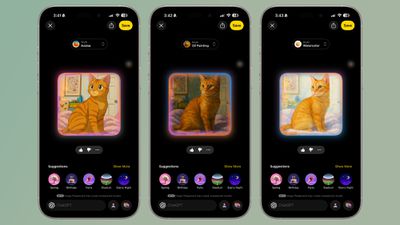 Anime, oil painting, and water color styles in Image Playground
The output is similar to what you get if you use ChatGPT 4o for image generation, and you can make those cute anime-style images that have been floating around the internet.
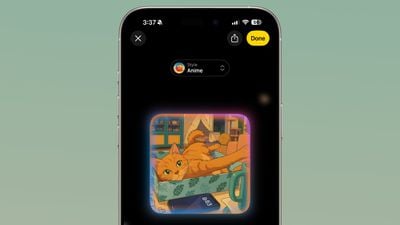 ChatGPT's anime-style output in Image Playground
There's also an open-ended "Any Style" option to create images with ChatGPT, and that adds more range to what's possible with Image Playground. ChatGPT can essentially mimic any style that you ask it to, and it can generate realistic images, which is not something that Apple's image generation technology does.
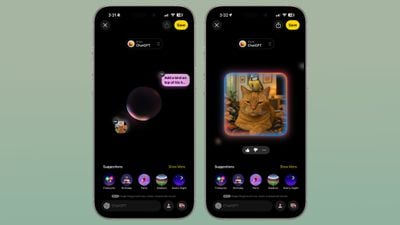 A "realistic" image of a bird on top of a cat's head.
As with standard Image Playground image generation, you can make a text-based request or upload an image to ChatGPT and ask it to use that as the basis for an image. Images that you upload and text requests can be combined.
Creating images with ChatGPT uses up tokens, and if you have a free account, you probably won't be able to create more than one or two images. Taking advantage of ChatGPT image creation features in Image Playground beyond that requires a paid account.
Genmoji
Image Playground in iOS 18 does not support creating Genmoji, and that's a separate feature located in the Messages app. In iOS 26, you can use Image Playground for Genmoji.
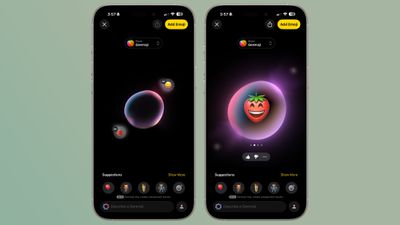
Genmoji is a style that you can select, and choosing it opens up an interface where you can choose an emoji or multiple emoji to customize. One of the new Genmoji features in iOS 26 is the option to combine emoji to make new emoji rather than starting from scratch with a character, and this capability is available in Image Playground in addition to the Messages app.
You can tap multiple emoji to create a new one, or choose an emoji and then add text-based descriptions to make tweaks. There is no option to use photos for Genmoji. The Genmoji that you make are added to your emoji keyboard and they can be used in Messages.
Labeling
When you send someone an image generated with Image Playground in iOS 26, like over AirDrop, it is labeled as a generated image in the file name.