iOS 26: Everything New With FaceTime

All of Apple's communication apps received updates with iOS 26, including FaceTime. There's a redesigned interface that puts more emphasis on your contacts, new translation features, and more.

iOS 26 Glass FaceTime Feature

Live Translation

Along with the Phone and Messages apps, ‌FaceTime‌ supports Live Translation as long as you have a phone that works with Apple Intelligence.

ios 26 live translation facetime
With Live Translation, you can video chat with someone who speaks a different language than you do. The ‌FaceTime‌ app displays live captions that are translated into your language as the person speaks. Your response can also be translated back into their language as long as they also have a device that supports ‌Apple Intelligence‌ and runs ‌iOS 26‌, iPadOS 26, or macOS 26.

You'll need to download language packs to use Live Translation, and it works with a limited number of languages. ‌FaceTime‌'s Live Translation feature works with English, French, German, Portuguese (Brazil), and Spanish (Spain).

To use Live Translation on a ‌FaceTime‌ call, initiate the call and then tap on the button with three dots. From there, tap on the Live Translation option and select the to and from languages. Everything spoken will be translated and displayed in the same way Live Captions are displayed. To stop a translation, just tap on the Stop button.

Interface Updates

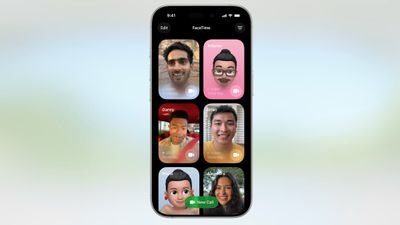
Apple updated the ‌FaceTime‌ interface in ‌iOS 26‌. Rather than a list of names of recent and suggested contacts, you'll see a card-style view that includes a full image of your contact that they've shared, if one is available. If they've sent you a video message, that will automatically play in the background as you scroll for an animated look. You can tap on one of the cards to place a ‌FaceTime‌ Audio or ‌FaceTime‌ Video call, depending on how you last contacted them.
ios 26 facetime interface
Long pressing on a card brings up an option to delete it.

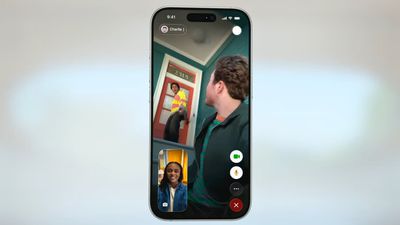
The "New Call" button is at the bottom of the ‌FaceTime‌ app rather than at the top, and filtering options can be accessed by tapping on the menu button at the top right. When you're on a call, the buttons are now at the bottom right of the display.
ios 26 facetime on call
Like all of Apple's other apps, ‌FaceTime‌ adopts the Liquid Glass aesthetic. Contact cards feature rounded corners, buttons have a rounded design, and the New Call button and some of the other interface buttons have a glass-like design.

Call Screening

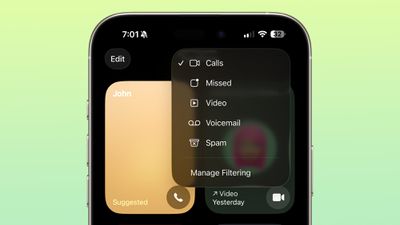
Like the Phone app, ‌FaceTime‌ has new call filtering options. There's still a Silence Unknown Callers toggle, but missed calls and voicemails from unsaved numbers will now be sorted into an Unknown Callers list that's hidden from view unless you select it.
ios 26 facetime call filtering
Calls that are identified as spam will be silenced and automatically added to a new Spam list.

Call filtering is opt-in, so if you often get calls from unknown numbers, you can turn it on. If you don't want to miss any calls, you can leave it off. The toggle for spam and unknown callers can be found in the ‌FaceTime‌ section of the Settings app under Call Filtering.

In the ‌FaceTime‌ app, you can get to the different filtered sections by tapping on the menu button in the upper right of the app. Sections include Calls, Missed, Video, Voicemail, Unknown Callers, and Spam.

Sensitive Content Blocking

In ‌iOS 26‌, the Sensitive Content Warning and Communication Safety features are available for ‌FaceTime‌ video calls. When nudity is detected, the ‌FaceTime‌ video will pause and a warning about nude content will be displayed.
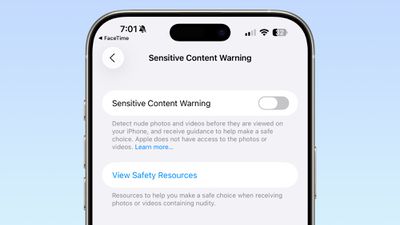
ios 26 facetime sensitive content
Communication Safety is a feature that is designed for the accounts of children and teens, and it provides warnings if images and videos of nudity are detected. Communication Safety is on by default for accounts created for children up to age 17.

Adults can use Communication Safety features too, in the form of Sensitive Content Warnings. Sensitive Content Warnings are an opt-in feature that prevents users of all ages from being subject to unwanted nude photos and videos.

Both options blur nudity in the Messages app and pause video in ‌FaceTime‌. There is no situation where an adult will see their ‌FaceTime‌ calls paused for nudity unless they have turned on the Sensitive Content Warning feature.

Sensitive Content Warnings can be turned on in the Privacy and Security section of the Settings app. Adults can also opt to turn on Communication Safety in the Screen Time section of the Settings app.

Sensitive Content Warnings and Communication Safety use on-device machine learning to analyze photos and videos. Apple does not receive an alert that nudity was detected, and does not have access to any photos or videos.

Read More

We have a dedicated iOS 26 roundup that goes into detail on all of the new features that are available in the update.
Related Roundups: iOS 26, iPadOS 26
Related Forum: iOS 26

Popular Stories

iOS 26

iOS 26.4 and iOS 27 Features Revealed in New Leak

Friday December 12, 2025 10:56 am PST by
Macworld's Filipe Espósito today revealed a handful of features that Apple is allegedly planning for iOS 26.4, iOS 27, and even iOS 28. The report said the features are referenced within the code for a leaked internal build of iOS 26 that is not meant to be seen by the public. However, it appears that Espósito and/or his sources managed to gain access to it, providing us with a sneak peek...
iOS 26

iOS 26.2 Coming Soon With These 8 New Features on Your iPhone

Thursday December 11, 2025 8:49 am PST by
Apple seeded the second iOS 26.2 Release Candidate to developers earlier this week, meaning the update will be released to the general public very soon. Apple confirmed iOS 26.2 would be released in December, but it did not provide a specific date. We expect the update to be released by early next week. iOS 26.2 includes a handful of new features and changes on the iPhone, such as a new...
iOS 26

Apple Releases iOS 26.2 With Alarms for Reminders, Lock Screen Changes, Enhanced Safety Alerts and More

Friday December 12, 2025 10:10 am PST by
Apple today released iOS 26.2, the second major update to the iOS 26 operating system that came out in September, iOS 26.2 comes a little over a month after iOS 26.1 launched. ‌iOS 26‌.2 is compatible with the ‌iPhone‌ 11 series and later, as well as the second-generation ‌iPhone‌ SE. The new software can be downloaded on eligible iPhones over-the-air by going to Settings >...
AirPods Pro Firmware Feature

Apple Releases New Firmware for AirPods Pro 2 and AirPods Pro 3

Thursday December 11, 2025 11:28 am PST by
Apple today released new firmware designed for the AirPods Pro 3 and the prior-generation AirPods Pro 2. The AirPods Pro 3 firmware is 8B30, up from 8B25, while the AirPods Pro 2 firmware is 8B28, up from 8B21. There's no word on what's include in the updated firmware, but the AirPods Pro 2 and AirPods Pro 3 are getting expanded support for Live Translation in the European Union in iOS...
macOS Tahoe 26 Thumb

Apple Releases macOS Tahoe 26.2 With Edge Light

Friday December 12, 2025 10:08 am PST by
Apple today released macOS Tahoe 26.2, the second major update to the macOS Tahoe operating system that came out in September. macOS Tahoe 26.2 comes five weeks after Apple released macOS Tahoe 26.1. Mac users can download the macOS Tahoe update by using the Software Update section of System Settings. macOS Tahoe 26.2 includes Edge Light, a feature that illuminates your face with soft...
AirTag 2 Mock Feature

Apple AirTag 2: Four New Features Found in iOS 26 Code

Thursday December 11, 2025 10:31 am PST by
The AirTag 2 will include a handful of new features that will improve tracking capabilities, according to a new report from Macworld. The site says that it was able to access an internal build of iOS 26, which includes references to multiple unreleased products. Here's what's supposedly coming: An improved pairing process, though no details were provided. AirTag pairing is already...
ipados 26 1 slide over

Apple Releases iPadOS 26.2 With Multitasking Improvements

Friday December 12, 2025 10:09 am PST by
Apple today released iPadOS 26.2, the second major update to the iPadOS 26 operating system released in September. iPadOS 26.2 comes a month after iPadOS 26.1. The new software can be downloaded on eligible iPads over-the-air by going to Settings > General > Software Update. iPadOS 26.2 continues with the multitasking improvements that were added with iPadOS 26.1. You can now drag and...
bug security vulnerability issue fix larry

Update Now: iOS 26.2 Fixes 20+ Security Vulnerabilities

Friday December 12, 2025 11:11 am PST by
Apple today released iOS 26.2, iPadOS 26.2, and macOS 26.2, all of which introduce new features, bug fixes, and security improvements. Apple says that the updates address over 20 vulnerabilities, including two bugs that are known to have been actively exploited. There are a pair of WebKit vulnerabilities that could allow maliciously crafted web content to execute code or cause memory...

Top Rated Comments

ipedro Avatar
18 weeks ago
The only new feature I want in FaceTime is for it to detect that someone is out in public and insist that they turn off their mutha****in speakerphone. ?
Score: 16 Votes (Like | Disagree)
cybercommand Avatar
18 weeks ago
Apple needs to hurry up and get their act together when it comes to languages. It’s been years.
Score: 10 Votes (Like | Disagree)
fizzyfizz Avatar
18 weeks ago
Wish they'd include an option to swipe away my own face when chatting. I mean, why do I need to see a little video of myself?!
Score: 10 Votes (Like | Disagree)
ZipZilla Avatar
18 weeks ago

The only new feature I want in FaceTime is for it to detect that someone is out in public and insist that they turn off their mutha****in speakerphone. ?
Amen bro. the absolute worst of the worst. people have no manners
Score: 8 Votes (Like | Disagree)
Syk Avatar
18 weeks ago
Why not Spanish spoken in Mexico
Score: 6 Votes (Like | Disagree)
ZipZilla Avatar
18 weeks ago

“‌FaceTime‌ supports Live Translation as long as you have a phone that works with Apple Intelligence ('https://www.macrumors.com/guide/apple-intelligence/').”

Interesting. Yesterday, I was driving to town in a no service area, and asked Siri, “Siri, shuffle playlist 90’s favourites.”

She replied, “To do that you’ll need to be online.”

?
Other greatest hits from useless Siri:

"To do that, you'll need to unlock your phone"

"Here is what I found on the internet (for whatever you asked)"

Siri is beaten by Google Assistant on a 5-year-old Android 12 $99 Budget phone. it's embarrassing and terrible
Score: 4 Votes (Like | Disagree)