

iOS 18.1 Features: Everything New in iOS 18.1

iOS 18.1 is the first major update to iOS 18, and it brings a slew of new features including Apple Intelligence, phone call recording, and more, plus bug fixes.
Generic iOS 18
This guide highlights everything that's new in iOS 18.1.

Apple Intelligence

iOS 18.1 includes the first ‌Apple Intelligence‌ features for the iPhone 15 Pro models and the iPhone 16 lineup. It will take some time for Apple to roll out all of the ‌Apple Intelligence‌ capabilities, but a handful are available now.

  • Writing Tools - Writing Tools lets you proofread, summarize, and rewrite text throughout the operating system.
  • Siri - Siri has a new look, offers Apple device product knowledge, there's a Type to ‌Siri‌ feature, and ‌Siri‌ is able to maintain contexts between requests and understand when you stumble over your words.
  • Smart Replies - In Mail and Messages, Apple can suggest replies to incoming messages.
  • Summaries - ‌Apple Intelligence‌ can summarize email messages and notifications so you can see what's important at a glance. You can also get summaries of transcriptions in the Notes app, and websites in Safari.
  • Photos - Memory Maker lets you create custom slideshows with just a description, natural language search is supported, and there's a Clean Up feature for removing unwanted objects from images.
  • Focus - A Reduce Interruptions Focus Mode only shows you important notifications while filtering out everything else.

Phone App

iOS 18.1 supports recording your phone calls and getting transcriptions from the calls. Tapping on the upper left hand record button after placing a call initiates a recording, and all participants are notified that the call is being recorded.
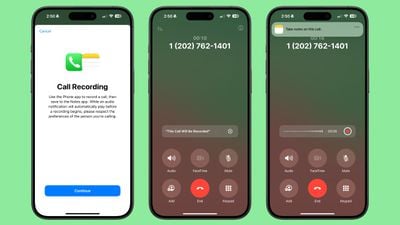
ios 18 1 call recording 1
Calls are saved to the Notes app, and the Notes app is able to generate a transcription.

Camera

Spatial photo capture has been added to the ‌iPhone‌ 15 Pro and ‌iPhone‌ 15 Pro Max, and it joins the existing spatial video capture feature in a new Spatial camera mode. Spatial photo capture has been an ‌iPhone 16‌ feature since launch.

For ‌iPhone 16‌ models, Camera Control now has an option to swap over to the front-facing TrueDepth camera with press and swipe gestures. If you hold down the Camera Control button with a light press, you will also now see a bar underneath the adjustment options.
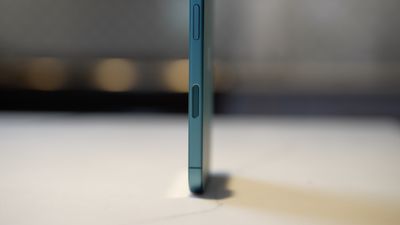
iphone 16 hands on camera control

AirPods Pro 2

If you have AirPods Pro 2, iOS 18.1 adds a new set of Hearing Health features. You can do a built-in hearing test, identifying tones to check for hearing loss. Should hearing loss be detected, there is an option to use the AirPods Pro 2 as a hearing aid to boost conversations and other sounds around you.
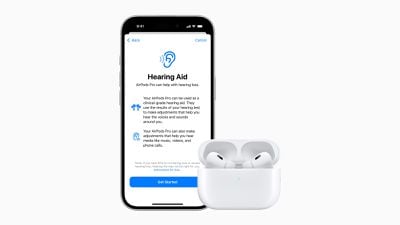
airpods pro 2 hearing aids
Apple also has an option to tweak music, videos, and calls based on your hearing test (if loss is detected), and there is a hearing protection feature for all users that minimizes exposure to loud environmental noises across all listening modes.

Control Center

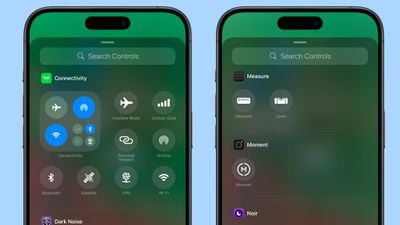
There are new connectivity controls in Control Center for Satellite and AirDrop, allowing these buttons to be added to Control Center individually. Previously, the toggles were only available in the all-in-one connectivity control.
ios 18 1 control center connectivity
Apple has also added new Measure and Level controls to the Control Center. Measure opens up the Measure app, while Level opens up the Measure app to the included Level feature.

Apple Music

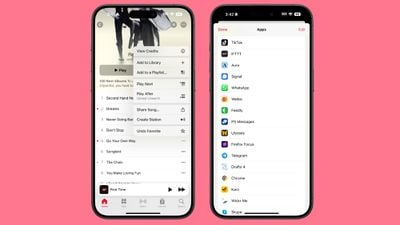
Apple Music now has an option to share ‌Apple Music‌ songs directly on TikTok. To do so, tap on Share Song and then choose TikTok from the list of apps.
ios 18 1 share song tiktok

RCS Business Messaging

You can text with businesses that use Apple's Business Messaging feature over RCS.

Wallet App

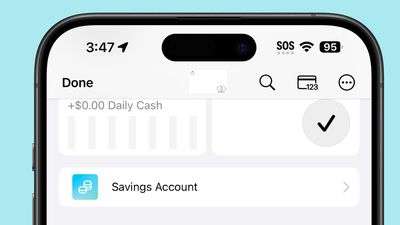
In the Wallet app, if you have an Apple Card and your Daily Cash goes to a savings account, you'll no longer see the savings account balance on the main ‌Apple Card‌ screen. Instead, you can tap on the savings button to get your current account balance.
ios 18 1 savings account no balance

App Store

App Store search now supports natural language to make it easier to find exactly what you're looking for.

Game Center

You can send Game Center friend invites directly from the Contacts app and Friends Suggestions, with receivers able to see the invites in their inbox in Settings.

Bug Fixes

There are several bug fixes in iOS 18.1.

  • Unplayed Podcasts episodes will no longer be marked as played.
  • Videos recorded at 4K 60 fps and viewed in the Photos app will no longer stutter when scrubbing through the video.
  • A bug that could cause digital car keys not to start or unlock a vehicle with passive unlocking after restoring from a backup or transferring from another ‌iPhone‌ has been fixed.
  • ‌iPhone 16‌ and ‌iPhone 16‌ models should no longer unexpectedly restart.

Security Updates

iOS 18.1 addresses over 20 security vulnerabilities, which means it's a good idea to update as soon as you can.

A full list of the vulnerabilities fixed can be found on Apple's website, but it includes updates for image processing, Safari downloads, Safari private browsing, Shortcuts, ‌Siri‌ and Spotlight.

Read More

For more detail on the ‌Apple Intelligence‌ features in iOS 18.1, we have a dedicated guide. Our iOS 18 roundup has a list of all of the features in the iOS 18 update.


Related Forums: iOS 18, iPadOS 18

Popular Stories

Aston Martin CarPlay Ultra Screen

Apple's CarPlay Ultra to Expand to These Vehicle Brands Later This Year

Sunday February 1, 2026 10:08 am PST by
Last year, Apple launched CarPlay Ultra, the long-awaited next-generation version of its CarPlay software system for vehicles. Nearly nine months later, CarPlay Ultra is still limited to Aston Martin's latest luxury vehicles, but that should change fairly soon. In May 2025, Apple said many other vehicle brands planned to offer CarPlay Ultra, including Hyundai, Kia, and Genesis. In his Powe...
Apple Logo Black

Apple's Next Launch is 'Imminent'

Sunday February 1, 2026 12:31 pm PST by
The calendar has turned to February, and a new report indicates that Apple's next product launch is "imminent," in the form of new MacBook Pro models. "All signs point to an imminent launch of next-generation MacBook Pros that retain the current form factor but deliver faster chips," Bloomberg's Mark Gurman said on Sunday. "I'm told the new models — code-named J714 and J716 — are slated...
Apple MacBook Pro M4 hero

New MacBook Pros Reportedly Launching Alongside macOS 26.3

Sunday February 1, 2026 5:42 am PST by
Apple is planning to launch new MacBook Pro models with M5 Pro and M5 Max chips alongside macOS 26.3, according to Bloomberg's Mark Gurman. "Apple's faster MacBook Pros are planned for the macOS 26.3 release cycle," wrote Gurman, in his Power On newsletter today. "I'm told the new models — code-named J714 and J716 — are slated for the macOS 26.3 software cycle, which runs from...
iOS 26

iOS 26.3 and iOS 26.4 Will Add These New Features to Your iPhone

Tuesday February 3, 2026 7:47 am PST by
We are still waiting for the iOS 26.3 Release Candidate to come out, so the first iOS 26.4 beta is likely still at least a week or two away. Following beta testing, iOS 26.4 will likely be released to the general public in March or April. Below, we have recapped known or rumored iOS 26.3 and iOS 26.4 features so far. iOS 26.3 iPhone to Android Transfer Tool iOS 26.3 makes it easier...
14 inch MacBook Pro Keyboard

Apple Changes How You Order a Mac

Saturday January 31, 2026 10:51 am PST by
Apple recently updated its online store with a new ordering process for Macs, including the MacBook Air, MacBook Pro, iMac, Mac mini, Mac Studio, and Mac Pro. There used to be a handful of standard configurations available for each Mac, but now you must configure a Mac entirely from scratch on a feature-by-feature basis. In other words, ordering a new Mac now works much like ordering an...

Top Rated Comments

EU-Regulations Avatar
17 months ago
How did we need Privacy before and now just let this „Intelligence“ read and write our emails ?

Is that the result of somewhat like a common covid-shot-damage ?
Score: 4 Votes (Like | Disagree)
Popple Avatar
17 months ago

Upgraded my iPhone 15 pro earlier today and I haven’t seen any of these updates. There’s a new apple intelligence in my settings app which invites me to join some waitlist. Dunno.?‍♂️
You’ll probably get access less than 10 minutes after joining the waitlist. I think my notification came in less than 5 minutes. My guess is that ‘Join Waitlist’ is Apple’s user-facing way of saying ‘hold tight while we set up your private AI server’.
Score: 4 Votes (Like | Disagree)
JohnC1959 Avatar
17 months ago

I was wondering how they were going to get around dual party consent states like CA with the call recording. Can't wait to get my first notification that my call is being recorded. Doesn't seem like too many peeps are gonna be down with that. Can't think of too many situations where I'm going to say "oh sure, I'm cool with you recording this call".
A good use would be when talking to some customer support center for help. You can have a transcript of their suggestions. And it would be odd for them to refuse to be recorded when they themselves likely told you this call was being recorded on their side too.
Score: 3 Votes (Like | Disagree)
AlinomyTomy Avatar
17 months ago
So is this the release that makes icon/widget arranging (in the home screen or control center) not psychotic anymore?
Score: 3 Votes (Like | Disagree)
EU-Regulations Avatar
17 months ago
Trust is a concept that makes a lot of money for Apple.

At the same time Apple takes 20.000.000.000 $ every year from Data Kraken Google …

And now they are guaranteeing Privacy again?

As you will find Partners in the terms of use, that nobody knows…

Criticizing business models like Big Data and its AI Marketing is our last resort.

But John is our Mastermind, defending Apple like their advocat, a company that does not even pay taxes like the rest of us.

Oomph.
Score: 2 Votes (Like | Disagree)
frifra Avatar
17 months ago

Control centre is still so buggy especially for a .1 release.
Meaning exactly what?
Score: 2 Votes (Like | Disagree)
















