

Since 2012, Apple has developed two kinds of keyboards for its MacBook Pro and MacBook Air machines - one that uses butterfly switches and one that uses scissor switches.
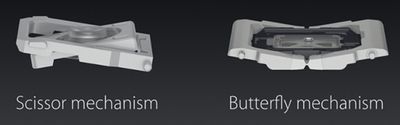
Many people are aware of the problems with the butterfly keyboards that resulted in a huge recall program and many frustrated customers, but may still be confused by what exactly a butterfly keyboard is, how it's different from a scissor switch keyboard, and why Apple elected to ditch the butterfly key mechanism to return to the tried and true scissor switch mechanism. This guide explains the differences between the two keyboard types.
How a Scissor Switch Keyboard Works
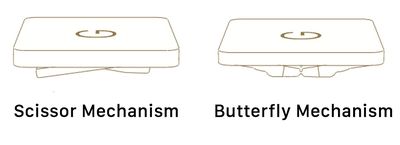
With a scissor switch keyboard, the keys are attached to the keyboard using two plastic pieces that interlock together in an X shape like a pair of scissors, hence the name.
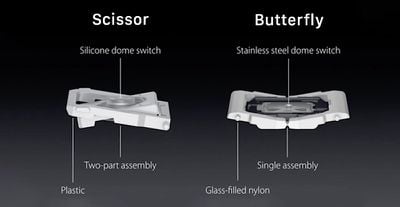
The two pieces snap to the keyboard and the key, and when you press down, the two pieces close together like scissors. Scissor switch keys don't have quite as much travel as some other key types, but there's more travel than a butterfly keyboard because there's more space when the scissor mechanism compresses.
How a Butterfly Switch Keyboard Works
The scissor switch keyboards have a scissor-like operating mechanism, while the butterfly keyboards use a mechanism that features components that work together like the wings on a butterfly rather than overlap.
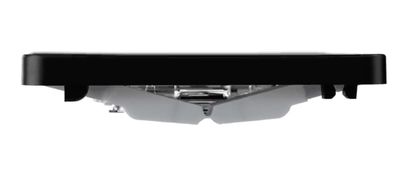
The two halves of the butterfly switch attach to a hinge in the middle and when pressed, the two sides compress down in more of a V or U shape.
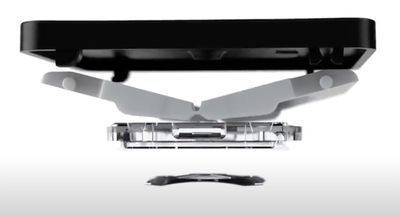
Apple swapped to a butterfly design for a thinner keyboard that allowed for thinner devices, but also advertised the butterfly keys as being more stable because of the way that a butterfly mechanism more evenly distributes applied pressure from a finger press.
Butterfly keys generally have less travel than scissor switch keys and there's less squish and less movement, plus there's a more space for debris to accumulate, which is what led to Apple's issues.
Butterfly Keyboard Problems
The butterfly keyboard design, where the two halves of each keyboard switch attach to a middle hinge, allow a lot of space where dust, debris, and other particulates can accumulate, gunking up the mechanism and preventing it from working properly.
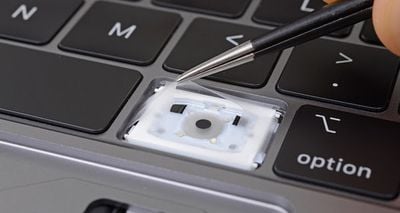
When dust and debris get into the butterfly keyboard mechanism on a Mac, the keys get stuck, start repeating or fail to work entirely, all of which are undesirable outcomes.
Apple attempted to improve the butterfly keyboard over the course of several years through various improvements such as the addition of membranes to block particulates, but no improvement method was successful.
So many people ended up running into problems with the butterfly keyboard that Apple implemented a recall program.
Mac Notebooks That Had Butterfly Keyboards
The first Mac with a butterfly keyboard was released in 2015, and the last Mac with a butterfly keyboard was released in 2019. A full list of of Mac models with butterfly keyboards is below, and all of these Macs are eligible for Apple's butterfly keyboard repair program.
- MacBook (Retina, 12-inch, Early 2015)
- MacBook (Retina, 12-inch, Early 2016)
- MacBook (Retina, 12-inch, 2017)
- MacBook Air (Retina, 13-inch, 2018)
- MacBook Air (Retina, 13-inch, 2019)
- MacBook Pro (13-inch, 2016, Two Thunderbolt 3 Ports)
- MacBook Pro (13-inch, 2017, Two Thunderbolt 3 Ports)
- MacBook Pro (13-inch, 2019, Two Thunderbolt 3 ports)
- MacBook Pro (13-inch, 2016, Four Thunderbolt 3 Ports)
- MacBook Pro (13-inch, 2017, Four Thunderbolt 3 Ports)
- MacBook Pro (15-inch, 2016)
- MacBook Pro (15-inch, 2017)
- MacBook Pro (13-inch, 2018, Four Thunderbolt 3 Ports)
- MacBook Pro (15-inch, 2018)
- MacBook Pro (13-inch, 2019, Four Thunderbolt 3 Ports)
- MacBook Pro (15-inch, 2019)
The repair program covers Macs for four years after the first retail sale of the machine.
Why Apple Ditched Butterfly Keyboards
There was a huge amount of criticism levied at Apple for its decision to continue using the butterfly keyboard for four years after people first started experiencing issues with the design, and dissatisfaction had ramped up to such a degree that there was no other choice for Apple but to adopt a new design.
Apple also had to implement a repair program for the butterfly keyboard that was undoubtedly expensive, another factor necessitating a switch to the more reliable scissor switch mechanism.
The New Scissor Switch Keyboards
Apple in the 2019 16-inch MacBook Pro, the 2020 13-inch MacBook Pro, and the 2020 13-inch MacBook Air introduced a redesigned "Magic Keyboard" that uses a scissor switch mechanism instead of a butterfly mechanism.
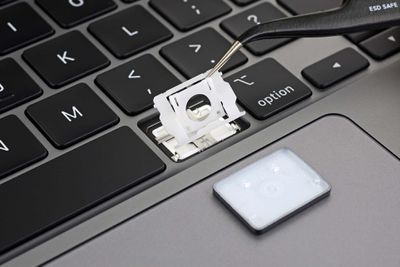
Apple says that the new Magic Keyboard features the "best typing experience ever on a Mac notebook" with 1mm of key travel and a stable key feel. According to Apple, the keys were designed with an Apple-crafted rubber dome that stores more potential energy for a more responsive key press.
Guide Feedback
Have a question about Apple's butterfly or scissor switch keyboards, know of something we left out, or want to offer feedback? Send us an email here.





















