15 New Things Your iPhone Can Do in iOS 26.2

Apple is about to release iOS 26.2, the second major point update for iPhones since iOS 26 was rolled out in September, and there are at least 15 notable changes and improvements worth checking out. We've rounded them up below.
iOS 26
Apple is expected to roll out iOS 26.2 to compatible devices sometime between December 8 and December 16. When the update drops, you can check Apple's servers for the download by going to Settings ➝ General ➝ Software Update on your iPhone.

Set a Reminder Alarm

reminders alarm complete
iOS 26.2 brings a new alarm capability to the Reminders app. When you create a reminder, you can toggle on an "Urgent" option so that, at the due time, your iPhone sounds an alarm rather than simply showing a notification.

Adjust Liquid Glass Clock
ios 26 2 liquid glass slider extremes
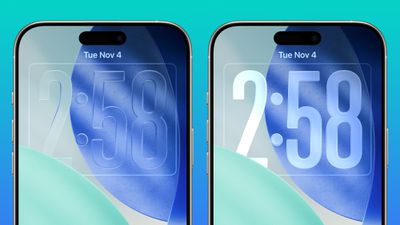
Apple's latest update adds a new slider under the "Liquid Glass" Lock Screen settings that gives much finer control over the clock's appearance. You can choose to make the time display nearly fully transparent, or more frosted and opaque, rather than being limited to the previous fixed presets.

AirDrop Files to People Not in Contacts
ios 26 2 airdrop
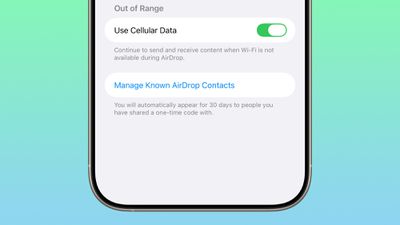
iOS 26.2 introduces a one-time AirDrop code system, letting you share files with someone even if they're not in your contacts. Once generated, the code remains valid for 30 days. Apple also includes a "Manage Known AirDrop Contacts" pane so that you can see and manage the people you've shared codes with.

View Apple Music Lyrics Offline
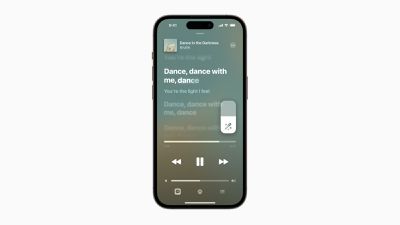
Apple Music Lyrics
Apple Music is gaining offline lyrics support, so you can now view song lyrics in the app even when your iPhone isn't connected to Wi-Fi or mobile data.

Get a Better Sleep Score
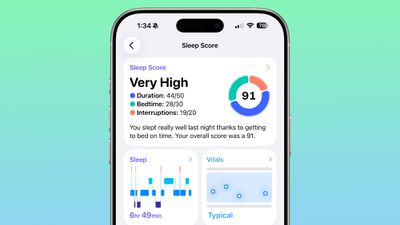
watchos 26 2 sleep score
If you wear your Apple Watch in bed, it's worth knowing that Apple has reworked its Sleep Score scoring tiers, with the aim of better matching typical sleep-quality experiences. Now, "Very Low" runs 0–40 (previously 0–29), "Low" 41–60, "OK" 61–80, "High" 81–95, and "Very High" 96–100 (previously labelled "Excellent").

Automatically Create Podcast Chapters
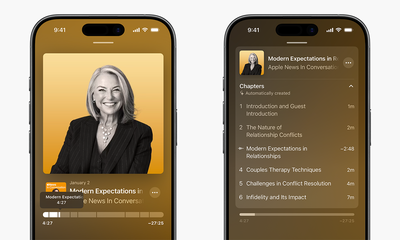
Apple Podcasts Chapters
The Podcasts app can now automatically generate chapters for individual episodes. This means that rather than fixed chapter markers, the app will create them for you – and episode transcriptions now let you tap on mentions of other podcasts or links.

Manage Websites Where Passwords Aren't Saved
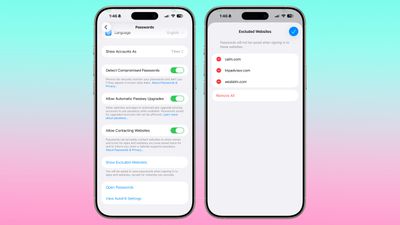
ios 26 2 passwords excluded websites
In the Passwords app's main settings menu, there's a new section allowing you to review and manage websites where you have deliberately avoided saving credentials. It gives you finer control over which domains are excluded from password storage.

Get AirPods Live Translation in EU
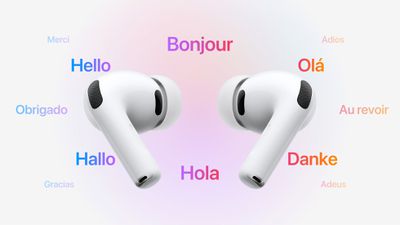
AirPods Live Translation
Apple's latest update expands the reach of AirPods Live Translation to countries in the European Union. The feature was previously unavailable in the EU due to Apple's ongoing regulatory compliance work.

Flash iPhone Screen for Alerts
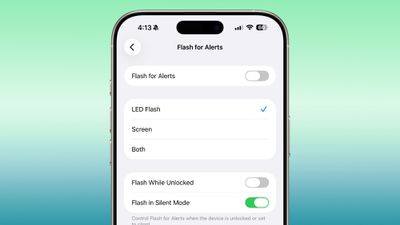
ios 26 2 flash alert
In the Accessibility settings, under "Flash for Alerts," you can now choose to have your iPhone screen flash when a notification arrives, rather than just the rear camera's LED flash. You can configure it to use the screen flash alone, the LED flash, or both simultaneously, giving you more flexibility for alert styles.

Quicker Access to Apple News Sections
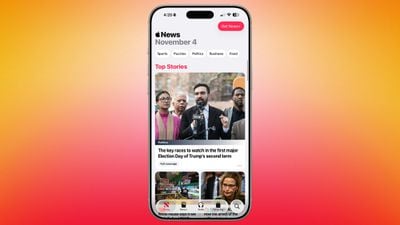
ios 26 2 apple news update
The Apple News app gets a refreshed interface. The top-of-feed buttons now let you jump quickly into categories (e.g. sports, business, food, puzzles) instead of scrolling or tapping through menus.

Manage Safety Alerts
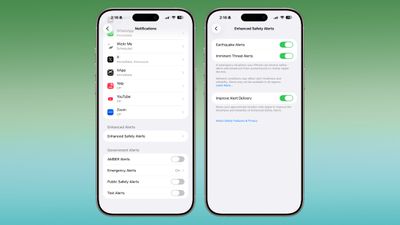
ios 26 2 safety alerts enhanced
iOS 26.2 introduces an "Enhanced Safety Alerts" section in Notifications settings that centralizes earthquake alerts, imminent-threat alerts, and also includes a new location-based "improved alert delivery" option, helping ensure the reliability of alerts.

Sort Games by Size
ios 26 2 games app
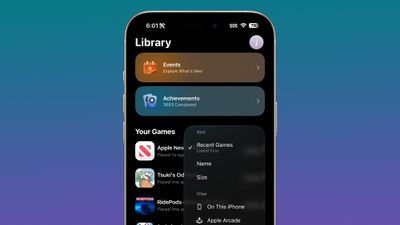
In the Games app library, there's now an option to sort games by size (in addition to name or recent). It should prove useful if you want to clear storage or identify large games quickly. Beyond sorting, the update also brings support for controller-based navigation and real-time challenge-score updates while playing.

Disable Pinned Messages in CarPlay
CarPlay Pinned Messages
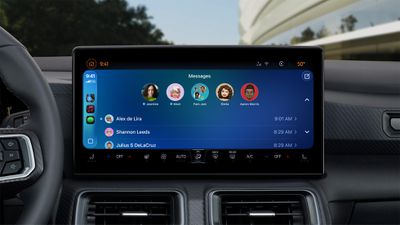
For CarPlay users, iOS 26.2 lets you disable the new "pinned messages" view in the Messages app – restoring the older, classic messages interface if you prefer that simpler look while driving.

Replace Siri Side Button Functionality (in Japan)
iPhone Siri Glow
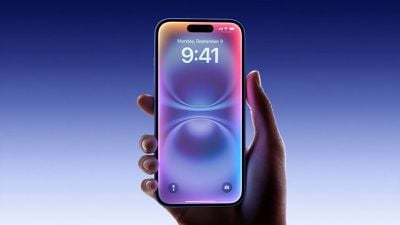
For iPhone users registered in Japan, iOS 26.2 lays the foundation for replacing the default voice assistant triggered by the Side button from Siri to a third-party voice assistant (for example, Gemini or Alexa), giving users a choice at the system level for the first time.

Multitask More on iPad

ipados 26 1 slide over
For iPad users, iPadOS 26.2 restores some multitasking flexibility, and allows you to drag and drop apps from the App Library, Dock, or Spotlight into Split View or Slide Over. The change should make window and multitask management on iPad more fluid.
Popular Stories

iOS 26

iOS 26.2 Coming Soon With These 8 New Features on Your iPhone

Thursday December 11, 2025 8:49 am PST by
Apple seeded the second iOS 26.2 Release Candidate to developers earlier this week, meaning the update will be released to the general public very soon. Apple confirmed iOS 26.2 would be released in December, but it did not provide a specific date. We expect the update to be released by early next week. iOS 26.2 includes a handful of new features and changes on the iPhone, such as a new...
Google maps feaure

Google Maps Quietly Added This Long-Overdue Feature for Drivers

Wednesday December 10, 2025 2:52 am PST by
Google Maps on iOS quietly gained a new feature recently that automatically recognizes where you've parked your vehicle and saves the location for you. Announced on LinkedIn by Rio Akasaka, Google Maps' senior product manager, the new feature auto-detects your parked location even if you don't use the parking pin function, saves it for up to 48 hours, and then automatically removes it once...
AirPods Pro Firmware Feature

Apple Releases New Firmware for AirPods Pro 2 and AirPods Pro 3

Thursday December 11, 2025 11:28 am PST by
Apple today released new firmware designed for the AirPods Pro 3 and the prior-generation AirPods Pro 2. The AirPods Pro 3 firmware is 8B30, up from 8B25, while the AirPods Pro 2 firmware is 8B28, up from 8B21. There's no word on what's include in the updated firmware, but the AirPods Pro 2 and AirPods Pro 3 are getting expanded support for Live Translation in the European Union in iOS...
iOS 26

iOS 26.4 and iOS 27 Features Revealed in New Leak

Friday December 12, 2025 10:56 am PST by
Macworld's Filipe Espósito today revealed a handful of features that Apple is allegedly planning for iOS 26.4, iOS 27, and even iOS 28. The report said the features are referenced within the code for a leaked internal build of iOS 26 that is not meant to be seen by the public. However, it appears that Espósito and/or his sources managed to gain access to it, providing us with a sneak peek...
Foldable iPhone 2023 Feature 1

Apple to Make More Foldable iPhones Than Expected [Updated]

Tuesday December 9, 2025 9:59 am PST by
Apple has ordered 22 million OLED panels from Samsung Display for the first foldable iPhone, signaling a significantly larger production target than the display industry had previously anticipated, ET News reports. In the now-seemingly deleted report, ET News claimed that Samsung plans to mass-produce 11 million inward-folding OLED displays for Apple next year, as well as 11 million...
AirTag 2 Mock Feature

Apple AirTag 2: Four New Features Found in iOS 26 Code

Thursday December 11, 2025 10:31 am PST by
The AirTag 2 will include a handful of new features that will improve tracking capabilities, according to a new report from Macworld. The site says that it was able to access an internal build of iOS 26, which includes references to multiple unreleased products. Here's what's supposedly coming: An improved pairing process, though no details were provided. AirTag pairing is already...
iOS 26

Apple Releases iOS 26.2 With Alarms for Reminders, Lock Screen Changes, Enhanced Safety Alerts and More

Friday December 12, 2025 10:10 am PST by
Apple today released iOS 26.2, the second major update to the iOS 26 operating system that came out in September, iOS 26.2 comes a little over a month after iOS 26.1 launched. ‌iOS 26‌.2 is compatible with the ‌iPhone‌ 11 series and later, as well as the second-generation ‌iPhone‌ SE. The new software can be downloaded on eligible iPhones over-the-air by going to Settings >...
iOS 26

15 New Things Your iPhone Can Do in iOS 26.2

Friday December 5, 2025 9:40 am PST by
Apple is about to release iOS 26.2, the second major point update for iPhones since iOS 26 was rolled out in September, and there are at least 15 notable changes and improvements worth checking out. We've rounded them up below. Apple is expected to roll out iOS 26.2 to compatible devices sometime between December 8 and December 16. When the update drops, you can check Apple's servers for the ...
maxresdefault

iOS 26 Code Leak Reveals Apple Smart Home Hub Details

Thursday December 11, 2025 4:02 pm PST by
Apple is working on a smart home hub that will rely heavily on the more capable version of Siri that's coming next year. We've heard quite a bit about the hub over the last two years, but a recent iOS 26 code leak provides additional insight into what we can expect and confirms rumored features. Subscribe to the MacRumors YouTube channel for more videos. Macworld claims to have access to an ...

Top Rated Comments

BGrifter Avatar
1 week ago
Things my iPhone can do on 18.7.2

- Function properly
- Have a nice looking and easy to read UI
Score: 21 Votes (Like | Disagree)
vertsix Avatar
1 week ago
Also improved battery life, far less stutters and improved stability! I'm on the RC and I gotta say, 26 is decent now. And this comes from a 26 critic since the beginning.

Finally getting somewhere.
Score: 17 Votes (Like | Disagree)
Admiral Fart Avatar
1 week ago
The things I want my iPhone to do include having a keyboard that doesn’t constantly switch between light and dark mode and having app icons that don’t look blurry and weird.
Score: 8 Votes (Like | Disagree)
ProbablyDylan Avatar
1 week ago
They need to rework the sleep score some more. I slept horribly and got graded a 99.
Score: 6 Votes (Like | Disagree)
kenta_ Avatar
1 week ago
Literally none of those features will help iOS 26. Doesn’t Apple consider fixing bugs or improving performance a “feature”. Or I guess those were #16 and #17, and didn’t make the cut.
Score: 6 Votes (Like | Disagree)
jz0309 Avatar
1 week ago
Nothing really "must have" for me, though there will be security fixes that'll make me update upon release
Score: 5 Votes (Like | Disagree)