iOS 26.2 Adds These New Features to Your iPhone

iOS 26.2 is currently in beta testing. The upcoming update includes a handful of new features and changes on the iPhone, including a new Liquid Glass slider for the Lock Screen's clock, offline lyrics for Apple Music, and more.
iOS 26
In a recent press release, Apple confirmed that iOS 26.2 will be released to all users in December, but it did not provide a specific release date.

Keep reading for eight new features coming with iOS 26.2. The update is compatible with the iPhone 11 and newer, but some features require a newer iPhone.

Liquid Glass Slider on Lock Screen
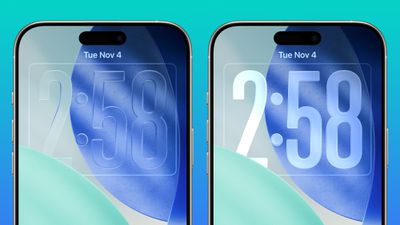
ios 26 2 liquid glass slider extremes
A new slider in the Lock Screen customization menu lets you adjust the opacity of Liquid Glass for the clock, allowing you to decide how clear or frosted it appears.

This comes after iOS 26.1 added "Clear" and "Tinted" options for Liquid Glass overall.

Offline Lyrics in Apple Music
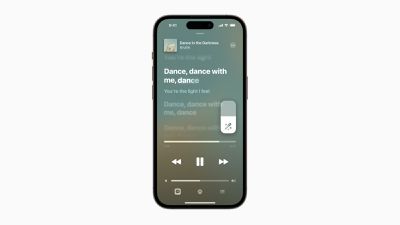
Apple Music Lyrics
iOS 26.2 adds offline lyric support to Apple Music, allowing you to view a song's lyrics even when you are not connected to a Wi-Fi or cellular network.

Sleep Score Revisions
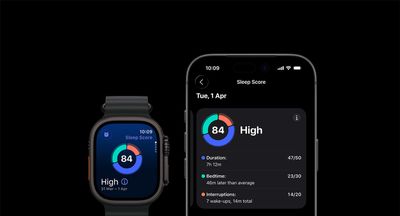
Apple Sleep Score
iOS 26.2 and watchOS 26.2 have revised Sleep Score ranges:

  • Very Low: 0-40 (previously 0-29)
  • Low: 41-60 (previously 30-49)
  • OK: 61-80 (previously 50-69)
  • High: 81-95 (previously 70-89)
  • Very High: 96-100 (previously 90-100)

Apple says sleep scores are calculated based on how long you slept, the consistency of when you fell asleep, and the frequency and duration of waking up during the night. The feature is available in the Health app on all iPhone models compatible with iOS 26, and in the Sleep app on all Apple Watch models compatible with watchOS 26.

Alarms for Reminders
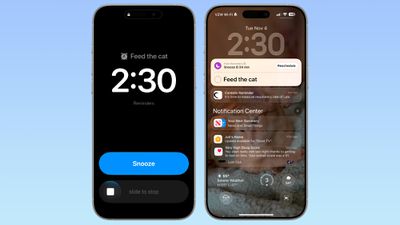
ios 26 2 alarm reminders
iOS 26.2 lets you set alarms for reminders in Apple's Reminders app.

When adding a reminder, selecting a time and then toggling on the "Urgent" option will cause an alarm to go off at the designated time.

Apple Podcasts Enhancements
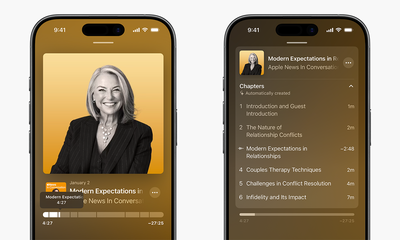
Apple Podcasts Chapters
Apple's Podcasts app has three new features on iOS 26.2, including automatic chapters for episodes, timed links on the screen, and the ability to view other podcasts that a podcast mentions right from the audio player and the transcript.

Apple News Revamp
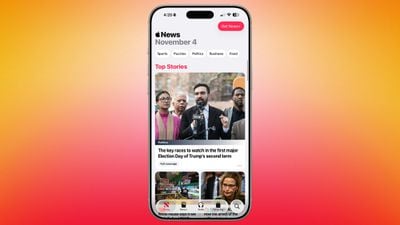
ios 26 2 apple news update
In the Apple News app, there is now a dedicated "Following" tab, and buttons for quick access to topics like sports, puzzles, politics, business, and food.

iPhone Screen Flash for Notifications
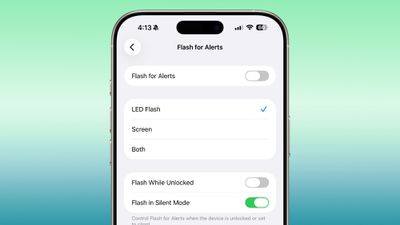
ios 26 2 flash alert
Starting with iOS 26.2, your iPhone's screen can flash when you receive a notification. Previously, this setting was limited to the LED camera flash on the back of the iPhone.

In the Settings app, under Accessibility → Audio & Visual → Flash for Alerts, there are now options for LED Flash, Screen, and Both. Or, you can keep the setting turned off.

AirPods Live Translation in EU
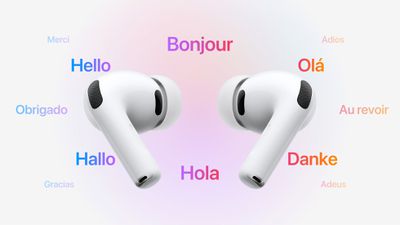
AirPods Live Translation
iOS 26.2 makes Live Translation on AirPods available in the EU.

Live Translation allows you to understand someone who is speaking a different language than you. For example, if you speak English, and someone is speaking to you in French, Siri can tell you what they are saying in English through your AirPods.

The feature works best when both participants in a conversation are using Live Translation on AirPods. If you are talking with someone who is not wearing AirPods, you can display a live transcription in the other person's language on your iPhone.

Live Translation is available on the AirPods Pro 3, AirPods Pro 2, and higher-end AirPods 4 with Active Noise Cancellation. The feature launched in the U.S. and select other countries with iOS 26, but it was not available in the EU until iOS 26.2, as Apple said it needed additional time to ensure compliance with the EU's Digital Markets Act.

In addition to compatible AirPods, users need an iPhone 15 Pro or newer with Apple Intelligence turned on and Apple's Translate app installed.

As of iOS 26.1, Live Translation on AirPods supports the following languages:

  • English (U.S.)
  • English (U.K.)
  • French (France)
  • German (Germany)
  • Portuguese (Brazil)
  • Spanish (Spain)
  • Chinese — Simplified (China)
  • Chinese — Traditional (China)
  • Japanese
  • Korean
  • Italian

iOS 26 also has a built-in Live Translation feature in the Messages, Phone, and FaceTime apps, with no AirPods required.


Related Roundups: iOS 26, iPadOS 26
Related Forum: iOS 26

Popular Stories

iOS 26

iOS 26.2 Coming Soon With These 8 New Features on Your iPhone

Thursday December 11, 2025 8:49 am PST by
Apple seeded the second iOS 26.2 Release Candidate to developers earlier this week, meaning the update will be released to the general public very soon. Apple confirmed iOS 26.2 would be released in December, but it did not provide a specific date. We expect the update to be released by early next week. iOS 26.2 includes a handful of new features and changes on the iPhone, such as a new...
iOS 26

iOS 26.4 and iOS 27 Features Revealed in New Leak

Friday December 12, 2025 10:56 am PST by
Macworld's Filipe Espósito today revealed a handful of features that Apple is allegedly planning for iOS 26.4, iOS 27, and even iOS 28. The report said the features are referenced within the code for a leaked internal build of iOS 26 that is not meant to be seen by the public. However, it appears that Espósito and/or his sources managed to gain access to it, providing us with a sneak peek...
iOS 26

Apple Releases iOS 26.2 With Alarms for Reminders, Lock Screen Changes, Enhanced Safety Alerts and More

Friday December 12, 2025 10:10 am PST by
Apple today released iOS 26.2, the second major update to the iOS 26 operating system that came out in September, iOS 26.2 comes a little over a month after iOS 26.1 launched. ‌iOS 26‌.2 is compatible with the ‌iPhone‌ 11 series and later, as well as the second-generation ‌iPhone‌ SE. The new software can be downloaded on eligible iPhones over-the-air by going to Settings >...
AirPods Pro Firmware Feature

Apple Releases New Firmware for AirPods Pro 2 and AirPods Pro 3

Thursday December 11, 2025 11:28 am PST by
Apple today released new firmware designed for the AirPods Pro 3 and the prior-generation AirPods Pro 2. The AirPods Pro 3 firmware is 8B30, up from 8B25, while the AirPods Pro 2 firmware is 8B28, up from 8B21. There's no word on what's include in the updated firmware, but the AirPods Pro 2 and AirPods Pro 3 are getting expanded support for Live Translation in the European Union in iOS...
macOS Tahoe 26 Thumb

Apple Releases macOS Tahoe 26.2 With Edge Light

Friday December 12, 2025 10:08 am PST by
Apple today released macOS Tahoe 26.2, the second major update to the macOS Tahoe operating system that came out in September. macOS Tahoe 26.2 comes five weeks after Apple released macOS Tahoe 26.1. Mac users can download the macOS Tahoe update by using the Software Update section of System Settings. macOS Tahoe 26.2 includes Edge Light, a feature that illuminates your face with soft...
AirTag 2 Mock Feature

Apple AirTag 2: Four New Features Found in iOS 26 Code

Thursday December 11, 2025 10:31 am PST by
The AirTag 2 will include a handful of new features that will improve tracking capabilities, according to a new report from Macworld. The site says that it was able to access an internal build of iOS 26, which includes references to multiple unreleased products. Here's what's supposedly coming: An improved pairing process, though no details were provided. AirTag pairing is already...
ipados 26 1 slide over

Apple Releases iPadOS 26.2 With Multitasking Improvements

Friday December 12, 2025 10:09 am PST by
Apple today released iPadOS 26.2, the second major update to the iPadOS 26 operating system released in September. iPadOS 26.2 comes a month after iPadOS 26.1. The new software can be downloaded on eligible iPads over-the-air by going to Settings > General > Software Update. iPadOS 26.2 continues with the multitasking improvements that were added with iPadOS 26.1. You can now drag and...
iphone fold text

'iPhone Fold' Arrival Expected to Cement Book-Style Era for Foldables

Friday December 12, 2025 3:55 am PST by
Foldable smartphone panel shipments are projected to jump 46% year-over-year in 2026, with Apple's entry into the market serving as the main catalyst, according to Counterpoint Research's latest Foldable-Rollable Display Shipment Tracker. "Apple is the key driver as it starts to procure panels for its first foldable iPhone," said Counterpoint's Guillaume Chansin. The research firm expects...

Top Rated Comments

WarmWinterHat Avatar
4 weeks ago
Only sider I need: Borders around icons and widgets - on-off.

Bonus slider: Liquid glass - on-off.
Score: 13 Votes (Like | Disagree)
Love-hate ? relationship Avatar
4 weeks ago
I'm hoping it's more optimzied, although 26.1 is better than 26.0, it's still a HUGE mess especially in power consumption (compared to ios 18)

as an aside, I would like to see more of these posts. it's only been the third or fourth time you've posted this one , and I feel like it's not enough to make sure I didn't miss anything. would you mind posting it on a daily basis, perhaps even hourly?
Score: 5 Votes (Like | Disagree)
antiprotest Avatar
4 weeks ago
I am glad they are finally getting rid of the dedicated Sports tab in News app. Not everyone wants that, just like not everyone would want one for Politics, or Tech, etc. It was just there taking up space for me.
Score: 3 Votes (Like | Disagree)
skiguy45 Avatar
4 weeks ago

Only sider I need: Borders around icons and widgets - on-off.

Bonus slider: Liquid glass - on-off.
on the right track ... for me a liquid glass slider slider with an off option is critical.

Liquid glass is a mess.
Score: 3 Votes (Like | Disagree)
dreztvx Avatar
4 weeks ago
Lots of aspects of the liquid glass customizations for appearance look oddly amateurish, but this new "snooze/off" UI for the alarm clock is next level.


Attachment Image
Score: 3 Votes (Like | Disagree)
Ar_c Avatar
4 weeks ago
Big W for Apple that they are giving you first a toggle now a slider to turn off their great visual feature whilst they drain your battery and render your old phone useless.
Score: 2 Votes (Like | Disagree)