iOS 26.2 Adds Alarms for Reminders
In iOS 26.2, there's a new option to set an alarm to go off when creating a reminder in the Reminders app. When adding a reminder, selecting a time and then toggling on the "Urgent" option will cause an alarm to go off at the designated time.
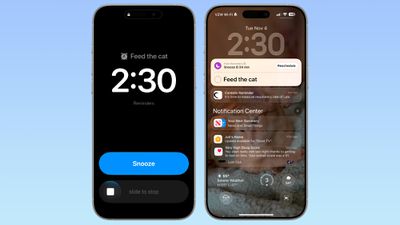
Alarms that you set in the Clock app can also be integrated into the Reminders app by allowing the app to access Alarms in the Settings app.
When a Reminder alarm activates, it displays a snooze option or a slide to stop option. If you snooze it, it will show a countdown on the Lock Screen that includes an option to complete the reminder or reschedule it. Tapping to complete the reminder opens up the Reminders app where you need to tap again.
In the Reminders section of the Settings app, you can also opt to remove the snooze option and replace it with a Complete button to immediately mark it as complete. Apple distinguishes Reminders alarms from standard alarms with a new blue color.
Popular Stories
While the iPhone 18 Pro and iPhone 18 Pro Max are not expected to launch for more than five more months, there are already plenty of rumors about the devices.
It was initially reported that the iPhone 18 Pro models would have fully under-screen Face ID, with only a front camera visible in the top-left corner of the screen. However, the latest rumors indicate that only one Face ID component...
We're long overdue for an Apple TV update, and there have been rumors about an imminent refresh since late last year. It's now sounding like we're not going to get a new version for several months because of Siri delays. If you're holding out for a new model, here's a recap on what to expect when it eventually comes out so you can decide whether to continue to wait, or buy now.
Design
Apple ...
Apple's CarPlay system for accessing iPhone apps on a vehicle's dashboard screen received three popular apps this week: ChatGPT, Google Meet, and Audiomack.
CarPlay Ultra in an Aston Martin
In addition, WhatsApp is beta testing a revamped CarPlay app that will improve upon the basic Siri-based functionality that was previously available.
Make sure you have the latest version of each app...
Popular Stories
Apple has released iOS 26.4, the fourth major point update for iPhones since iOS 26 was released in September, and there are at least 14 notable changes and improvements worth checking out. We've rounded them up below.
The update doesn't have the enhanced Siri feature set we were hoping for – that's likely to arrive in iOS 27 – but there are quite a few other new additions included. They ...
Apple today seeded the fourth betas of upcoming iOS 26.4 and iPadOS 26.4 updates to developers for testing purposes, with the software coming a week after Apple provided the third betas to developers.
Registered developers can download the betas from the Settings app on the iPhone or iPad by going to the General section and selecting Software Update.
iOS 26.4 and iPadOS 26.4 add multiple...
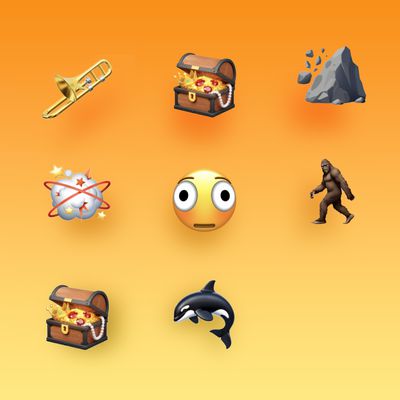
The fourth iOS 26.4, iPadOS 26.4, and macOS Tahoe 26.4 betas that Apple provided to developers today introduce nine new emoji characters.
Trombone
Treasure Chest
Distorted Face
Hairy Creature (aka Bigfoot or Sasquatch)
Fight Cloud
Orca
Landslide
There are also new skin tone modifiers people wrestling and dancers with bunny ears, as well as a gender neutral option for ...