

iPhone 18 Said to Use Simpler Camera Control Button Design

Apple is working to simplify the Camera Control button's design on the iPhone 18 in order to reduce costs, claims an established Chinese leaker.
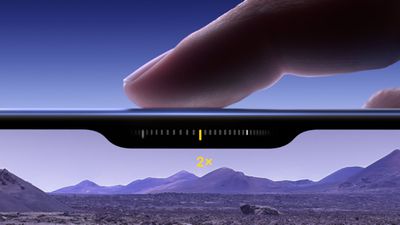
iphone 16 capture button
The current Camera Control button on iPhone 17 models uses both capacitive and pressure sensors beneath a sapphire crystal surface. The capacitive layer detects touch gestures, while the force sensor recognizes different pressure levels for taps, presses, and swipes.

However, according to the Weibo-based account Instant Digital, Apple will remove the capacitive sensing layer and retain only pressure sensing recognition in the second iteration to achieve all Camera Control functions on the iPhone 18.

The single-sensor approach is similar to designs found in devices like the OPPO X8 Ultra and vivo X200 Ultra, where pressure sensors alone can recognize light taps, firm presses, and sliding gestures.

In later iterations, the leaker claims piezoelectric ceramics will be introduced to provide localized haptic feedback. While it's not entirely clear, this could be part of a wholesale switch to solid-state buttons that Apple is allegedly working on and which will debut in the 20th anniversary iPhone.

Instant Digital previously disputed rumors suggesting Apple plans to eliminate the Camera Control button from the iPhone 18. The simplified version is not about reducing functionality in the button, but about saving money. The current solution is said to be very expensive for Apple and is generating costly after-sales repairs.

The iPhone 18 Air, Pro, Pro Max, and foldable is expected to come in September 2026, while the iPhone 18 and iPhone 18e will launch in 2027.


Related Roundup: iPhone 18
Related Forum: iPhone

Popular Stories

iOS 26

iOS 26.4 and iOS 27 Features Revealed in New Leak

Friday December 12, 2025 10:56 am PST by
Macworld's Filipe Espósito today revealed a handful of features that Apple is allegedly planning for iOS 26.4, iOS 27, and even iOS 28. The report said the features are referenced within the code for a leaked internal build of iOS 26 that is not meant to be seen by the public. However, it appears that Espósito and/or his sources managed to gain access to it, providing us with a sneak peek...
iOS 26

iOS 26.2 Coming Soon With These 8 New Features on Your iPhone

Thursday December 11, 2025 8:49 am PST by
Apple seeded the second iOS 26.2 Release Candidate to developers earlier this week, meaning the update will be released to the general public very soon. Apple confirmed iOS 26.2 would be released in December, but it did not provide a specific date. We expect the update to be released by early next week. iOS 26.2 includes a handful of new features and changes on the iPhone, such as a new...
iOS 26

Apple Releases iOS 26.2 With Alarms for Reminders, Lock Screen Changes, Enhanced Safety Alerts and More

Friday December 12, 2025 10:10 am PST by
Apple today released iOS 26.2, the second major update to the iOS 26 operating system that came out in September, iOS 26.2 comes a little over a month after iOS 26.1 launched. ‌iOS 26‌.2 is compatible with the ‌iPhone‌ 11 series and later, as well as the second-generation ‌iPhone‌ SE. The new software can be downloaded on eligible iPhones over-the-air by going to Settings >...
AirPods Pro Firmware Feature

Apple Releases New Firmware for AirPods Pro 2 and AirPods Pro 3

Thursday December 11, 2025 11:28 am PST by
Apple today released new firmware designed for the AirPods Pro 3 and the prior-generation AirPods Pro 2. The AirPods Pro 3 firmware is 8B30, up from 8B25, while the AirPods Pro 2 firmware is 8B28, up from 8B21. There's no word on what's include in the updated firmware, but the AirPods Pro 2 and AirPods Pro 3 are getting expanded support for Live Translation in the European Union in iOS...
macOS Tahoe 26 Thumb

Apple Releases macOS Tahoe 26.2 With Edge Light

Friday December 12, 2025 10:08 am PST by
Apple today released macOS Tahoe 26.2, the second major update to the macOS Tahoe operating system that came out in September. macOS Tahoe 26.2 comes five weeks after Apple released macOS Tahoe 26.1. Mac users can download the macOS Tahoe update by using the Software Update section of System Settings. macOS Tahoe 26.2 includes Edge Light, a feature that illuminates your face with soft...
AirTag 2 Mock Feature

Apple AirTag 2: Four New Features Found in iOS 26 Code

Thursday December 11, 2025 10:31 am PST by
The AirTag 2 will include a handful of new features that will improve tracking capabilities, according to a new report from Macworld. The site says that it was able to access an internal build of iOS 26, which includes references to multiple unreleased products. Here's what's supposedly coming: An improved pairing process, though no details were provided. AirTag pairing is already...
ipados 26 1 slide over

Apple Releases iPadOS 26.2 With Multitasking Improvements

Friday December 12, 2025 10:09 am PST by
Apple today released iPadOS 26.2, the second major update to the iPadOS 26 operating system released in September. iPadOS 26.2 comes a month after iPadOS 26.1. The new software can be downloaded on eligible iPads over-the-air by going to Settings > General > Software Update. iPadOS 26.2 continues with the multitasking improvements that were added with iPadOS 26.1. You can now drag and...
bug security vulnerability issue fix larry

Update Now: iOS 26.2 Fixes 20+ Security Vulnerabilities

Friday December 12, 2025 11:11 am PST by
Apple today released iOS 26.2, iPadOS 26.2, and macOS 26.2, all of which introduce new features, bug fixes, and security improvements. Apple says that the updates address over 20 vulnerabilities, including two bugs that are known to have been actively exploited. There are a pair of WebKit vulnerabilities that could allow maliciously crafted web content to execute code or cause memory...

Top Rated Comments

MacUserFella Avatar
7 weeks ago
It would cost less to just remove it entirely
Score: 39 Votes (Like | Disagree)
rsnhakan Avatar
7 weeks ago
Please remove it and make the phone cheaper. Who uses this button?
Score: 21 Votes (Like | Disagree)
stiligFox Avatar
7 weeks ago
I really thought the button was a cool idea but I swear it’s more fiddly to use than the screen buttons…
Score: 20 Votes (Like | Disagree)
Apple-achian Avatar
7 weeks ago

It would cost less to just remove it entirely
Their internal polling clearly shows that consumers love it
Score: 14 Votes (Like | Disagree)
attila Avatar
7 weeks ago
I can't wait to not use this on my next iPhone.
Score: 14 Votes (Like | Disagree)
ghostface147 Avatar
7 weeks ago
Eh, I turned it off except to double click to open camera.
Score: 11 Votes (Like | Disagree)















