What's New in iOS 26.1 Beta 4

Even though we're at the fourth beta of iOS 26.1, Apple is continuing to add new features. In fact, the fourth beta has some of the biggest changes that we'll get when iOS 26.1 releases to the public later this month. We've rounded up what's new below.
iOS 26

Liquid Glass Transparency Toggle

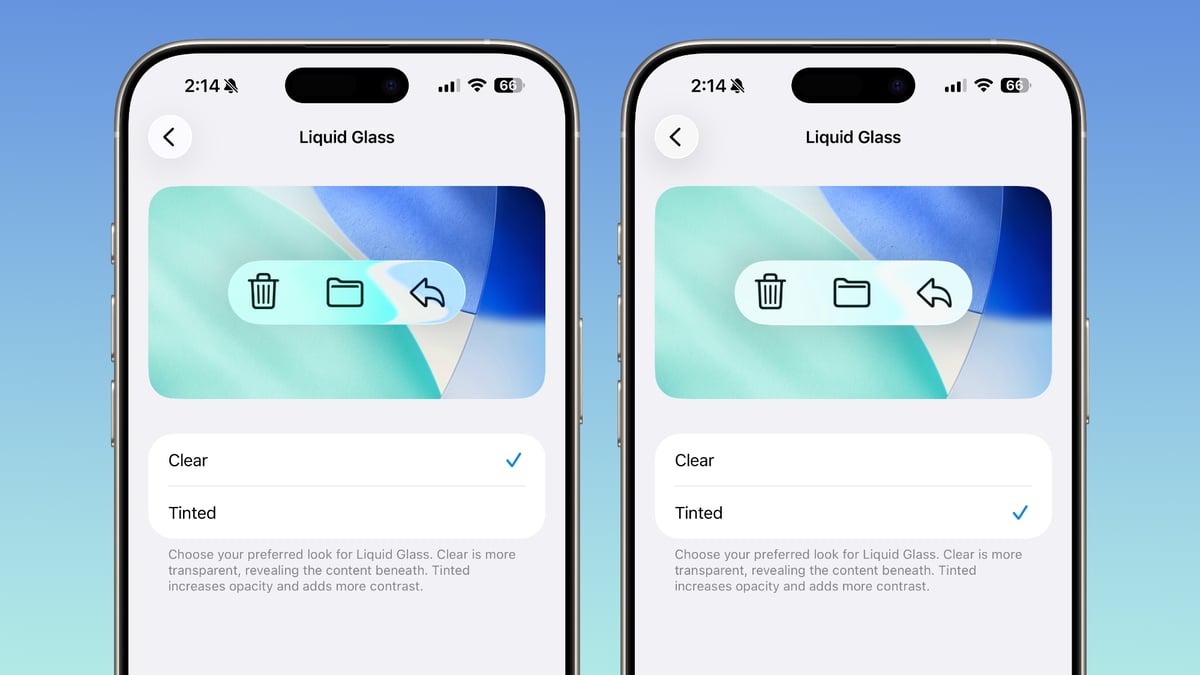
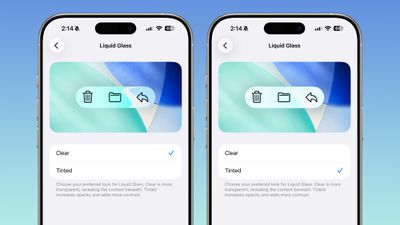
Apple added a toggle for customizing the look of Liquid Glass. In Settings > Display and Brightness, there's a new option to switch between Clear or Tinted settings.
ios 26 1 liquid glass opaque
Clear is more transparent and is the standard version of Liquid Glass that displays the background underneath buttons, menu bars, and other interface elements, while Tinted increases the opacity of Liquid Glass and adds contrast.

Lock Screen Camera Swipe

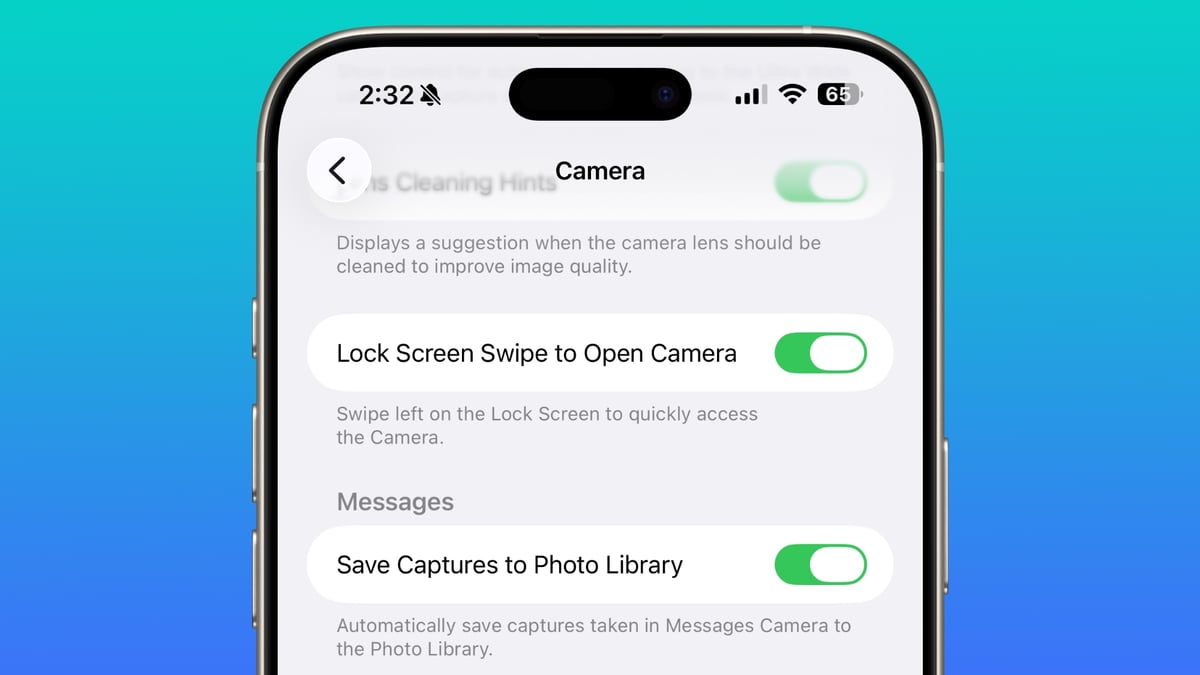
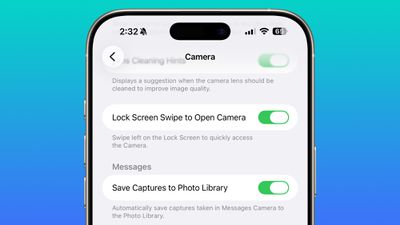
In the Camera section of the Settings app, there's a Lock Screen Swipe to Open Camera setting, and turning it off disables the feature where you can swipe left to open the camera from the Lock Screen.
lock screen swipe disable camera
The iPhone has long allowed users to open the Camera app directly from the Lock Screen with a swipe, but it can be a setting that's easy to activate, and it provides a way for someone that gets ahold of an ‌iPhone‌ to use it to take unwanted photos.

There was previously no way to turn off Lock Screen camera activation without disabling the camera app entirely.

Phone Haptics

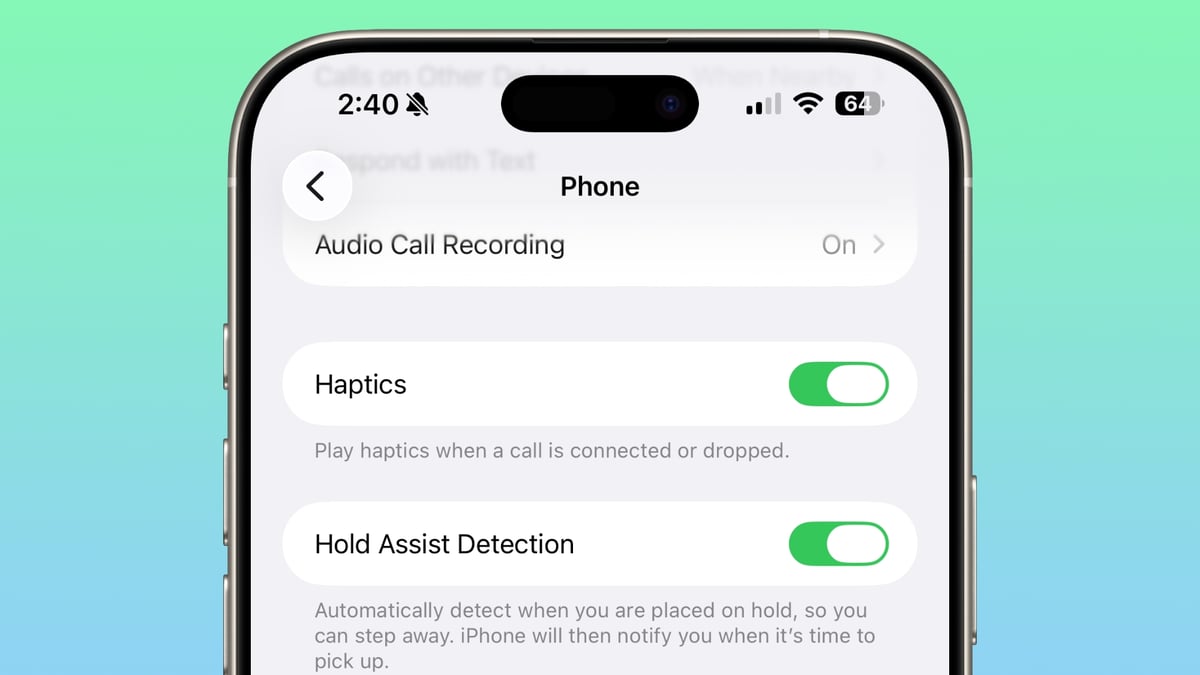
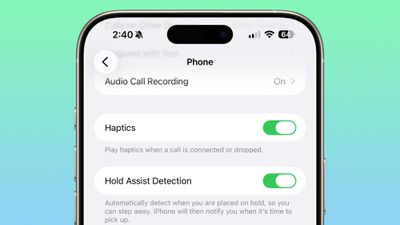
In the Phone app, there's a toggle to turn off haptic feedback when a call is connected or dropped.
ios 26 1 phone haptics

Apple Intelligence Settings

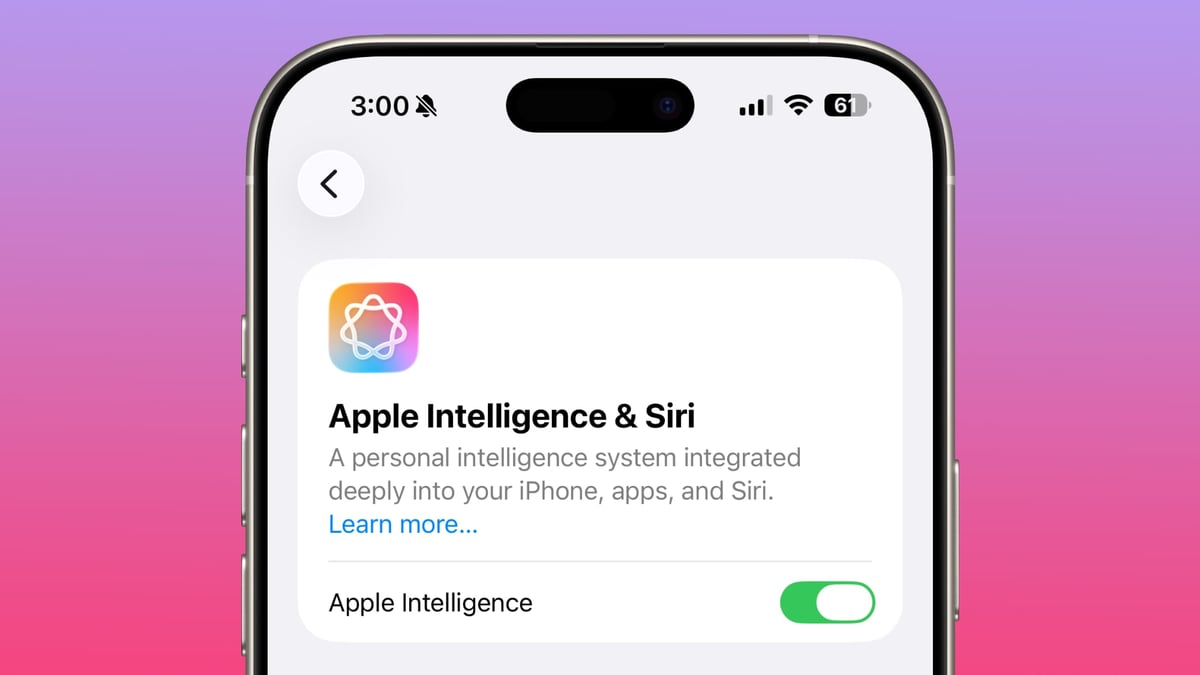
Apple has changed the look of the Apple Intelligence section in the Settings app, and it is now left aligned. Apple made the alignment change for other sections of the Settings app in earlier betas, but ‌Apple Intelligence‌ remained the same.

ios 26 1 apple intelligence
Apple has also removed the "Beta" label from ‌Apple Intelligence‌, but it's not clear if some features are officially out of beta, or if it's an oversight. Apple has not removed the beta labeling in macOS Tahoe 26.1 beta 4.

More Features

Know of a feature that we left out? Let us know in the comments. To see what Apple has added in prior iOS 26.1 betas, check out our iOS 26.1 feature guide.

Related Roundups: iOS 26, iPadOS 26
Related Forum: iOS 26

Popular Stories

iOS 26

iOS 26.4 and iOS 27 Features Revealed in New Leak

Friday December 12, 2025 10:56 am PST by
Macworld's Filipe Espósito today revealed a handful of features that Apple is allegedly planning for iOS 26.4, iOS 27, and even iOS 28. The report said the features are referenced within the code for a leaked internal build of iOS 26 that is not meant to be seen by the public. However, it appears that Espósito and/or his sources managed to gain access to it, providing us with a sneak peek...
iOS 26

iOS 26.2 Coming Soon With These 8 New Features on Your iPhone

Thursday December 11, 2025 8:49 am PST by
Apple seeded the second iOS 26.2 Release Candidate to developers earlier this week, meaning the update will be released to the general public very soon. Apple confirmed iOS 26.2 would be released in December, but it did not provide a specific date. We expect the update to be released by early next week. iOS 26.2 includes a handful of new features and changes on the iPhone, such as a new...
iOS 26

Apple Releases iOS 26.2 With Alarms for Reminders, Lock Screen Changes, Enhanced Safety Alerts and More

Friday December 12, 2025 10:10 am PST by
Apple today released iOS 26.2, the second major update to the iOS 26 operating system that came out in September, iOS 26.2 comes a little over a month after iOS 26.1 launched. ‌iOS 26‌.2 is compatible with the ‌iPhone‌ 11 series and later, as well as the second-generation ‌iPhone‌ SE. The new software can be downloaded on eligible iPhones over-the-air by going to Settings >...
AirPods Pro Firmware Feature

Apple Releases New Firmware for AirPods Pro 2 and AirPods Pro 3

Thursday December 11, 2025 11:28 am PST by
Apple today released new firmware designed for the AirPods Pro 3 and the prior-generation AirPods Pro 2. The AirPods Pro 3 firmware is 8B30, up from 8B25, while the AirPods Pro 2 firmware is 8B28, up from 8B21. There's no word on what's include in the updated firmware, but the AirPods Pro 2 and AirPods Pro 3 are getting expanded support for Live Translation in the European Union in iOS...
macOS Tahoe 26 Thumb

Apple Releases macOS Tahoe 26.2 With Edge Light

Friday December 12, 2025 10:08 am PST by
Apple today released macOS Tahoe 26.2, the second major update to the macOS Tahoe operating system that came out in September. macOS Tahoe 26.2 comes five weeks after Apple released macOS Tahoe 26.1. Mac users can download the macOS Tahoe update by using the Software Update section of System Settings. macOS Tahoe 26.2 includes Edge Light, a feature that illuminates your face with soft...
AirTag 2 Mock Feature

Apple AirTag 2: Four New Features Found in iOS 26 Code

Thursday December 11, 2025 10:31 am PST by
The AirTag 2 will include a handful of new features that will improve tracking capabilities, according to a new report from Macworld. The site says that it was able to access an internal build of iOS 26, which includes references to multiple unreleased products. Here's what's supposedly coming: An improved pairing process, though no details were provided. AirTag pairing is already...
ipados 26 1 slide over

Apple Releases iPadOS 26.2 With Multitasking Improvements

Friday December 12, 2025 10:09 am PST by
Apple today released iPadOS 26.2, the second major update to the iPadOS 26 operating system released in September. iPadOS 26.2 comes a month after iPadOS 26.1. The new software can be downloaded on eligible iPads over-the-air by going to Settings > General > Software Update. iPadOS 26.2 continues with the multitasking improvements that were added with iPadOS 26.1. You can now drag and...
bug security vulnerability issue fix larry

Update Now: iOS 26.2 Fixes 20+ Security Vulnerabilities

Friday December 12, 2025 11:11 am PST by
Apple today released iOS 26.2, iPadOS 26.2, and macOS 26.2, all of which introduce new features, bug fixes, and security improvements. Apple says that the updates address over 20 vulnerabilities, including two bugs that are known to have been actively exploited. There are a pair of WebKit vulnerabilities that could allow maliciously crafted web content to execute code or cause memory...

Top Rated Comments

Paradoxally Avatar
8 weeks ago
Great move, now next move is to fire Alan Dye because he has no idea what good design is.
Score: 10 Votes (Like | Disagree)
fullauto Avatar
8 weeks ago
Now add an option called ‘Liquid’ and give us back the iOS26 beta 1 look. smh
Score: 9 Votes (Like | Disagree)
Apple Knowledge Navigator Avatar
8 weeks ago

('https://www.macrumors.com/2025/10/20/ios-26-1-beta-4-features/')

Apple has also removed the "Beta" label from Apple Intelligence, but it's not clear if some features are officially out of beta, or if it's an oversight.
If it truly is ‘out’ of beta, then all I can say is that standards really have dropped.
Score: 7 Votes (Like | Disagree)
ikramerica Avatar
8 weeks ago
Is there a toggle for “turn off oversized buttons to fix interface that no longer fits on an iPhone screen”
Score: 7 Votes (Like | Disagree)
acblue94 Avatar
8 weeks ago

Now add an option called ‘Liquid’ and give us back the iOS26 beta 1 look. smh
Yes. I prefer more liquid glass
Score: 7 Votes (Like | Disagree)
acblue94 Avatar
8 weeks ago

('https://www.macrumors.com/2025/10/20/ios-26-1-beta-4-features/')

Even though we're at the fourth beta of iOS 26.1, Apple is continuing to add new features. In fact, the fourth beta has some of the biggest changes that we'll get when iOS 26.1 releases to the public later this month. We've rounded up what's new below.


Liquid Glass Transparency Toggle

Apple added a toggle for customizing the look of Liquid Glass. In Settings > Display and Brightness, there's a new option to switch between Clear or Tinted settings.


Clear is more transparent and is the standard version of Liquid Glass that displays the background underneath buttons, menu bars, and other interface elements, while Tinted increases the opacity of Liquid Glass and adds contrast.

Lock Screen Camera Swipe

In the Camera section of the Settings app, there's a Lock Screen Swipe to Open Camera setting, and turning it off disables the feature where you can swipe left to open the camera from the Lock Screen.


The iPhone has long allowed users to open the Camera app directly from the Lock Screen with a swipe, but it can be a setting that's easy to activate, and it provides a way for someone that gets ahold of an iPhone to use it to take unwanted photos.

There was previously no way to turn off Lock Screen camera activation without disabling the camera app entirely.

Phone Haptics

In the Phone app, there's a toggle to turn off haptic feedback when a call is connected or dropped.


Apple Intelligence Settings

Apple has changed the look of the Apple Intelligence section in the Settings app, and it is now left aligned. Apple made the alignment change for other sections of the Settings app in earlier betas, but Apple Intelligence remained the same.
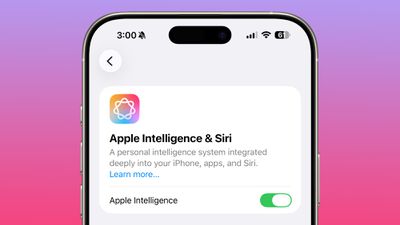


Apple has also removed the "Beta" label from Apple Intelligence, but it's not clear if some features are officially out of beta, or if it's an oversight. Apple has not removed the beta labeling in macOS Tahoe 26.1 beta 4.

More Features

Know of a feature that we left out? Let us know in the comments. To see what Apple has added in prior iOS 26.1 betas, check out our iOS 26.1 feature guide ('https://www.macrumors.com/guide/ios-26-1-beta-features/').

Article Link: What's New in iOS 26.1 Beta 4 ('https://www.macrumors.com/2025/10/20/ios-26-1-beta-4-features/')
How about a way to enhance liquid glass
Score: 6 Votes (Like | Disagree)