Apple Releases Fourth Public Betas of iOS 26 and More

Apple today released the fourth public betas of iOS 26, iPadOS 26, and macOS 26, allowing the public to test the updates ahead of their September launch. The fourth public betas come a week after the third public betas, and the updates correspond with the seventh developer betas that were released earlier today.
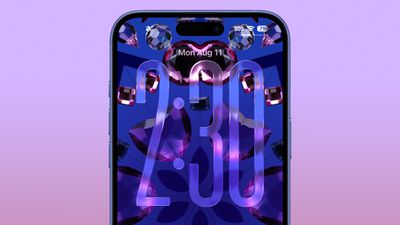
ios 26 liquid glass lock screen beta 6
Public beta testers that have registered on Apple's website can download the latest iOS 26, iPadOS 26, and macOS 26 public betas by opening the Settings or System Settings app, going to the General section, tapping on Software Update, and choosing the iOS 26, iPadOS 26, or macOS 26 Public Beta options.

iOS 26 and iPadOS 26 feature Apple's Liquid Glass design, with a visual aesthetic that focuses on transparency. Icons, menu buttons, navigation bars, and more reflect and refract light with subtle animations. There are pop-out menus in some areas, tab bars shrink down, and everything has a more rounded look.
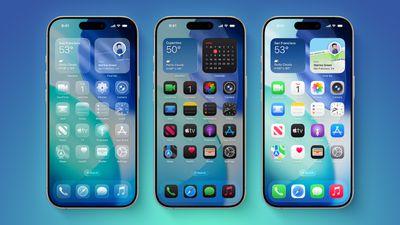
iOS 26 on Three iPhones
There are new Apple Intelligence features like Visual Intelligence for screenshots, updated order tracking in the Wallet app, new features in Reminders, and Live Translation for the Messages, Phone, and FaceTime apps. Image Playground has ChatGPT style options, and Genmoji supports mixing two or more emoji characters to make something new.
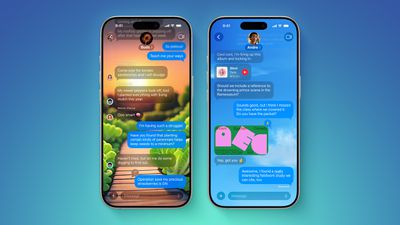
ten messages features
2D photos have a more 3D look with a Spatial Scene feature, and Safari has updated navigation. In the Phone app, there are new Call Screening and Hold Assist features that will save you time, while the Messages app supports customizable backgrounds and polls. Apple Music has a DJ-like AutoMix feature, CarPlay has an overhauled interface, there's a new Apple Games app, and Preview has come to the iPhone for the first time.
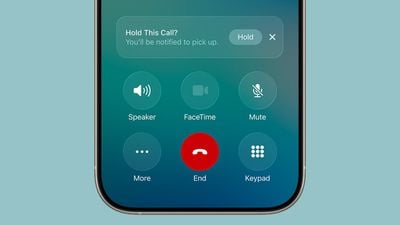
ios 26 call holding
macOS Tahoe has the same Liquid Glass design as iOS 26, and it extends to app icons, folders, the Dock, in-app navigation, menus, the Control Center, and the Menu Bar. The Control Center and the Menu Bar are customizable, and you're also able to customize folders, app icons, and widgets.
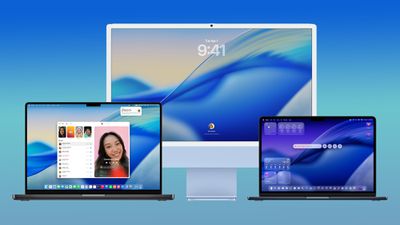
macos tahoe design
Safari has an updated tab design and a redesigned sidebar, and Apple has brought the Phone app to the Mac for making phone calls through Wi-Fi Calling. The Phone app supports the new Call Screening and Hold Assist features.

Spotlight has been overhauled with improved search and the ability to execute hundreds of actions without opening up an app. There's a new Games app with a Game Overlay feature, and developers have access to Metal 4.

More on what's new can be found in our iOS 26, iPadOS 26, and macOS Tahoe roundups.
Related Roundups: iOS 26, iPadOS 26
Related Forum: iOS 26

Popular Stories

iOS 26

iOS 26.4 and iOS 27 Features Revealed in New Leak

Friday December 12, 2025 10:56 am PST by
Macworld's Filipe Espósito today revealed a handful of features that Apple is allegedly planning for iOS 26.4, iOS 27, and even iOS 28. The report said the features are referenced within the code for a leaked internal build of iOS 26 that is not meant to be seen by the public. However, it appears that Espósito and/or his sources managed to gain access to it, providing us with a sneak peek...
iOS 26

iOS 26.2 Coming Soon With These 8 New Features on Your iPhone

Thursday December 11, 2025 8:49 am PST by
Apple seeded the second iOS 26.2 Release Candidate to developers earlier this week, meaning the update will be released to the general public very soon. Apple confirmed iOS 26.2 would be released in December, but it did not provide a specific date. We expect the update to be released by early next week. iOS 26.2 includes a handful of new features and changes on the iPhone, such as a new...
iOS 26

Apple Releases iOS 26.2 With Alarms for Reminders, Lock Screen Changes, Enhanced Safety Alerts and More

Friday December 12, 2025 10:10 am PST by
Apple today released iOS 26.2, the second major update to the iOS 26 operating system that came out in September, iOS 26.2 comes a little over a month after iOS 26.1 launched. ‌iOS 26‌.2 is compatible with the ‌iPhone‌ 11 series and later, as well as the second-generation ‌iPhone‌ SE. The new software can be downloaded on eligible iPhones over-the-air by going to Settings >...
AirPods Pro Firmware Feature

Apple Releases New Firmware for AirPods Pro 2 and AirPods Pro 3

Thursday December 11, 2025 11:28 am PST by
Apple today released new firmware designed for the AirPods Pro 3 and the prior-generation AirPods Pro 2. The AirPods Pro 3 firmware is 8B30, up from 8B25, while the AirPods Pro 2 firmware is 8B28, up from 8B21. There's no word on what's include in the updated firmware, but the AirPods Pro 2 and AirPods Pro 3 are getting expanded support for Live Translation in the European Union in iOS...
macOS Tahoe 26 Thumb

Apple Releases macOS Tahoe 26.2 With Edge Light

Friday December 12, 2025 10:08 am PST by
Apple today released macOS Tahoe 26.2, the second major update to the macOS Tahoe operating system that came out in September. macOS Tahoe 26.2 comes five weeks after Apple released macOS Tahoe 26.1. Mac users can download the macOS Tahoe update by using the Software Update section of System Settings. macOS Tahoe 26.2 includes Edge Light, a feature that illuminates your face with soft...
AirTag 2 Mock Feature

Apple AirTag 2: Four New Features Found in iOS 26 Code

Thursday December 11, 2025 10:31 am PST by
The AirTag 2 will include a handful of new features that will improve tracking capabilities, according to a new report from Macworld. The site says that it was able to access an internal build of iOS 26, which includes references to multiple unreleased products. Here's what's supposedly coming: An improved pairing process, though no details were provided. AirTag pairing is already...
ipados 26 1 slide over

Apple Releases iPadOS 26.2 With Multitasking Improvements

Friday December 12, 2025 10:09 am PST by
Apple today released iPadOS 26.2, the second major update to the iPadOS 26 operating system released in September. iPadOS 26.2 comes a month after iPadOS 26.1. The new software can be downloaded on eligible iPads over-the-air by going to Settings > General > Software Update. iPadOS 26.2 continues with the multitasking improvements that were added with iPadOS 26.1. You can now drag and...
bug security vulnerability issue fix larry

Update Now: iOS 26.2 Fixes 20+ Security Vulnerabilities

Friday December 12, 2025 11:11 am PST by
Apple today released iOS 26.2, iPadOS 26.2, and macOS 26.2, all of which introduce new features, bug fixes, and security improvements. Apple says that the updates address over 20 vulnerabilities, including two bugs that are known to have been actively exploited. There are a pair of WebKit vulnerabilities that could allow maliciously crafted web content to execute code or cause memory...

Top Rated Comments

MothJab Avatar
17 weeks ago
Ios26 is so ugly. Literally bad windows vista and aero.

Wouldn’t be so bad if the icons weren’t made to look like candy crush
Score: 11 Votes (Like | Disagree)
beant0wn Avatar
17 weeks ago

A lot of bad padding around several UI elements. You’d think they would work on that after several betas, where I’m sure they got plenty of feedback on that. Embarrassing stuff.
The days of good designers at Apple are gone. The new generation working on UI and software are really lost, nothing is intuitive at all, aesthetics slipping…sigh.
Score: 9 Votes (Like | Disagree)
djinn Avatar
17 weeks ago

Frosting…defrosting…frosting…defrosting. Apple really playing with beta testers’ emotions when it comes to liquid glass effect ??
We call that Apple OS Global Warming
Score: 8 Votes (Like | Disagree)
Robert.Walter Avatar
17 weeks ago

strictly speaking, 4 days later (PB3 was released last week Thursday).
I am enjoying iPadOS 26 on my M2 iPad Air, no real complaints thus far
I’m not a fan of the rounded text boxes, they make things feel cramped.

Also who needs a prominent search box everywhere? Pull down was better bc it didn’t displace critical functions (some two taps down) into fussy menus.

I have a problem with safari reader freezing the And Wallet didn’t populate with info from my safari autofill. When I started manually putting it into wallet, it overwrote one if my descriptions. So I deleted all cards from Apple Pay, on phone & watch, and repopulated with a wallet drawing from my autofill data.

Looking forward to my passport into wallet. This will be great.

I do like minor passwords upgrade (will be very helpful for many folks).

But so many seeming style changes for change’s sake. I would rather have had more functionality than cosmetic schnik-schnak.
Score: 8 Votes (Like | Disagree)
Havalo Avatar
17 weeks ago
Frosting…defrosting…frosting…defrosting. Apple really playing with beta testers’ emotions when it comes to liquid glass effect ??
Score: 7 Votes (Like | Disagree)
jz0309 Avatar
17 weeks ago

The fourth public betas come a week after the third public betas, and the updates correspond with the seventh developer betas.
strictly speaking, 4 days later (PB3 was released last week Thursday).
I am enjoying iPadOS 26 on my M2 iPad Air, no real complaints thus far
Score: 7 Votes (Like | Disagree)