Everything New in iOS 26 Beta 2

Apple provided developers with the second beta of iOS 26, introducing the first changes and refinements to the new operating system since it debuted after the WWDC keynote. Because we're early in the beta testing process, there are quite a few tweaks to ‌iOS 26‌, which we've rounded up below.

Control Center

The background behind the Liquid Glass Control Center buttons has more blur, allowing for a more opaque look that makes everything easier to see than before.
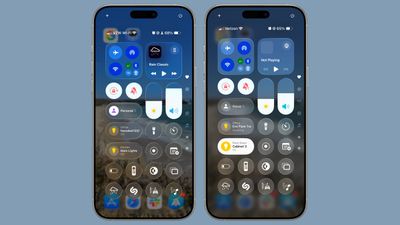
ios 26 control center b2‌iOS 26‌ beta 1 on left, ‌iOS 26‌ beta 2 on right

Reduce Transparency

The Reduce Transparency option under Accessibility in the Settings app now cuts down on the Liquid Glass transparency even more.
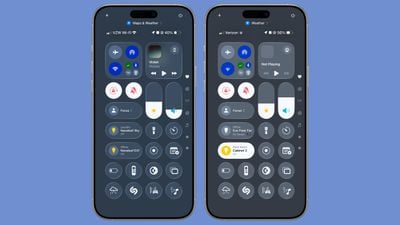
ios 26 reduce transparency‌iOS 26‌ beta 1 on left, ‌iOS 26‌ beta 2 on right

Safari

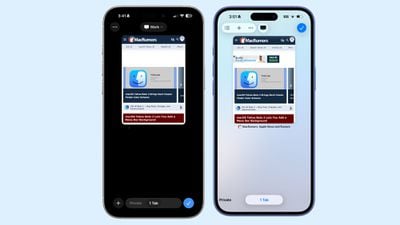
In Safari, Apple changed the location of the new tab button in the tab management view. The "+" button for adding a new tab is now located in the bottom left as it is in iOS 18, rather than the upper left as it was in ‌iOS 26‌ beta 1.

safari design changes ios 26 b2Safari in beta 2 on left, Safari in beta 1 on right

With the Compact tab bar, there are also now both back and forward options.

App Store

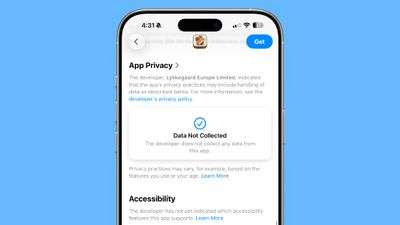
In the App Store, Apple added an Accessibility section to product pages. Developers will need to provide details listing the accessibility features they support for this section in the ‌App Store‌ to be populated.

app store accessibility ios 26 b2

Wallet

‌iOS 26‌ beta 2 adds full support for the order tracking feature that Apple announced at WWDC. In the Wallet app, there is an option to let Siri to scan your Mail app to find all orders and emails from merchants, even if those orders weren't made with Apple Pay.
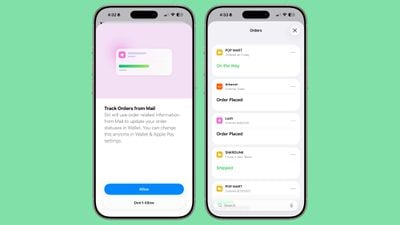
ios 26 order tracking wallet

New Ringtone

There's a new "Alt 1" ringtone option for the Reflection ringtone. You can choose it as your ringtone by going to the Settings app, tapping on Sounds and Haptics, tapping on Ringtone, and then choosing Alt 1 under Reflection.
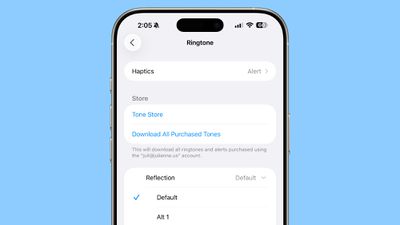
ringtone alt 1 ios 26

Radio Widget

There is a new Live Radio Apple Music widget.
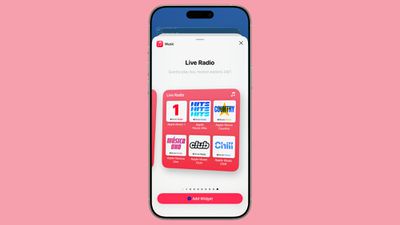
ios 26 live radio

Low Power Mode

Apple has improved the description for Low Power Mode, making it clearer what it does.

iPhone will temporarily reduce some background activities, processing speed, display refresh rate and brightness, and limit certain features such as 5G, iCloud syncing, mail fetch, and more.

Before now, the setting only mentioned reducing background activity like downloads and mail fetch.

Live Captions

For Live Captions, the Transcribe Calls option is now Save Call Transcripts, and the feature makes it clear that it will inform call participants with a sound before transcribing begins.
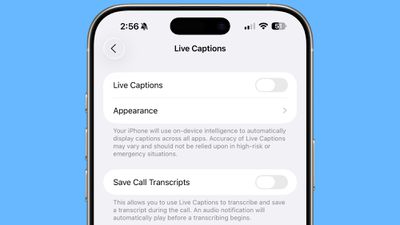
ios 26 live captions

Passkeys

The Passkey sign-in window has a new design.
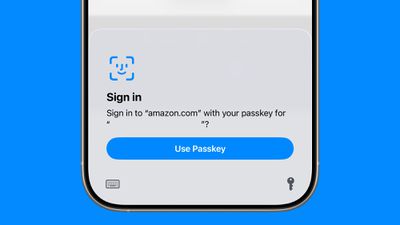
ios 26 b2 passkey

Lock Screen Widgets

Widgets on the Lock Screen can now be moved to the bottom of the display, and aren't limited to the top.
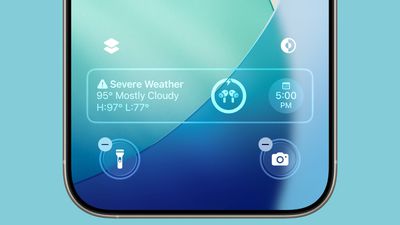
ios 26 b2 widgets

Wallpaper

The default wallpaper that's new in ‌iOS 26‌ now animates with the spatial scene functionality in the update.
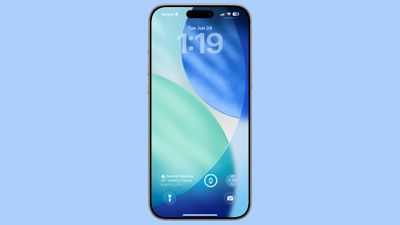
ios 26 home screen

Read More

For an overview of the features in ‌iOS 26‌, make sure to check out our iOS 26 roundup. We also have a roundup of iPadOS 26 features.
Related Roundups: iOS 26, iPadOS 26
Related Forum: iOS 26

Popular Stories

iOS 26

iOS 26.3 and iOS 26.4 Will Add These New Features to Your iPhone

Tuesday February 3, 2026 7:47 am PST by
We are still waiting for the iOS 26.3 Release Candidate to come out, so the first iOS 26.4 beta is likely still at least a week or two away. Following beta testing, iOS 26.4 will likely be released to the general public in March or April. Below, we have recapped known or rumored iOS 26.3 and iOS 26.4 features so far. iOS 26.3 iPhone to Android Transfer Tool iOS 26.3 makes it easier...
Apple Logo Black

Apple's Next Launch is 'Imminent'

Sunday February 1, 2026 12:31 pm PST by
The calendar has turned to February, and a new report indicates that Apple's next product launch is "imminent," in the form of new MacBook Pro models. "All signs point to an imminent launch of next-generation MacBook Pros that retain the current form factor but deliver faster chips," Bloomberg's Mark Gurman said on Sunday. "I'm told the new models — code-named J714 and J716 — are slated...
iOS 26 Home Feature

Apple Gives Final Warning to Home App Users

Tuesday February 3, 2026 8:55 am PST by
In 2022, Apple introduced a new Apple Home architecture that is "more reliable and efficient," and the deadline to upgrade and avoid issues is fast approaching. In an email this week, Apple gave customers a final reminder to upgrade their Home app by February 10, 2026. Apple says users who do not upgrade may experience issues with accessories and automations, or lose access to their smart...
Aston Martin CarPlay Ultra Screen

Apple's CarPlay Ultra to Expand to These Vehicle Brands Later This Year

Sunday February 1, 2026 10:08 am PST by
Last year, Apple launched CarPlay Ultra, the long-awaited next-generation version of its CarPlay software system for vehicles. Nearly nine months later, CarPlay Ultra is still limited to Aston Martin's latest luxury vehicles, but that should change fairly soon. In May 2025, Apple said many other vehicle brands planned to offer CarPlay Ultra, including Hyundai, Kia, and Genesis. In his Powe...
Apple Foldable Thumb

First Foldable iPhone Design Details Revealed

Monday February 2, 2026 7:19 am PST by
Apple's first foldable iPhone will feature relocated volume buttons, an all-black camera plateau, a smaller Dynamic Island, and more, according to design leaks from a known Weibo leaker. The user known as "Instant Digital" today claimed to share several key details about the design of the foldable iPhone: The volume buttons will be located on the top edge of the device, aligned to the...

Top Rated Comments

flybynight Avatar
8 months ago
Even in the same article, we have 2 images with "iOS 26 beta 1 on left, iOS 26 beta 2 on right" and 1 image with "Safari in beta 2 on left, Safari in beta 1 on right". Ugh. C'mon, people. Consistency, please!
Score: 15 Votes (Like | Disagree)
Gioser Avatar
8 months ago

I feel like this is a buggier beta than the first
I'm sorry to disappoint you but I see it more fluid and with fewer errors
Score: 8 Votes (Like | Disagree)
nfl46 Avatar
8 months ago
This is a solid update. Great job, Apple.

Two betas down…maybe six left to go?
Score: 5 Votes (Like | Disagree)
verniesgarden Avatar
8 months ago
I feel like this is a buggier beta than the first
Score: 5 Votes (Like | Disagree)
digitalfx Avatar
8 months ago
small changes in CarPlay:
widgets only have two columns now instead of three in the previous release and maps adds in a detail to the route with the street names visible on the blue route line

EDIT:
This is huge, the garage door control from homekit that pops up as you arrive home now has three dots that allows you to scroll thru all available garage doors!!

one more addition, with the multiple garage doors...if you hold your finger on one door for a few seconds a pop-up appears that offers to "Clear for this drive"
Score: 5 Votes (Like | Disagree)
Gioser Avatar
8 months ago

So they are going back to iOS 18 style. Apple needs a new design team. They can’t get it right. This isn’t a major re design we were promised, just a theme pack skin
But where do you see the return to iOS 18? It is the normal process of evolving a beta operating system, since users have not yet understood the difference between a beta and a public one!
Score: 4 Votes (Like | Disagree)