Safari Changes on iOS 26 Go Beyond the Address Bar - MacRumorsOpen MenuShow RoundupsShow Forums menuVisit ForumsOpen Sidebar
Skip to Content

Safari Changes on iOS 26 Go Beyond the Address Bar

One of the key changes to Safari on iOS 26 is a redesigned Liquid Glass address bar, with three layouts available to choose from. Beyond that, the upcoming software update includes a few smaller changes for the web browser.
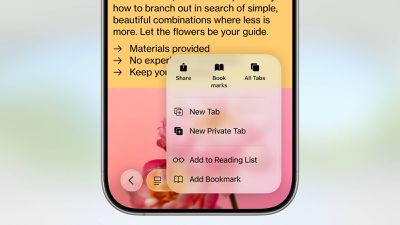
safari liquid glass

Web Apps For All Websites

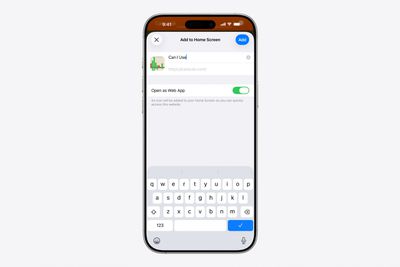
Starting with iOS 26, every website added to the Home Screen via Safari opens as a web app, even if it is not configured to be. On earlier iOS versions, websites that were not configured to open as a web app would open in Safari, meaning that the Home Screen app icons for those websites were effectively just bookmarks.
iOS 26 Safari Web Apps
Users can turn off "Open as Web App" while adding a website to the Home Screen if they prefer the app icons to still function as simple bookmarks.

This change also applies to iPadOS 26.

HDR Images

Safari now supports HDR images, five years after the browser gained support for HDR video.

HDR images have wider dynamic range and increased color gamut, making bright areas of the image appear brighter and dark areas appear darker.

This change applies across iOS 26, iPadOS 26, macOS 26, and visionOS 26.

SVG Icons

Safari now supports the SVG file format for icons anywhere that they are shown in the browser, including in the bookmark bar and on the start page.

SVG icons have smaller file sizes than PNG icons, and they offer infinite vector scaling, meaning they can be resized without any loss in image quality.

More

Even more changes coming to Safari across iOS 26, iPadOS 26, macOS 26, and visionOS 26 were outlined in a WebKit blog post last week.

iOS 26 and the other software updates are currently in beta.
Related Roundups: iOS 26, iPadOS 26
Tag: Safari
Related Forum: iOS 26

Popular Stories

iPhone 18 Pro Deep Red Feature

iPhone 18 Pro Launching Later This Year With These 12 New Features

Wednesday March 18, 2026 7:39 am PDT by
While the iPhone 18 Pro and iPhone 18 Pro Max are not expected to launch for another six months or so, there are already plenty of rumors about the devices. It was initially reported that the iPhone 18 Pro models would have fully under-screen Face ID, with only a front camera visible in the top-left corner of the screen. However, the latest rumors indicate that only one Face ID component...
imac video apple feature

Apple Released Yet Another New Product Today

Friday March 20, 2026 2:39 pm PDT by
Apple has unveiled a whopping nine new products so far this March, including an iPhone 17e, iPad Air models with the M4 chip, MacBook Air models with the M5 chip, MacBook Pro models with M5 Pro and M5 Max chips, the all-new MacBook Neo, an updated Studio Display, a higher-end Studio Display XDR, AirPods Max 2, and now the Nike Powerbeats Pro 2. iPhone 17e features the same overall design as...
ios 26 4 yellow

Here Are Apple's Release Notes for iOS 26.4

Wednesday March 18, 2026 11:56 am PDT by
Apple provided developers and public beta testers with the release candidate versions of iOS 26.4 and iPadOS 26.4, which means we're going to see a public launch as soon as next week. The RC versions of the software include Apple's official release notes, giving us final details on what's included in the update. Apple Music - Playlist Playground (beta) generates a playlist from your...

Top Rated Comments

sniffies Avatar
10 months ago
Quick tip on how to open tab overview with a single gesture: swipe up on the address bar
Score: 17 Votes (Like | Disagree)
10 months ago
Why in the world was the "new tab" + icon moved to the top left corner?! What a stupid change. Everything about this Safari redesign makes the app more cumbersome and slow to use.
Score: 9 Votes (Like | Disagree)
10 months ago
Apple needs to change the new Gabe button to be on the bottom right when your in the all tab view. It is annoying having to reach to the upper left to open a new tab.
Score: 6 Votes (Like | Disagree)
klasma Avatar
10 months ago

The mention of SVG immediately made me think of this frustrated Apple user from yesterday.
Not a lot of "customer SAT" going on here
🥴 😬


SVGs are being used for phishing. They can contain javascript that is executed upon displaying the SVG, can submit data to an external host, or can contain malware payload as an embedded zip file or similar (https://attack.mitre.org/techniques/T1027/017/).

Here is a screenshot of an SVG that displays a fake Excel spreadsheet with a built-in login form that sends the data to attacker:


Attachment Image
Score: 5 Votes (Like | Disagree)
sniffies Avatar
10 months ago

Apple needs to change the new Gabe button to be on the bottom right when your in the all tab view. It is annoying having to reach to the upper left to open a new tab.
You can simply swipe left on the address bar to open a new tab.
Score: 5 Votes (Like | Disagree)
mikebenton Avatar
10 months ago
Before anything else, I would appreciate a focus on the fundamentals. Many sites don't work properly using Safari, but work fine on Chrome, Firefox, and Edge. To me, that seems like a Safari problem. Also, it would be nice if there was a solution to the page-loading issues. Many sites that have inline adverts bounce all over the place. When you navigate to their site you get 95% of the content right away. Then all this other content starts loading (usually adverts) and content starts shifting around. Often I end up click on the wrong thing because of this shifting. I'm not claiming to have a solution, but it would be nice if this problem was solved.
Score: 4 Votes (Like | Disagree)
Related Apple News: News | Travel | Business | Reviews | World News