Here Are All the iOS 26 Features That Require iPhone 15 Pro or Newer

With iOS 26, Apple has introduced some major changes to the iPhone experience, headlined by the new Liquid Glass redesign that's available across all compatible devices. However, several of the update's features are exclusive to iPhone 15 Pro and iPhone 16 models, since they rely on Apple Intelligence.
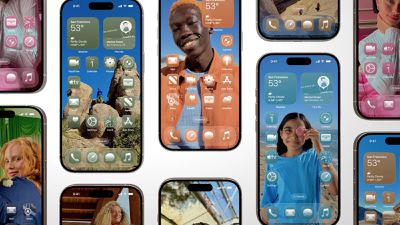
iOS 26 Screens
The following features are powered by on-device large language models and machine learning, which require the advanced neural processing capabilities found in Apple's latest A-series chips. Here's what iPhone 15 Pro users and newer can expect from iOS 26 that older device owners will miss out on.

  • Live Translation in Messages, FaceTime, Phone – Provides real-time translation across Apple's communication apps, automatically translating messages as you type, displaying live captions during FaceTime calls, and speaking translations aloud during phone conversations.
  • Shortcuts Actions with AI Features – Adds new Shortcuts app actions that tap into Apple Intelligence models, enabling users to create images, summarize text, and access AI responses within their automated workflows.
  • Reminders Suggestions and Organization – Uses on-device AI to suggest new tasks and grocery items based on text found in Messages and emails, while automatically categorizing task lists into organized sections.
  • Messages Background Generation and Poll Suggestion – Adds AI-powered poll suggestions for easy creation and enables custom background generation through Image Playground integration, beyond the standard background options available to all users.
  • Apple Wallet Order Tracking – Leverages AI to extract order tracking information directly from emails in your inbox, eliminating the need for merchant participation in Apple's tracking system.
  • New Genmoji and Image Playground Features – Enhances existing Apple Intelligence image tools with the ability to mix emoji together, customize generated characters, and access ChatGPT-powered style options including anime, oil painting, and watercolor effects.
  • Visual Intelligence with Screenshots – Expands the camera-based AI feature to work systemwide with screenshots, allowing users to analyze captured content for shopping, calendar events, and more information gathering.

Users with iPhone 14 Pro and earlier models can still get to experience the visual refresh and many other iOS 26 improvements, but the new AI-powered capabilities remain limited to Apple's latest iPhone models.

spatial scenes 1
It's worth noting that the new Spatial Scenes effect might sound like an Apple Intelligence feature, but it actually uses the Neural Engine to create a spatially reactive version of a photo that animates as you move your device. The Spatial Scenes option is available in the Photos app and on the Lock Screen, but since it does not use Apple Intelligence, it's available on iPhone 12 and newer devices.


Related Roundups: iOS 26, iPadOS 26
Related Forum: iOS 26

Popular Stories

iOS 26

iOS 26.4 and iOS 27 Features Revealed in New Leak

Friday December 12, 2025 10:56 am PST by
Macworld's Filipe Espósito today revealed a handful of features that Apple is allegedly planning for iOS 26.4, iOS 27, and even iOS 28. The report said the features are referenced within the code for a leaked internal build of iOS 26 that is not meant to be seen by the public. However, it appears that Espósito and/or his sources managed to gain access to it, providing us with a sneak peek...
iOS 26

iOS 26.2 Coming Soon With These 8 New Features on Your iPhone

Thursday December 11, 2025 8:49 am PST by
Apple seeded the second iOS 26.2 Release Candidate to developers earlier this week, meaning the update will be released to the general public very soon. Apple confirmed iOS 26.2 would be released in December, but it did not provide a specific date. We expect the update to be released by early next week. iOS 26.2 includes a handful of new features and changes on the iPhone, such as a new...
iOS 26

Apple Releases iOS 26.2 With Alarms for Reminders, Lock Screen Changes, Enhanced Safety Alerts and More

Friday December 12, 2025 10:10 am PST by
Apple today released iOS 26.2, the second major update to the iOS 26 operating system that came out in September, iOS 26.2 comes a little over a month after iOS 26.1 launched. ‌iOS 26‌.2 is compatible with the ‌iPhone‌ 11 series and later, as well as the second-generation ‌iPhone‌ SE. The new software can be downloaded on eligible iPhones over-the-air by going to Settings >...
AirPods Pro Firmware Feature

Apple Releases New Firmware for AirPods Pro 2 and AirPods Pro 3

Thursday December 11, 2025 11:28 am PST by
Apple today released new firmware designed for the AirPods Pro 3 and the prior-generation AirPods Pro 2. The AirPods Pro 3 firmware is 8B30, up from 8B25, while the AirPods Pro 2 firmware is 8B28, up from 8B21. There's no word on what's include in the updated firmware, but the AirPods Pro 2 and AirPods Pro 3 are getting expanded support for Live Translation in the European Union in iOS...
macOS Tahoe 26 Thumb

Apple Releases macOS Tahoe 26.2 With Edge Light

Friday December 12, 2025 10:08 am PST by
Apple today released macOS Tahoe 26.2, the second major update to the macOS Tahoe operating system that came out in September. macOS Tahoe 26.2 comes five weeks after Apple released macOS Tahoe 26.1. Mac users can download the macOS Tahoe update by using the Software Update section of System Settings. macOS Tahoe 26.2 includes Edge Light, a feature that illuminates your face with soft...
AirTag 2 Mock Feature

Apple AirTag 2: Four New Features Found in iOS 26 Code

Thursday December 11, 2025 10:31 am PST by
The AirTag 2 will include a handful of new features that will improve tracking capabilities, according to a new report from Macworld. The site says that it was able to access an internal build of iOS 26, which includes references to multiple unreleased products. Here's what's supposedly coming: An improved pairing process, though no details were provided. AirTag pairing is already...
ipados 26 1 slide over

Apple Releases iPadOS 26.2 With Multitasking Improvements

Friday December 12, 2025 10:09 am PST by
Apple today released iPadOS 26.2, the second major update to the iPadOS 26 operating system released in September. iPadOS 26.2 comes a month after iPadOS 26.1. The new software can be downloaded on eligible iPads over-the-air by going to Settings > General > Software Update. iPadOS 26.2 continues with the multitasking improvements that were added with iPadOS 26.1. You can now drag and...
bug security vulnerability issue fix larry

Update Now: iOS 26.2 Fixes 20+ Security Vulnerabilities

Friday December 12, 2025 11:11 am PST by
Apple today released iOS 26.2, iPadOS 26.2, and macOS 26.2, all of which introduce new features, bug fixes, and security improvements. Apple says that the updates address over 20 vulnerabilities, including two bugs that are known to have been actively exploited. There are a pair of WebKit vulnerabilities that could allow maliciously crafted web content to execute code or cause memory...

Top Rated Comments

Havalo Avatar
27 weeks ago
Amazing. A Pro device is needed for Messages Background Creation and Poll Suggestion - well done, keep up the good work.
Score: 27 Votes (Like | Disagree)
Warped9 Avatar
27 weeks ago
I have an iPhone 14 and I won’t miss any of those features.
Score: 19 Votes (Like | Disagree)
thiscatisfat Avatar
27 weeks ago
Now that's ridiculous. Typical Apple and their "you have the old iPhone" FOMO tactics. Okay, "Visual Intelligence" may require some power, but the rest? These are basic things an iPhone 14 Pro should definitely be capable of handling. There's always something with Apple...
Score: 17 Votes (Like | Disagree)
antiprotest Avatar
27 weeks ago
All of these features or their equivalent have been functioning in third party apps on much older chips.
Score: 12 Votes (Like | Disagree)
The Doctor11 Avatar
27 weeks ago

Now that's ridiculous. Typical Apple and their "you have the old iPhone" FOMO tactics. Okay, "Visual Intelligence" may require some power, but the rest? These are basic things an iPhone 14 Pro should definitely be capable of handling. There's always something with Apple...
I'm pretty sure even an iPhone 5 could've suggested polls in messages... Some of these restrictions are so pathetic
Score: 12 Votes (Like | Disagree)
ipedro Avatar
27 weeks ago
Holding onto my iPhone 12 Pro Max has turned out to be a really good decision year after year. This phone has held up so well, the chrome hardware is still beautiful, no scratches or cracks (always used it caseless) and I haven't missed out on any important features.

Apple Intelligence on mobile will eventually be useful when the new Siri is released but so far it's fine accessing some of those features on my MacBookPro or iPad Pro. Even some of the features restricted this year like AI Shortcuts and Apple Wallet order tracking can be created and used on a Mac.

5 years with the same phone and I dont feel compelled to update. Now, that's incredible support and lifetime value.
Score: 9 Votes (Like | Disagree)