Here's What You Can Do With the iOS 26 Apple Intelligence Shortcuts App

Apple overhauled the Shortcuts app in iOS 26, iPadOS 26, and macOS Tahoe, and there are now Apple Intelligence options that users can take advantage of. The app supports ‌Apple Intelligence‌ models for things like summarizing PDFs, generating recipes, answering questions, and more.
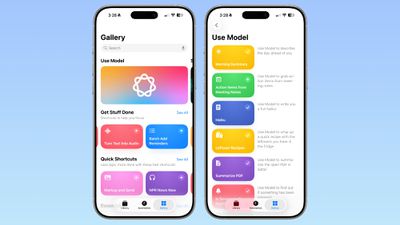
ios 26 shortcuts app examples
There are several pre-programmed Shortcuts in the Gallery that you can select in ‌iOS 26‌. Here's what Apple offers, along with the descriptions:

  • Morning Summary - Use Model to describe the day ahead of you.
  • Action Items From Meeting Notes - Use Model to grab action items from meeting notes.
  • Haiku - Use Model to write a you a fun haiku.
  • Leftover Recipes - Use Model to whip up a quick recipe with leftovers you have in the fridge.
  • Summarize PDF - Use Model to summarize the open PDF in Safari.
  • Is Severance Season 3 Out? - Use Model to find out if something has been released.
  • ASCII Art - Use Model to draw you some ASCII art.
  • Document Review - Use Mode to help you compare and contrast documents.
  • Reminders Roulette - Use Model to punt an unimportant reminder to tomorrow.
  • Get Started With Language Models - A tutorial for Use Model with examples.

As the last pre-made Shortcut suggests, you can create your own shortcuts that incorporate Apple's AI model, and Apple's offerings serve as examples.

When you go to create a Shortcut, there's a new ‌Apple Intelligence‌ section. You can opt to use an on-device model, a cloud model that takes advantage of Private Cloud Compute, or ChatGPT. There are some pre-determined options, so you can do things like open Visual Intelligence or generate an image with Image Playground.
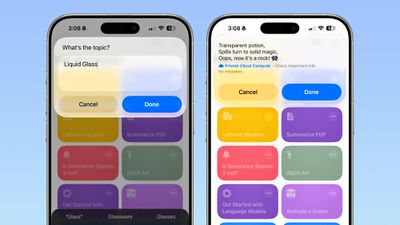
ios 26 shortcuts app haiku
There are several Writing Tools features for adjusting the tone of text, proofreading, creating a list from text, summarizing text, or rewriting text.

When you tap on Cloud, On-Device Model, or ChatGPT, there's an open-ended prompt where you can write in what you want to do. You need to work within the confines of the model that Apple provides, pairing it with other functionality in Shortcuts. You can pull in data from the Weather app, your Calendar, and Reminders, then ask the model to prepare a summary, for example. AI models can be incorporated into any Shortcut.
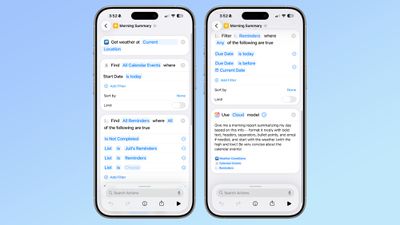
ios 26 shortcuts app ai
‌iOS 26‌, ‌iPadOS 26‌, and macOS Tahoe are in the early stages of beta testing, so the work on Shortcuts has just started, and Apple will be refining the app over the course of the beta testing period.
Popular Stories

iOS 26

iOS 26.4 and iOS 27 Features Revealed in New Leak

Friday December 12, 2025 10:56 am PST by
Macworld's Filipe Espósito today revealed a handful of features that Apple is allegedly planning for iOS 26.4, iOS 27, and even iOS 28. The report said the features are referenced within the code for a leaked internal build of iOS 26 that is not meant to be seen by the public. However, it appears that Espósito and/or his sources managed to gain access to it, providing us with a sneak peek...
iOS 26

Apple Releases iOS 26.2 With Alarms for Reminders, Lock Screen Changes, Enhanced Safety Alerts and More

Friday December 12, 2025 10:10 am PST by
Apple today released iOS 26.2, the second major update to the iOS 26 operating system that came out in September, iOS 26.2 comes a little over a month after iOS 26.1 launched. ‌iOS 26‌.2 is compatible with the ‌iPhone‌ 11 series and later, as well as the second-generation ‌iPhone‌ SE. The new software can be downloaded on eligible iPhones over-the-air by going to Settings >...
Apple Foldable Thumb

Leak Reveals Foldable iPhone Details

Monday December 15, 2025 9:09 am PST by
The first foldable iPhone will feature a series of design and hardware firsts for Apple, according to details shared by the Weibo leaker known as Digital Chat Station. According to a new post, via machine translation, Apple is developing what the leaker describes as a "wide foldable" device, a term used to refer to a horizontally oriented, book-style foldable with a large internal display....
iOS 26

iOS 26.2 Coming Soon With These 8 New Features on Your iPhone

Thursday December 11, 2025 8:49 am PST by
Apple seeded the second iOS 26.2 Release Candidate to developers earlier this week, meaning the update will be released to the general public very soon. Apple confirmed iOS 26.2 would be released in December, but it did not provide a specific date. We expect the update to be released by early next week. iOS 26.2 includes a handful of new features and changes on the iPhone, such as a new...
macOS Tahoe 26 Thumb

Apple Releases macOS Tahoe 26.2 With Edge Light

Friday December 12, 2025 10:08 am PST by
Apple today released macOS Tahoe 26.2, the second major update to the macOS Tahoe operating system that came out in September. macOS Tahoe 26.2 comes five weeks after Apple released macOS Tahoe 26.1. Mac users can download the macOS Tahoe update by using the Software Update section of System Settings. macOS Tahoe 26.2 includes Edge Light, a feature that illuminates your face with soft...
AirPods Pro Firmware Feature

Apple Releases New Firmware for AirPods Pro 2 and AirPods Pro 3

Thursday December 11, 2025 11:28 am PST by
Apple today released new firmware designed for the AirPods Pro 3 and the prior-generation AirPods Pro 2. The AirPods Pro 3 firmware is 8B30, up from 8B25, while the AirPods Pro 2 firmware is 8B28, up from 8B21. There's no word on what's include in the updated firmware, but the AirPods Pro 2 and AirPods Pro 3 are getting expanded support for Live Translation in the European Union in iOS...
ipados 26 1 slide over

Apple Releases iPadOS 26.2 With Multitasking Improvements

Friday December 12, 2025 10:09 am PST by
Apple today released iPadOS 26.2, the second major update to the iPadOS 26 operating system released in September. iPadOS 26.2 comes a month after iPadOS 26.1. The new software can be downloaded on eligible iPads over-the-air by going to Settings > General > Software Update. iPadOS 26.2 continues with the multitasking improvements that were added with iPadOS 26.1. You can now drag and...
airpods max 2024 colors

AirPods Max 2 Likely to Offer These 10 New Features

Monday December 15, 2025 7:41 am PST by
Apple released the AirPods Max on December 15, 2020, meaning the over-ear headphones launched five years ago today. While the AirPods Max were updated with a USB-C port and new color options last year, followed by support for lossless audio and ultra-low latency audio this year, the headphones lack some of the features that have been introduced for newer generations of the regular AirPods and the ...

Top Rated Comments

211 Avatar
27 weeks ago
I still don’t understand Shortcuts. Can I just tell it what I want now and it will create it?
Score: 6 Votes (Like | Disagree)
gaximus Avatar
27 weeks ago
I love shortcuts, and use them for everything. But most of these new things, Siri should just be able to handle. I shouldn’t have to create a shortcut to find out if a move has been released, Siri should just know if I ask.
Score: 5 Votes (Like | Disagree)
LordArchie Avatar
27 weeks ago
Loving this.. waiting for some really cool shortcuts. Great list to start from
Score: 3 Votes (Like | Disagree)
eifelbube Avatar
27 weeks ago
Much more fun to write one yourself …

So, i open the fridge, point my iPhone camera to engage visual intelligence, and i’ll get a recipe whipped up using the captured leftovers? Now that would be a real shortcut!! I forgot: I need it to scan the best-by dates … ?

Attachment Image
Score: 1 Votes (Like | Disagree)
svish Avatar
27 weeks ago
This is making the shortcuts app even better. Waiting to try out the various possibilities soon.
Score: 1 Votes (Like | Disagree)
tomtad Avatar
27 weeks ago
What's model?

Also isn't this essentially saved prompts for a chatbot? All of these I should be able to do by just asking Siri.
Score: 1 Votes (Like | Disagree)