iOS 26 Will Let You Add Your U.S. Passport to Wallet for Identity Verification - MacRumorsOpen MenuShow RoundupsShow Forums menuVisit ForumsOpen Sidebar
Skip to Content

iOS 26 Will Let You Add Your U.S. Passport to Wallet for Identity Verification

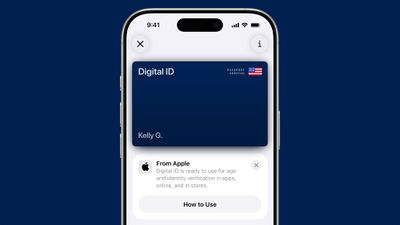
In iOS 26, Apple is implementing a new Digital ID feature that builds on integration for Driver's Licenses in the Wallet app. Starting this fall, Apple Wallet will allow iPhone users to add a U.S. passport that can be used in lieu of a physical passport for domestic travel.
ios 26 digital id passport wallet
The Digital ID can be stored on the iPhone or the Apple Watch, and it can be used at select TSA checkpoints throughout the United States. It is Real ID compliant, as a passport can be presented instead of a Real ID when traveling.

Digital IDs do not replace physical passports, and Apple warns that they cannot be used for international travel or border crossings. In these situations, a physical passport will be required, but for domestic travel, iPhone users won't need to pull out a passport and can instead pass through TSA checkpoints quicker.

As with state driver's licenses and IDs, Digital IDs will work for age and identity verification in apps, retail store locations, and new in ‌iOS 26‌, websites. The option to add a passport to Wallet for use as an ID option will expand digital identification features to many more iPhone users.

U.S. states and territories have been slowly rolling out support for IDs in the Wallet app, but it is still limited to Arizona, California, Colorado, Georgia, Hawaii, Iowa, Maryland, New Mexico, Ohio, and Puerto Rico.

Apple is adding other travel-friendly features to the Wallet app. There's an overhauled boarding pass experience that provides users with a Live Activity overview of their flight and real-time updates. Boarding passes also offer options to go to Maps for an airport overview, and Find My for tracking luggage.

Apple is partnering with airlines to implement the updated boarding passes, and these airlines will be the first to support the feature: Air Canada, American Airlines, Delta Air Lines, JetBlue, Jetstar, Lufthansa Group, Qantas, Southwest Airlines, United Airlines, and Virgin Australia.
Related Roundups: iOS 26, iPadOS 26
Related Forum: iOS 26

Popular Stories

iOS 26

Here's What's New in iOS 26.5 So Far

Tuesday April 21, 2026 1:30 pm PDT by
iOS 26.5 has been in beta since late March, with a third beta released this week. The update is relatively minor so far, which is not too surprising given that Apple is starting to shift its focus towards iOS 27. Apple will unveil iOS 27 during its WWDC 2026 keynote on June 8, and the update should be released in September. iOS 26.5 lays the groundwork for two changes, including end-to-end...
iOS 26

Apple Seeds Second iOS 26.5 and iPadOS 26.5 Betas to Developers

Monday April 13, 2026 10:08 am PDT by
Apple today seeded the second betas of upcoming iOS 26.5 and iPadOS 26.5 updates to developers for testing purposes, with the software coming two weeks after Apple released updated first betas. Registered developers can download the betas from the Settings app on the iPhone or iPad by going to the General section and selecting Software Update. iOS 26.5 and iPadOS 26.5 do not include new...
iOS 26

Apple Releases iOS 26.4.1 and iPadOS 26.4.1 With Bug Fixes

Wednesday April 8, 2026 1:09 pm PDT by
Apple today released minor iOS 26.4.1 and iPadOS 26.4.1 software updates for the iPhone and iPad, respectively. The updates have a build number of 23E254, and they arrive a little more than two weeks after Apple released iOS 26.4 and iPadOS 26.4. According to Apple's release notes, the software updates contain unspecified "bug fixes." The updates do not include any security fixes,...

Top Rated Comments

12 months ago
This is a great way to get around waiting on individual states.
Score: 20 Votes (Like | Disagree)
12 months ago

As awesome as this and digital state driver licenses are, there is 0 chance I am willingly handing over my entire phone to any authority!
This is like saying "As awesome as Apple Pay is, there is 0 chance I am willingly handing over my entire phone to any cashier!"
Score: 14 Votes (Like | Disagree)
dontwalkhand Avatar
12 months ago

As awesome as this and digital state driver licenses are, there is 0 chance I am willingly handing over my entire phone to any authority!
It only took a few posts before someone posts this misinformation…yet…..again.
Score: 12 Votes (Like | Disagree)
12 months ago

I thought the Keynote said "it's not a replacement for your physical passport". Does that mean that you might still need it? Direct link to that note:

Here's how to think about it: You can use it to check into TSA checkpoints at select airports (and even then, sometimes you can't, machines not working, or TSA Pre only and you aren't on TSA Pre, or the agent just yells at you to show your ID card).

You can't use it for customs at all. You can't enter or exit any country with it. You can't even use it where you can use passport cards (a separate thing you can get that lets you pass certain border checkpoints, but not for use in international air travel). They don't accept it, yet, for anything besides TSA.

It's a way of delivering national ID in Apple Wallet. But it's not a replacement for a physical passport.

Reminder: if you are doing any international travel, you need a passport. You can optionally use a passport for domestic travel, especially if you don't have a RealID card and RealID is now required for domestic air travel.
Score: 8 Votes (Like | Disagree)
ipedro Avatar
12 months ago

As awesome as this and digital state driver licenses are, there is 0 chance I am willingly handing over my entire phone to any authority!
For those having a hard time imagining how this works and to quiet the paranoia in this thread, here you go:


It doesn't unlock your phone, you DO NOT hand your phone to anybody, nobody even needs to look at your phone because you're not showing them a picture of your driver's license, you're authorizing access to specific information from your State's database.

You tap the terminal, it tells you what it's requesting, and then you agree to send just that information with a Face ID confirmation, just like Apple Pay. Your phone remains locked and in your possession.[Click to view video attachment]
Score: 7 Votes (Like | Disagree)
12 months ago
" At select TSA checkpoints"

Funny. You rely on this alone folks, don't expect the airline to reimburse your ticket. But it's a good idea for convenience.
Score: 7 Votes (Like | Disagree)
Related Apple News: Business | Opinion | Sport | Iphone | Culture