

Apple today updated both Final Cut Pro for iPad and Final Cut Camera, introducing a handful of useful new features that improve video editing and recording on Apple's mobile devices.
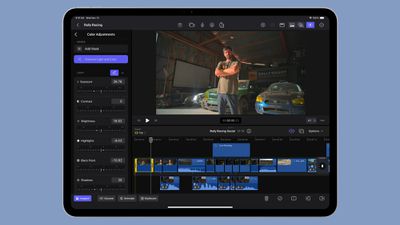
Final Cut Pro for iPad gains support for editing video in portrait orientation, and it includes new keyboard shortcuts. There's also Image Playground integration, and an option to capture video in 50fps.
- Expand your editing workflows with support for portrait orientation on your iPad.
- Speed up your editing with keyboard shortcuts to nudge a selection, replace with gap, and lift or overwrite to the primary storyline.
- Get inspired with Image Playground and use Apple Intelligence to quickly create stylized images based on a description, suggested concepts, or people from your Photos library. (Requires iPad with A17 Pro or M1 and later and iPadOS 18.2 or later.)
- Capture in 50 fps for additional editing flexibility and delivery options.
The updated version of Final Cut Camera includes support for quickly swapping over to the Telephoto lens on the iPhone 14 Pro and later, recording in Spatial Audio on the iPhone 16 and later, and recording in 50fps video.
- Quickly switch to the 48 mm telephoto lens to capture the perfect shot. (Requires iPhone 14 Pro or later.)
- Play back your Log videos in SDR or HDR with the vibrancy of the original scene by applying the Apple Log LUT. (Requires iPhone 15 Pro or later.)
- Record videos in Spatial Audio for even more realistic and immersive sound. (Requires iPhone 16.)
- Capture in 50 fps for additional editing flexibility and delivery options.
Final Cut Camera is software that is designed to let users record from up to four devices with footage imported into Final Cut Pro for iPad.
Final Cut Pro for iPad is available for $49 per year or $4.99 per month, while Final Cut Camera is free.























