

The iOS 18 Photos app features a new video speed control option that can be used to change the frame rate of your videos after they're captured.
Apple mentioned the option to change video speed in post processing when it introduced the new iPhone 16 models, but it turns out it's a feature that's available for older iPhones running iOS 18.
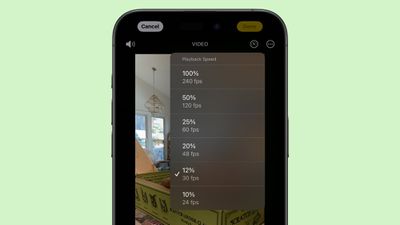
Added in the iOS 18 Release Candidate, the Playback Speed editor can be used to slow down playback speed of a high frame rate video. There are 240, 120, 60, 48, 30, and 24 frames per second options to choose from.
There's always been a feature for adjusting the speed of select parts of Slo-mo videos, but Playback Speed is a separate control. You can get to it by opening up the editing interface for a video, and then tapping on the timer icon at the top right.
Apple's iPhone 16 Pro models support 4K 120fps video in Slo-mo and Video modes, and the Playback Speed feature can be used for making adjustments after you shoot a video. From Apple's keynote event:
You can use 4k 120, in Slo-mo or Video mode, and now you don't have to make that upfront decision on frame rate. You can adjust the playback speed after capture. In the new Photos app, there's a quarter speed playback, a new half speed option that really adds a wonderful, dreamy effect, or you can bring it back to normal speed. There's also a 1/5 speed option that corresponds to 24 frames per second playback. These playback speeds are great for easy on the go editing.
iOS 18 with the Playback Speed feature is set to be released to the public on Monday, September 16.

Sunday February 1, 2026 10:08 am PST by Joe Rossignol
Last year, Apple launched CarPlay Ultra, the long-awaited next-generation version of its CarPlay software system for vehicles. Nearly nine months later, CarPlay Ultra is still limited to Aston Martin's latest luxury vehicles, but that should change fairly soon.
In May 2025, Apple said many other vehicle brands planned to offer CarPlay Ultra, including Hyundai, Kia, and Genesis.
In his Powe...
Tuesday February 3, 2026 7:47 am PST by Joe Rossignol
We are still waiting for the iOS 26.3 Release Candidate to come out, so the first iOS 26.4 beta is likely still at least a week or two away. Following beta testing, iOS 26.4 will likely be released to the general public in March or April.
Below, we have recapped known or rumored iOS 26.3 and iOS 26.4 features so far.
iOS 26.3
iPhone to Android Transfer Tool
iOS 26.3 makes it easier...
Sunday February 1, 2026 12:31 pm PST by Joe Rossignol
The calendar has turned to February, and a new report indicates that Apple's next product launch is "imminent," in the form of new MacBook Pro models.
"All signs point to an imminent launch of next-generation MacBook Pros that retain the current form factor but deliver faster chips," Bloomberg's Mark Gurman said on Sunday. "I'm told the new models — code-named J714 and J716 — are slated...
Sunday February 1, 2026 5:42 am PST by Joe Rossignol
Apple is planning to launch new MacBook Pro models with M5 Pro and M5 Max chips alongside macOS 26.3, according to Bloomberg's Mark Gurman.
"Apple's faster MacBook Pros are planned for the macOS 26.3 release cycle," wrote Gurman, in his Power On newsletter today.
"I'm told the new models — code-named J714 and J716 — are slated for the macOS 26.3 software cycle, which runs from...
Tuesday February 3, 2026 8:55 am PST by Joe Rossignol
In 2022, Apple introduced a new Apple Home architecture that is "more reliable and efficient," and the deadline to upgrade and avoid issues is fast approaching.
In an email this week, Apple gave customers a final reminder to upgrade their Home app by February 10, 2026. Apple says users who do not upgrade may experience issues with accessories and automations, or lose access to their smart...
So this means you can technically record 120 FPS videos on older iPhones as well by recording in slo-mo.
I've done that before; if you record a slow mo video at 120FPS and then adjust the sliders so none of it plays in slow mo, you end up with a really high framerate video. It's liquid smooth to watch!
Slow mo comes in handy so often. I once recorded a computer screen in slow mo because an error message would appear for a tiny fraction of a second and I couldn't read it. Slo-mo let me read it and figure out what was going on.
It really is, especially iPhone's camera tech. I started using iPhones for making serious photographs with a 6+. Before that, using a 4 and 5, they just didn't cut it.
Today I'm always looking forward to seeing what the next iPhone brings with respect to improved cameras. Hat-tip to Apple deciding to go down this path!
Agreed,
Shooting RAW on the 13 Pro onward has been great! Video quality is good enough that I have used clips and even interviews from an iPhone for production videos with zero issues. In fact, I have to (sometimes) doctor video from other cameras / Devices in an attempt to match the iPhone.
Also been impressed by Pixel 8 and recent Samsung phone video quality too. Biggest issue with some of them is dropping frames, I rarely ever see that from an iPhone however!
Shooting RAW on the 13 Pro onward has been great! Video quality is good enough that I have used clips and even interviews from an iPhone for production videos with zero issues. In fact, I have to (sometimes) doctor video from other cameras / Devices in an attempt to match the iPhone.
Living in Lightroom since the beginning, Apple bringing RAW capture to iPhone was huge and offered a ton of flexibility in post.
I'm curious about Apple's new microphone tech with respect to videos, and how well it works with respect to subject separation and adjustability (especially after capture in post).
EDIT: Just thinking out loud on the above... With four microphones, I'm wondering if they're doing some kind of adjustable beamforming to facilitate multiple subject separation. Seems like mic separation would need to be large, but perhaps there's some special trickery in signal-processing where ambiguities could be processed out.
Annoyingly slowing to 24 FPS is only shown as an option for 240 and 120 FPS video. 60 FPS video can only be slowed to 30 FPS, and 30 FPS video doesn’t have the button at all.
So I’ll need to keep iMovie to adjust my drone footage to 24 FPS.
Yes, because those numbers are divisible by 24. Anything else is interpolated and the result is less than ideal.
It’s amazing how far we’ve come in the past 10 years and the tools now at our disposal!
It really is, especially iPhone's camera tech. I started using iPhones for making serious photographs with a 6+. Before that, using a 4 and 5, they just didn't cut it.
Today I'm always looking forward to seeing what the next iPhone brings with respect to improved cameras. Hat-tip to Apple deciding to go down this path!

















