

Safari 18 Features: Highlights, New Reader Mode, and Video Viewer

In macOS Sequoia, Apple has some additional features in Safari 18 that are likely to be welcomed by Mac users. Here's a quick rundown of what's new.
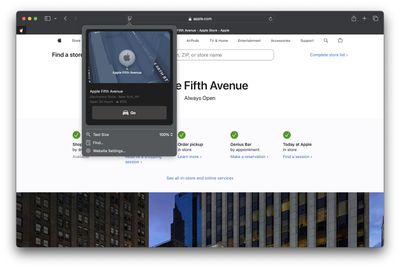
safari highlights
Safari's headline feature in macOS 15 is something called Highlights, which aims to make it easier to discover information on the web.

Highlights can be accessed via a new site menu icon that appears in the address bar, from which you can quickly pull up relevant information about a site, such as directions, summaries, or quick links to learn more about people, music, movies, and TV shows.

As of writing this, Highlights does not appear to work outside of the United States, so it is likely to be region-specific at this early state. However, there are other changes to Safari that are live wherever you are located.
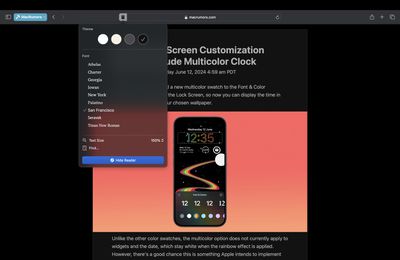
safari 18 reader
The Reader mode in Safari has received an overhaul, and now offers more customization options once you have enabled it on a site using the Reader button in the address bar.

If you click the button again, a dropdown menu lets you change the theme (white, off-white, gray, black) and choose your preferred font (Athelas, Charter, Georgia, Iowan, New York, Palatino, San Fransisco, Seravek, and Times New Roman).

In this menu, you can also find text size options by percentage (from 50% to 300%), as well as a "Find..." option to find a word or phrase on a page, and a button to Hide Reader mode.

Apple says that Reader can also provide a summary of an article, along with a table of contents in a sidebar, but we could not get this to work, likely because it is an aspect of Apple Intelligence, which will not be introduced until later in the year.
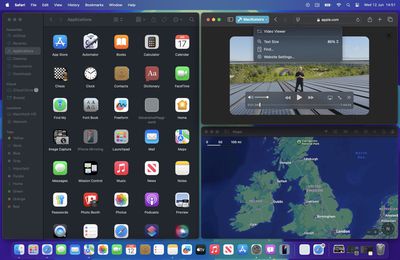
safari video viewer
Meanwhile, when Safari detects a video on the page, a new Video Viewer mode puts the media front and center, which allows you to adjust the window without obscuring the video. It also helpfully presents system playback controls within an overlay, including Picture in Picture.

In other Safari-related changes, macOS Sequoia beta adds support for opening links directly in web apps. Now, when you click a link, that link should open in the web app instead of your default web browser. You can also now personalize web apps on Mac with Safari Web Extensions and Content Blockers.

Lastly, Safari 18 beta for iOS, iPadOS, visionOS, macOS Sequoia and macOS Sonoma brings inline predictive text to the web, and you can now set which Safari profile should be used to open particular websites.


Tag: Safari
Related Forum: macOS Sequoia

Popular Stories

iOS 26

iOS 26.4 and iOS 27 Features Revealed in New Leak

Friday December 12, 2025 10:56 am PST by
Macworld's Filipe Espósito today revealed a handful of features that Apple is allegedly planning for iOS 26.4, iOS 27, and even iOS 28. The report said the features are referenced within the code for a leaked internal build of iOS 26 that is not meant to be seen by the public. However, it appears that Espósito and/or his sources managed to gain access to it, providing us with a sneak peek...
iOS 26

iOS 26.2 Coming Soon With These 8 New Features on Your iPhone

Thursday December 11, 2025 8:49 am PST by
Apple seeded the second iOS 26.2 Release Candidate to developers earlier this week, meaning the update will be released to the general public very soon. Apple confirmed iOS 26.2 would be released in December, but it did not provide a specific date. We expect the update to be released by early next week. iOS 26.2 includes a handful of new features and changes on the iPhone, such as a new...
iOS 26

Apple Releases iOS 26.2 With Alarms for Reminders, Lock Screen Changes, Enhanced Safety Alerts and More

Friday December 12, 2025 10:10 am PST by
Apple today released iOS 26.2, the second major update to the iOS 26 operating system that came out in September, iOS 26.2 comes a little over a month after iOS 26.1 launched. ‌iOS 26‌.2 is compatible with the ‌iPhone‌ 11 series and later, as well as the second-generation ‌iPhone‌ SE. The new software can be downloaded on eligible iPhones over-the-air by going to Settings >...
AirPods Pro Firmware Feature

Apple Releases New Firmware for AirPods Pro 2 and AirPods Pro 3

Thursday December 11, 2025 11:28 am PST by
Apple today released new firmware designed for the AirPods Pro 3 and the prior-generation AirPods Pro 2. The AirPods Pro 3 firmware is 8B30, up from 8B25, while the AirPods Pro 2 firmware is 8B28, up from 8B21. There's no word on what's include in the updated firmware, but the AirPods Pro 2 and AirPods Pro 3 are getting expanded support for Live Translation in the European Union in iOS...
macOS Tahoe 26 Thumb

Apple Releases macOS Tahoe 26.2 With Edge Light

Friday December 12, 2025 10:08 am PST by
Apple today released macOS Tahoe 26.2, the second major update to the macOS Tahoe operating system that came out in September. macOS Tahoe 26.2 comes five weeks after Apple released macOS Tahoe 26.1. Mac users can download the macOS Tahoe update by using the Software Update section of System Settings. macOS Tahoe 26.2 includes Edge Light, a feature that illuminates your face with soft...
AirTag 2 Mock Feature

Apple AirTag 2: Four New Features Found in iOS 26 Code

Thursday December 11, 2025 10:31 am PST by
The AirTag 2 will include a handful of new features that will improve tracking capabilities, according to a new report from Macworld. The site says that it was able to access an internal build of iOS 26, which includes references to multiple unreleased products. Here's what's supposedly coming: An improved pairing process, though no details were provided. AirTag pairing is already...
Apple Foldable Thumb

Leak Reveals Foldable iPhone Details

Monday December 15, 2025 9:09 am PST by
The first foldable iPhone will feature a series of design and hardware firsts for Apple, according to details shared by the Weibo leaker known as Digital Chat Station. According to a new post, via machine translation, Apple is developing what the leaker describes as a "wide foldable" device, a term used to refer to a horizontally oriented, book-style foldable with a large internal display....
ipados 26 1 slide over

Apple Releases iPadOS 26.2 With Multitasking Improvements

Friday December 12, 2025 10:09 am PST by
Apple today released iPadOS 26.2, the second major update to the iPadOS 26 operating system released in September. iPadOS 26.2 comes a month after iPadOS 26.1. The new software can be downloaded on eligible iPads over-the-air by going to Settings > General > Software Update. iPadOS 26.2 continues with the multitasking improvements that were added with iPadOS 26.1. You can now drag and...

Top Rated Comments

Moriakum Avatar
20 months ago

People still use Safari? I tried it when i first had my Mac, but I could nto get on with it, then I tried it again a few weeks ago, but had problems with some sites not working, so I have gone back to Firefox.
I do. I use the handoff between macOS and iOS a lot, which works perfectly, and I love the feature of automatically filling in 2fa codes for SMS and emails. And it's worked very well, I think Safari has improved a lot in the last few years.
Score: 8 Votes (Like | Disagree)
dredlew Avatar
20 months ago

People still use Safari? I tried it when i first had my Mac, but I could nto get on with it, then I tried it again a few weeks ago, but had problems with some sites not working, so I have gone back to Firefox.
Safari is still the second-most used browser. Far behind Chrome but also far ahead of Firefox.


Of course, most of that is iOS/iPadOS. But even on the desktop, Safari is ahead of Firefox and Safari is not even available on Windows & Linux, unlike Firefox. So yeah... People still use FireFox? :D


Attachment Image

Attachment Image
Score: 6 Votes (Like | Disagree)
Manzanito Avatar
20 months ago

People still use Safari? I tried it when i first had my Mac, but I could nto get on with it, then I tried it again a few weeks ago, but had problems with some sites not working, so I have gone back to Firefox.
I do. I was quite happy with it, until I got this weird issue where composing emails in hotmail was so slow that the typing experience was unbearable. Other than that, works all right for me.
Score: 6 Votes (Like | Disagree)
Moriakum Avatar
20 months ago

Safari is still the second-most used browser. Far behind Chrome but also far ahead of Firefox.


Of course, most of that is iOS/iPadOS. But even on the desktop, Safari is ahead of Firefox and Safari is not even available on Windows & Linux, unlike Firefox. So yeah... People still use FireFox? :D


People love Chrome... Never understood why.
Score: 5 Votes (Like | Disagree)
gk_brown Avatar
20 months ago

No fixes to the messy interface? I have no idea where to find stuff anymore. Scattered around the share sheet, under the A button, the refresh button, the extensions menu, third party buttons, …

And there are iCloud tabs, tab groups, profiles, tab group favorites, ….
Don't forget the sidebar!
Score: 2 Votes (Like | Disagree)
Junior117 Avatar
20 months ago

People still use Safari? I tried it when i first had my Mac, but I could nto get on with it, then I tried it again a few weeks ago, but had problems with some sites not working, so I have gone back to Firefox.
I still use it.

It feels lighter to me and less of a RAM hog than Chrome (having 300+ tabs (yes, I know I'm insane) would still not be as intensive as 70 tabs in Chrome for me, but maybe I just have bad luck, I don't know).

I could never be able to fit Firefox. For whatever reason, the design just feels... off. (To be clear, I don't hate the design per se (it's a good design). I just can't seem to get myself to... like it for whatever reason.)
Score: 2 Votes (Like | Disagree)
















