

iOS 18 Photos App Adds New Utilities Categories for Finding QR Codes, Receipts, Illustrations and More - MacRumorsOpen MenuShow RoundupsShow Forums menuVisit ForumsOpen Sidebar
Skip to Content

iOS 18 Photos App Adds New Utilities Categories for Finding QR Codes, Receipts, Illustrations and More

Apple introduced a new design for the iOS 18 Photos app that replaces the Library and For You sections with a more integrated all-in-one view, and part of that redesign includes an overhauled Utilities section that makes it easier to find different types of images.
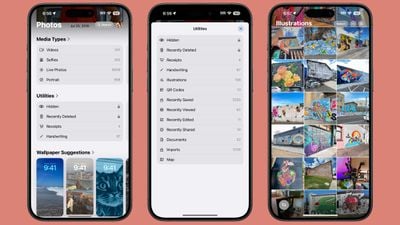
ios 18 photos utilities
Rather than being limited to Imports, Duplicates, Hidden, and Recently Deleted as in iOS 17, the Utilities section of the app has all of the following categories:

  • Hidden
  • Recently Deleted
  • Duplicates
  • Receipts
  • Handwriting
  • Illustrations
  • QR Codes
  • Recently Saved
  • Recently Viewed
  • Recently Edited
  • Documents
  • Imports
  • Maps

You've been able to search for things like receipts in prior versions of iOS, and still can, but having them in a dedicated Utilities section makes them quicker to locate.

Along with Utilities, the ‌Photos‌ app also features Media Types, and while this section is largely the same, there is a new Animated category. The Animated category and the Illustrations utility section may be aimed at the image generation tools that are coming to iOS 18 as part of the Apple Intelligence feature set.

Apple also added a "Pinned Collections" section to ‌Photos‌, which houses things that you might want quick access to like Videos, Favorites, Screenshots, and Selfies. Collections are a repeat of content that can be found elsewhere in ‌Photos‌, but you can customize it to your liking so you see your preferred content at the top of the app. These changes to ‌Photos‌ are in iPadOS 18 and macOS Sequoia as well as iOS 18.

Related Forums: iOS 18, iPadOS 18

Popular Stories

iOS 27 on iPhone 17 1

iOS 27 Will Add These New Features to Your iPhone

Saturday May 2, 2026 8:43 am PDT by
Apple is expected to unveil iOS 27 during its WWDC 2026 keynote on June 8, and there are already many rumored features and changes for iPhones. The first developer beta of iOS 27 will likely be available immediately following the keynote, and a public beta typically follows in July. Following beta testing, the software update should be released to all users with a compatible iPhone in...
Apple Event Logo

Apple Just Released a New Accessory

Monday May 4, 2026 8:13 am PDT by
Apple today released a new Pride Edition Sport Loop for the Apple Watch. The band features a rainbow design with 11 colors of woven nylon yarns. The new Pride Edition Sport Loop is available to order now on Apple.com and in the Apple Store app in 40mm, 42mm, and 46mm sizes, and it will be available at Apple Store locations starting later this week. In the U.S., the band costs $49. There...
Apple Announces 2026 Pride Band Watch Face and iPhone Wallpaper Article 2

iOS 26.5 Coming Soon With These New Features

Monday May 4, 2026 8:40 am PDT by
iOS 26.5 is expected to be released next week, following more than a month of beta testing. The update is relatively minor, but there are a couple of new features and changes across the operating system that we have recapped below. iOS 26.5 lays the groundwork for end-to-end encryption for RCS in the Messages app and ads in the Apple Maps app, and it will include a new Pride wallpaper and a...

Top Rated Comments

stiligFox Avatar
25 months ago
I mostly just want the option to filter out the photos I’ve taken with the device from everything and keep them from getting synced to my larger photo library. Apple always shows off the Photos with libraries full of beautiful photos and never shows off the screenshots, memes, saved videos, discord snippets and quick clips form websites that fill up the majority of my library, making it a pain to scroll through my library and look back at the memories of JUST the photos I TOOK with the device - what the “camera roll” should really have been. Everything else should go into a hard secondary folder, in my opinion. It’s kept me from using iCloud Photos because I know the second I do, my 160GB of 15 years of photos is going to get mixed in with thousands of memes and saved furry art…
Score: 23 Votes (Like | Disagree)
sw1tcher Avatar
25 months ago

Rather than being limited to Imports, Duplicates, Hidden, and Recently Deleted as in iOS 17, the Utilities section of the app has all of the following categories:

* Hidden
* Recently Deleted
* . . . .

No Deleted Years Ago ('https://www.macrumors.com/2024/05/21/update-to-ios-17-5-1-fix-deleted-photos-bug/') section? :confused:
Score: 21 Votes (Like | Disagree)
Apple Mac Daz Avatar
25 months ago

There should definitely be a 'screenshots' category so if you take a snap of train times, etc, you can easily get to them all and delete them. Or does that exist?
There is 🤷‍♂️


Attachment Image
Score: 8 Votes (Like | Disagree)
25 months ago
The image to text detection in Photos is already very handy for searching for random stuff from years ago.
Score: 8 Votes (Like | Disagree)
25 months ago
Can we just get folders? I want folders…and yes I know we have albums and one hidden. I just need a place to store my memes and stuff.
Score: 7 Votes (Like | Disagree)
bruno7 Avatar
25 months ago
Please tell me that there is a screen within this app where I can just quickly swipe all the way to the bottom to see my recent photos - like the present Albums behave.
Score: 7 Votes (Like | Disagree)
Related Apple News: South Africa | World News | Lifestyle | Ipad | Technology

















