Apple Pencil Pro: All the New Features - MacRumorsOpen MenuShow RoundupsShow Forums menuVisit ForumsOpen Sidebar
Skip to Content

Apple Pencil Pro: All the New Features

Apple this week debuted the Apple Pencil Pro, marking the first major revision to the ‌Apple Pencil‌ lineup since the 2018 launch of the ‌Apple Pencil‌ 2. There are some major changes that were introduced with the new accessory, including new gestures and capabilities.
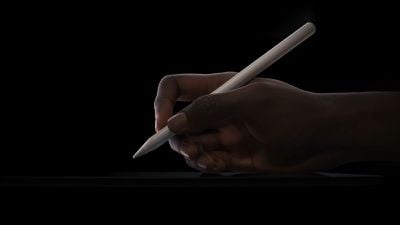
Apple Pencil Pro Newsroom

Squeeze

The squeeze gesture allows the ‌Apple Pencil‌ Pro to sense when pressure is applied to the sides of the device. Using squeeze brings up a palette so that you can do things like switch tools, line weights, and colors.

Developers can customize how apps react to the squeeze gesture so it can bring up custom controls in each app.

Barrel Roll

There is a gyroscope in the ‌Apple Pencil‌ Pro that allows the rotation of the barrel to change the orientation of certain tools. It basically offers much more precise control of shaped pen and brush tools, similar to how a real pen or brush would function when you tilt it while drawing or sketching.

Haptic Feedback

A built-in haptic engine offers haptic feedback when using the ‌Apple Pencil‌ Pro's gestures. A light haptic pulse will respond when using a squeeze or double-tap gesture, plus there is feedback when using the snap to a Smart Shape feature.

Find My

Find My is available for the ‌Apple Pencil‌ Pro so it can be tracked right alongside the iPad and other devices in the ‌Find My‌ app.

Charging and Pairing

The ‌Apple Pencil‌ Pro attaches to the side of the iPad Pro or the iPad Air, and the magnetic connection enables automatic pairing and charging. There is a new magnetic interface that is available on the 2024 ‌iPad Pro‌ models.

Existing Features

Current ‌Apple Pencil‌ features like ‌Apple Pencil‌ hover and double tap are supported. Hover lets you preview where the ‌Apple Pencil‌ will touch down on the display before a mark is made, while double tap can be used for swapping between tools.

Low latency, tilt sensitivity, and pressure sensitivity are all included features.

Compatibility

The ‌Apple Pencil‌ Pro is compatible with the M2 ‌iPad Air‌ models and the M4 ‌iPad Pro‌ models, so it only works with the May 2024 iPads.

Price

The ‌Apple Pencil‌ Pro is priced at $129, which is also the cost of the ‌Apple Pencil‌ 2.

Related Forum: iPad Accessories

Popular Stories

iOS 27 on iPhone 17 1

iOS 27 Will Add These New Features to Your iPhone

Saturday May 2, 2026 8:43 am PDT by
Apple is expected to unveil iOS 27 during its WWDC 2026 keynote on June 8, and there are already many rumored features and changes for iPhones. The first developer beta of iOS 27 will likely be available immediately following the keynote, and a public beta typically follows in July. Following beta testing, the software update should be released to all users with a compatible iPhone in...
Apple Event Logo

Apple Just Released a New Accessory

Monday May 4, 2026 8:13 am PDT by
Apple today released a new Pride Edition Sport Loop for the Apple Watch. The band features a rainbow design with 11 colors of woven nylon yarns. The new Pride Edition Sport Loop is available to order now on Apple.com and in the Apple Store app in 40mm, 42mm, and 46mm sizes, and it will be available at Apple Store locations starting later this week. In the U.S., the band costs $49. There...
Apple Announces 2026 Pride Band Watch Face and iPhone Wallpaper Article 2

iOS 26.5 Coming Soon With These New Features

Monday May 4, 2026 8:40 am PDT by
iOS 26.5 is expected to be released next week, following more than a month of beta testing. The update is relatively minor, but there are a couple of new features and changes across the operating system that we have recapped below. iOS 26.5 lays the groundwork for end-to-end encryption for RCS in the Messages app and ads in the Apple Maps app, and it will include a new Pride wallpaper and a...

Top Rated Comments

sdwaltz Avatar
26 months ago
Really wish the haptic feedback could be used to simulate a pen or pencil gliding across paper. That would have been neat.
Score: 17 Votes (Like | Disagree)
MLMcMillion Avatar
26 months ago
Hopefully the squeeze gesture isn't too tiring to use. Double Tap has been frustrating to use because it's easily accidentally triggered while drawing and moving around. I wish they would just cave and let me just flip the damn thing over to erase.
Score: 12 Votes (Like | Disagree)
26 months ago
They could have sold many more if they made it iPad all iPad m1 and m2 compatible….
Score: 11 Votes (Like | Disagree)
DMG35 Avatar
26 months ago
Find My is such a welcome addition. I’ve misplaced mine soooo many times.
Score: 9 Votes (Like | Disagree)
adrianjagielak Avatar
26 months ago
Do a barrel roll!
Score: 9 Votes (Like | Disagree)
Darth Tulhu Avatar
26 months ago
This is off topic, but I'm so used to seeing a white hand in shots like the thumbnail and the event animation that even I actually found it jarring, and I'm brown.

So, given everything that's going on in the US, and particularly in my home state of Florida, THANK YOU Apple for caring about DEI (even if it is for marketing purposes).

That said: this Pencil is EXCELLENT.

This iPad Event has been the most exciting Apple event for me since they put M1 into the iPad.
Score: 7 Votes (Like | Disagree)
Related Apple News: Culture | Mac | Politics | Ipad | Ipad