Hands-On With the Rabbit r1 Pocket AI Assistant - MacRumorsOpen MenuShow RoundupsShow Forums menuVisit ForumsOpen Sidebar
Skip to Content

Hands-On With the Rabbit r1 Pocket AI Assistant

With the rise of ChatGPT and large language models (LLMs), AI-dedicated devices have started coming out. The Humane AI pin was widely lambasted earlier this month when it launched, and now the Rabbit r1 AI assistant is out. With rumors that Apple is delving into AI in a big way, we thought we'd check out the Rabbit r1 to see what it can do and how it measures up to an iPhone.


Priced at $200, the Rabbit is a square-shaped pocket assistant that can answer questions, look up information, interface with food delivery and ride sharing services, play music, translate languages, and more. It's a cute little device that looks right at home with the Playdate from Panic, but most of what it can do can already be done with an iPhone.

Unlike the Humane AI Pin, the Rabbit r1 has a screen that you can interact with, which makes it much more functional. It comes with an old school scroll wheel for navigating the UI, and there's a built-in camera for recognizing objects. It is Wi-Fi only by default, but you can add a SIM card, which is an added cost.
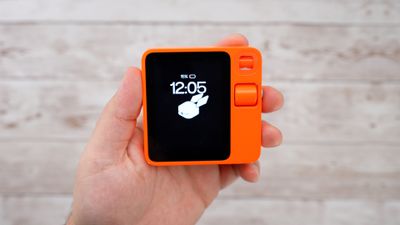
rabbit r1 time
As a first-generation device, the r1 isn't perfect. The setup process is bare bones without tips on how to use the device or what it's able to do. You'll almost certainly need to visit the website to figure out how to use it if you pick one of these up, so it could do with some on-device instruction to make using it smoother. There are, for example, hidden controls like shaking the device to get to the settings, and the settings are the only way to activate the terminal for typing.

The idea with the Rabbit r1 is to be less reliant on a smartphone, so there's no app for it. That's kind of a hassle if you want to get to the photos and other information that you've stored on it, because it's only accessible through the Rabbit Hole website.

You can hook up services like Spotify, but it's not super smart about suggesting songs. Asking it to play liked songs, for example, resulted in random song selections. The option to translate works well, but it can be slow, and it's tough to get to.
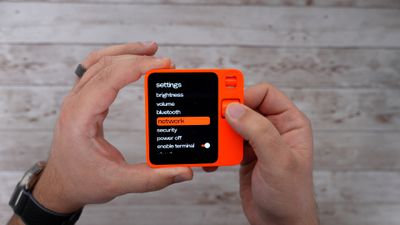
rabbit r1 settings
In some tests, ordering food was successful, but not without hiccups. We didn't test placing an order ourselves, but YouTuber Quinn Nelson did and the AI placed the order but didn't ask for guidance on a tip and ended up being overly generous and tipping the highest suggested amount.

The Rabbit r1 can summarize documents, a task that it's decent at, but that's not really something that a smartphone can't do. It is good at recognizing what's around through the camera, but some things, like a classic Mac, did trip it up.

We need to spend more time testing the Rabbit r1, but so far, it seems like a neat device but also an unnecessary one that isn't quite ready to replace a smartphone. Have an opinion on the r1? Let us know in the comments below.


Popular Stories

imac video apple feature

Apple Released Yet Another New Product Today

Friday March 20, 2026 2:39 pm PDT by
Apple has unveiled a whopping nine new products so far this March, including an iPhone 17e, iPad Air models with the M4 chip, MacBook Air models with the M5 chip, MacBook Pro models with M5 Pro and M5 Max chips, the all-new MacBook Neo, an updated Studio Display, a higher-end Studio Display XDR, AirPods Max 2, and now the Nike Powerbeats Pro 2. iPhone 17e features the same overall design as...
iPhone 18 Pro Deep Red Feature

iPhone 18 Pro Launching Later This Year With These 12 New Features

Wednesday March 18, 2026 7:39 am PDT by
While the iPhone 18 Pro and iPhone 18 Pro Max are not expected to launch for another six months or so, there are already plenty of rumors about the devices. It was initially reported that the iPhone 18 Pro models would have fully under-screen Face ID, with only a front camera visible in the top-left corner of the screen. However, the latest rumors indicate that only one Face ID component...
ios 26 4 pastel

iOS 26.4: Top 10 New Features Coming to Your iPhone

Friday March 20, 2026 2:44 pm PDT by
iOS 26.4 isn't the major update with new Siri features that we hoped for, but there are some useful quality of life improvements, and a little bit of fun with an AI playlist generator and new emoji characters. Playlist Playground - Apple Music has a Playlist Playground option that lets you generate playlists from text-based descriptions. You can include moods, feelings, activities, or...

Top Rated Comments

ThunderSkunk Avatar
25 months ago
Maybe I can duct tape it to my iPhone and petend it's siri working that well.
Score: 18 Votes (Like | Disagree)
25 months ago
Hey you there.

Yeah you the rabbit thing.

Get in line with the Humane pin thing and follow the sign that says ‘To ewaste pit ——>’
Score: 17 Votes (Like | Disagree)
25 months ago
Every “new” tech thing lately is something a smart phone could do but worse.
Score: 15 Votes (Like | Disagree)
25 months ago
I predict poor sales and it will disappear from the market. A solution looking for a problem.
Score: 15 Votes (Like | Disagree)
jdawgnoonan Avatar
25 months ago
There is no reason to not use your phone for that stuff, unless you really want a another device that is really only good at one thing to carry around in addition to your smart phone.
Score: 9 Votes (Like | Disagree)
25 months ago

A solution looking for a problem.
You don’t understand the genius behind the GenAI device era.

The makers believe you will never read your documents so you need a bot to summarize them.

The makers believe you don’t know what’s in front of the camera so you need the rabbit to tell you what’s in front of the camera.

Users are just stupid things who hand over money and let the rabbit thing do all the thinking.

That’s the business model with AI.
Score: 8 Votes (Like | Disagree)
Related Apple News: Culture | Motoring | Mac | Opinion | Education