iOS 17.4 Beta Adds CarPlay Option to Show Upcoming Maneuvers in Instrument Cluster

The fourth beta of iOS 17.4 that Apple released today adds a new CarPlay feature, according to the notes that Apple provided to developers.
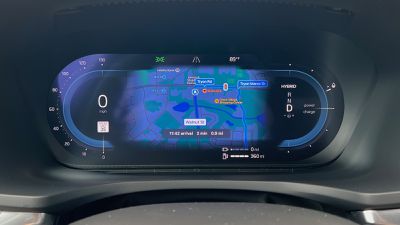
volvo s60 drivers apple maps
In supported ‌CarPlay‌ vehicles, there's now an Apple Maps option to show information about upcoming maneuvers in the instrument cluster. ‌CarPlay‌ users will be able to swap the display type between the main and instrument cluster by tapping on the map configuration button located in the upper right of the main Maps screen.

Apple this year introduced a new next-generation ‌CarPlay‌ experience that will show up in high-end vehicles starting in 2024, but this feature addition is separate from that.

It appears this new experience will be available in vehicles that support a dual-screen Apple Maps CarPlay experience, with a supplementary ‌Apple Maps‌ view that's located in the driver display or head-up display. ‌CarPlay‌ began supporting this functionality several years ago, but manufacturers have been slow to adopt it with BMW, Volvo, and Polestar being among the first on select vehicles.

While those vehicles have supported an ‌Apple Maps‌ view in the driver display, they have not shown text prompts such as upcoming turns or lane guidance, so it appears today's addition will give users some control about what information appears where.

With the iOS 17.4 update, the driver display will optionally display turn-by-turn directions so that ‌CarPlay‌ users can navigate without having to look away from the display directly in front of them.

iOS 17.4 is limited to developers and public beta testers at this time, but it will see a public release in March.

Related Roundup: CarPlay

Popular Stories

iOS 26

iOS 26.4 and iOS 27 Features Revealed in New Leak

Friday December 12, 2025 10:56 am PST by
Macworld's Filipe Espósito today revealed a handful of features that Apple is allegedly planning for iOS 26.4, iOS 27, and even iOS 28. The report said the features are referenced within the code for a leaked internal build of iOS 26 that is not meant to be seen by the public. However, it appears that Espósito and/or his sources managed to gain access to it, providing us with a sneak peek...
iOS 26

iOS 26.2 Coming Soon With These 8 New Features on Your iPhone

Thursday December 11, 2025 8:49 am PST by
Apple seeded the second iOS 26.2 Release Candidate to developers earlier this week, meaning the update will be released to the general public very soon. Apple confirmed iOS 26.2 would be released in December, but it did not provide a specific date. We expect the update to be released by early next week. iOS 26.2 includes a handful of new features and changes on the iPhone, such as a new...
iOS 26

Apple Releases iOS 26.2 With Alarms for Reminders, Lock Screen Changes, Enhanced Safety Alerts and More

Friday December 12, 2025 10:10 am PST by
Apple today released iOS 26.2, the second major update to the iOS 26 operating system that came out in September, iOS 26.2 comes a little over a month after iOS 26.1 launched. ‌iOS 26‌.2 is compatible with the ‌iPhone‌ 11 series and later, as well as the second-generation ‌iPhone‌ SE. The new software can be downloaded on eligible iPhones over-the-air by going to Settings >...
AirPods Pro Firmware Feature

Apple Releases New Firmware for AirPods Pro 2 and AirPods Pro 3

Thursday December 11, 2025 11:28 am PST by
Apple today released new firmware designed for the AirPods Pro 3 and the prior-generation AirPods Pro 2. The AirPods Pro 3 firmware is 8B30, up from 8B25, while the AirPods Pro 2 firmware is 8B28, up from 8B21. There's no word on what's include in the updated firmware, but the AirPods Pro 2 and AirPods Pro 3 are getting expanded support for Live Translation in the European Union in iOS...
macOS Tahoe 26 Thumb

Apple Releases macOS Tahoe 26.2 With Edge Light

Friday December 12, 2025 10:08 am PST by
Apple today released macOS Tahoe 26.2, the second major update to the macOS Tahoe operating system that came out in September. macOS Tahoe 26.2 comes five weeks after Apple released macOS Tahoe 26.1. Mac users can download the macOS Tahoe update by using the Software Update section of System Settings. macOS Tahoe 26.2 includes Edge Light, a feature that illuminates your face with soft...
AirTag 2 Mock Feature

Apple AirTag 2: Four New Features Found in iOS 26 Code

Thursday December 11, 2025 10:31 am PST by
The AirTag 2 will include a handful of new features that will improve tracking capabilities, according to a new report from Macworld. The site says that it was able to access an internal build of iOS 26, which includes references to multiple unreleased products. Here's what's supposedly coming: An improved pairing process, though no details were provided. AirTag pairing is already...
Apple Foldable Thumb

Leak Reveals Foldable iPhone Details

Monday December 15, 2025 9:09 am PST by
The first foldable iPhone will feature a series of design and hardware firsts for Apple, according to details shared by the Weibo leaker known as Digital Chat Station. According to a new post, via machine translation, Apple is developing what the leaker describes as a "wide foldable" device, a term used to refer to a horizontally oriented, book-style foldable with a large internal display....
ipados 26 1 slide over

Apple Releases iPadOS 26.2 With Multitasking Improvements

Friday December 12, 2025 10:09 am PST by
Apple today released iPadOS 26.2, the second major update to the iPadOS 26 operating system released in September. iPadOS 26.2 comes a month after iPadOS 26.1. The new software can be downloaded on eligible iPads over-the-air by going to Settings > General > Software Update. iPadOS 26.2 continues with the multitasking improvements that were added with iPadOS 26.1. You can now drag and...

Top Rated Comments

icwhatudidthere Avatar
24 months ago
Unless I’m misinterpreting this, my Mercedes will already show the Apple Maps turn by turn directions in my HUD.
Score: 5 Votes (Like | Disagree)
dontwalkhand Avatar
24 months ago

Nice way to force use of Apple Maps app to get the latest ‘feature’. No thanks
The superior prettier and better map option.
Score: 3 Votes (Like | Disagree)
Flight Plan Avatar
24 months ago

I’d love to have this but I have an older 2020 Mercedes and I doubt Mercedes is going to implement this.
I have a 2020 Nissan. I'm curious though, will it actually require the car manufacturer to provide an update for it? I guess it all comes down to whether or not screen-swapping was built into the firmware running in the car.

Nice way to force use of Apple Maps app to get the latest ‘feature’. No thanks
Apple Maps recently started showing "Waze-esque" information, which I like a lot. I would rather use Apple Maps, only because I don't have to do anything special to get it when I press the "maps" button on my center console.
Score: 3 Votes (Like | Disagree)
joshuamj Avatar
24 months ago
NICE! When they finally added Apple Maps to the instrument cluster in my Polestar 2, I never used it because it didn't indicate the distance to next turn (or the street name!) like it does on the phone itself or in the infotainment system. Not sure how/why this was even left out in the first place.
Score: 3 Votes (Like | Disagree)
MinimeJer05 Avatar
24 months ago

My BMW X5 has it anyway unless it will look different. Both HUD and control display below


That's how my Ram shows it when running CarPlay on the big infotainment screen. This new update is eventually supposed to allow the entire digital cluster to be CarPlay's aka, controlled by Apple. Right now, its just passing through some map data.
Score: 3 Votes (Like | Disagree)
deuxani Avatar
23 months ago

So I have installed 17.4 beta into my 2022 X5 40d (uk model) as I was tempted to test if there are any extra features added. It's looks exactly the same as before the update. Pictures from today. You can see map on the central display and turn directions on the control display and HUD. Was hoping for more being honest especially after the car software update (11/2023.50)
Yeah I also couldn't wait to update to 17.4 only to find out nothing changed. It seems that only iDrive 8 gets the full map in the instrument cluster and iDrive 7 only keeps turn by turn directions in the IC and HUD.

Especially if you have a HUD the directions in the IC don't make much sense because it shows the exact same information twice. That's why I was hoping to get more data in the IC.... ah well, maybe in a future iDrive update, but I don't expect it.
Score: 2 Votes (Like | Disagree)