Apple Seeds Second Betas of iOS 17.4 and iPadOS 17.4 to Developers - MacRumorsOpen MenuShow RoundupsShow Forums menuVisit ForumsOpen Sidebar
Skip to Content

Apple Seeds Second Betas of iOS 17.4 and iPadOS 17.4 to Developers

Apple today seeded the second betas of upcoming iOS 17.4 and iPadOS 17.4 betas to developers for testing purposes, with the updates coming two weeks after Apple seeded the first betas.
iOS 17
Registered developers are able to opt into the betas by opening up the Settings app, going to the Software Update section, tapping on the "Beta Updates" option, and toggling on the iOS 17 or iPadOS 17 Developer Beta. An Apple ID associated with a developer account is required to download and install the beta.

iOS 17.4 introduces sweeping changes to the way the App Store and apps operate in the European Union, paving the way for alternative app marketplaces, alternative payment systems, third-party browser engine support, and NFC access for banks and third-party payment providers. These features are limited to the EU, and won't be available in other countries.

There are, however, changes to gaming apps, and with the launch of iOS 17.4, Apple will be allowing cloud gaming apps like Xbox Cloud Gaming and Nvidia GeForce NOW. Mini games, chatbots, and plug-ins are also now able to use the in-app purchase system.

Along with these updates, iOS 17.4 adds new emoji characters, transcripts for podcasts in the Podcasts app, support for using SharePlay with the HomePod, Stopwatch Live Activities, and more. Full details on everything new in iOS 17.4 can be found in our iOS 17.4 features article.


Related Forums: iOS 17, iPadOS 17

Popular Stories

iPhone 18 Pro Deep Red Feature

iPhone 18 Pro Launching Later This Year With These 12 New Features

Wednesday March 18, 2026 7:39 am PDT by
While the iPhone 18 Pro and iPhone 18 Pro Max are not expected to launch for another six months or so, there are already plenty of rumors about the devices. It was initially reported that the iPhone 18 Pro models would have fully under-screen Face ID, with only a front camera visible in the top-left corner of the screen. However, the latest rumors indicate that only one Face ID component...
ios 26 4 yellow

Here Are Apple's Release Notes for iOS 26.4

Wednesday March 18, 2026 11:56 am PDT by
Apple provided developers and public beta testers with the release candidate versions of iOS 26.4 and iPadOS 26.4, which means we're going to see a public launch as soon as next week. The RC versions of the software include Apple's official release notes, giving us final details on what's included in the update. Apple Music - Playlist Playground (beta) generates a playlist from your...
Apple Logo Sketch Feature

Apple Has Now Unveiled Eight New Products This Month

Tuesday March 17, 2026 9:25 am PDT by
Apple has unveiled a whopping eight new products so far this March, including an iPhone 17e, iPad Air models with the M4 chip, MacBook Air models with the M5 chip, MacBook Pro models with M5 Pro and M5 Max chips, the all-new MacBook Neo, an updated Studio Display, a higher-end Studio Display XDR, and now the AirPods Max 2 this week. iPhone 17e features the same overall design as the iPhone...

Top Rated Comments

Realityck Avatar
28 months ago
Released today to devs

* iOS 17.4 beta 2 (21E5195e) - February 6, 2024
* iPadOS 17.4 beta 2 (21E5195e) - February 6, 2024
* macOS 14.4 beta 2 (23E5191e) - February 6, 2024
* tvOS 17.4 beta 2 (21L5206f) - February 6, 2024
* visionOS 1.1 beta (21O5181e) - February 6, 2024
* watchOS 10.4 beta 2 (21T5196d) - February 6, 2024
Score: 6 Votes (Like | Disagree)
Realityck Avatar
28 months ago


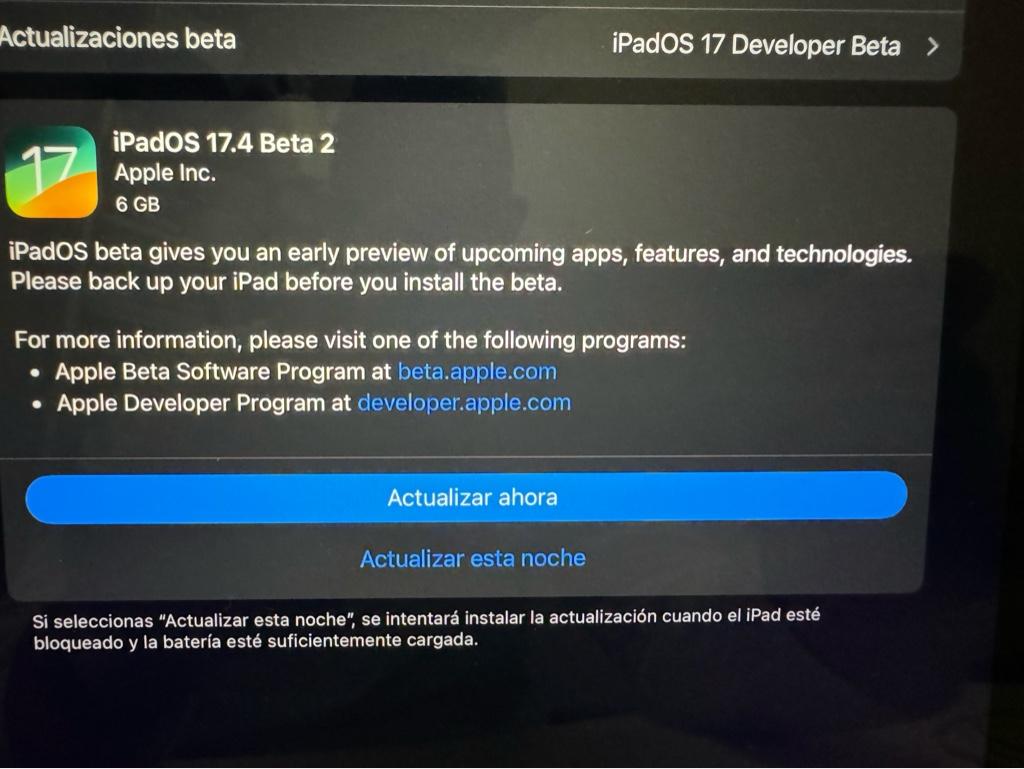
Only 6 gigabytes [emoji15]
Thats because you didn't install first beta otherwise it would be only 962.1 mb
Score: 4 Votes (Like | Disagree)
Realityck Avatar
28 months ago
Both iOS and iPadOS 17.4 beta 2 are showing OTA. 962.1 mb and 773mb install
Score: 4 Votes (Like | Disagree)
avegalf Avatar
28 months ago


Only 6 gigabytes [emoji15]
Score: 2 Votes (Like | Disagree)
Realityck Avatar
28 months ago
[SPOILER="iOS & iPadOS 17.4 Beta 2 Release Notes"]
[HEADING=2]App Store ('https://developer.apple.com/documentation/ios-ipados-release-notes/ios-ipados-17_4-release-notes#App-Store')[/HEADING]
[HEADING=3]Resolved Issues ('https://developer.apple.com/documentation/ios-ipados-release-notes/ios-ipados-17_4-release-notes#Resolved-Issues')[/HEADING]

* Fixed: Certain App Store product sheets will show a “Cannot Connect to iTunes Store” error. (121523272)

[HEADING=2]BrowserEngineKit ('https://developer.apple.com/documentation/ios-ipados-release-notes/ios-ipados-17_4-release-notes#BrowserEngineKit')[/HEADING]
[HEADING=3]Known Issues ('https://developer.apple.com/documentation/ios-ipados-release-notes/ios-ipados-17_4-release-notes#Known-Issues')[/HEADING]

* The symbol createVisibilityPropagationInteraction ('https://developer.apple.com/documentation/browserenginekit/propagating-view-visibility-information-to-browser-extensions') is missing in the SDK. (119845855)

[HEADING=2]HomeKit ('https://developer.apple.com/documentation/ios-ipados-release-notes/ios-ipados-17_4-release-notes#HomeKit')[/HEADING]
[HEADING=3]Known Issues ('https://developer.apple.com/documentation/ios-ipados-release-notes/ios-ipados-17_4-release-notes#Known-Issues')[/HEADING]

* Viewing HomeKit camera live video might not work when away from home. (121166796)
Workaround: Reboot the device viewing the video.

[HEADING=2]Maps ('https://developer.apple.com/documentation/ios-ipados-release-notes/ios-ipados-17_4-release-notes#Maps')[/HEADING]
[HEADING=3]Known Issues ('https://developer.apple.com/documentation/ios-ipados-release-notes/ios-ipados-17_4-release-notes#Known-Issues')[/HEADING]

* MapKit SwiftUI apps might show incorrect map mode for walking and cycling routes. (121085728)

[HEADING=2]Messages ('https://developer.apple.com/documentation/ios-ipados-release-notes/ios-ipados-17_4-release-notes#Messages')[/HEADING]
[HEADING=3]Known Issues ('https://developer.apple.com/documentation/ios-ipados-release-notes/ios-ipados-17_4-release-notes#Known-Issues')[/HEADING]

* Stickers (Memoji and 3rd party) might appear blank. (120994483)

[HEADING=2]Object Capture ('https://developer.apple.com/documentation/ios-ipados-release-notes/ios-ipados-17_4-release-notes#Object-Capture')[/HEADING]
[HEADING=3]New Features ('https://developer.apple.com/documentation/ios-ipados-release-notes/ios-ipados-17_4-release-notes#New-Features')[/HEADING]

* A new manual bounding box flow is now initiated if automatic object detection fails to find an object, particularly in cases where there is no salient ground plane. In this flow, the user is expected to utilize the standard manual bounding box controls to indicate the bounding box of the object to capture by adjusting the provided starting box placed in the world in front of the user. You can determine if this mode has been activated by observing for the new element .objectNotDetected, which will be added to the ObjectCaptureSession’s Feedback set when the manual flow has been activated. You can use this to provide notification and/or instructions to the user about this manual box flow as desired. (113474123)

[HEADING=3]Resolved Issues ('https://developer.apple.com/documentation/ios-ipados-release-notes/ios-ipados-17_4-release-notes#Resolved-Issues')[/HEADING]

* Fixed an issue where an ObjectCaptureView was incorrectly rotating the point cloud view in landscape UI orientations. (114248688) (FB13030239)
* Fixed: PhotogrammetrySession creation on iOS is now significantly faster. (114458164)
* Fixed a memory leak when ObjectCaptureSession was used in a SwiftUI Environment or was torn down without waiting for cleanup to finish. (114481678) (FB13057864)

[HEADING=2]Podcasts ('https://developer.apple.com/documentation/ios-ipados-release-notes/ios-ipados-17_4-release-notes#Podcasts')[/HEADING]
[HEADING=3]Known Issues ('https://developer.apple.com/documentation/ios-ipados-release-notes/ios-ipados-17_4-release-notes#Known-Issues')[/HEADING]

* Tapping on a podcast show from Recently Searched occasionally returns you to the Recently Searched view instead of the podcast show product page. (120915925)
Workaround: The Listener can swipe to remove the show from the list of recently searched items and then perform a new search.

[HEADING=2]Setup Assistant ('https://developer.apple.com/documentation/ios-ipados-release-notes/ios-ipados-17_4-release-notes#Setup-Assistant')[/HEADING]
[HEADING=3]Known Issues ('https://developer.apple.com/documentation/ios-ipados-release-notes/ios-ipados-17_4-release-notes#Known-Issues')[/HEADING]

* Pairing might fail when using Quick Start to set up a new device. (120982013)
Workaround: Set up the new device manually.

[HEADING=2]Shared iPad ('https://developer.apple.com/documentation/ios-ipados-release-notes/ios-ipados-17_4-release-notes#Shared-iPad')[/HEADING]
[HEADING=3]Known Issues ('https://developer.apple.com/documentation/ios-ipados-release-notes/ios-ipados-17_4-release-notes#Known-Issues')[/HEADING]

* Users might be greeted with a “Loading” screen in the Files app immediately after log in on a Shared iPad. (122092017)
Workaround: Relaunch the Files app.

[HEADING=2]StoreKit ('https://developer.apple.com/documentation/ios-ipados-release-notes/ios-ipados-17_4-release-notes#StoreKit')[/HEADING]
[HEADING=3]New Features ('https://developer.apple.com/documentation/ios-ipados-release-notes/ios-ipados-17_4-release-notes#New-Features')[/HEADING]

* In StoreKit testing in Xcode, a billing error StoreKit message ('https://developer.apple.com/documentation/storekit/message') will be sent when a subscription tries to renew while the Enable Billing Retry on Renewalsetting is enabled in the StoreKit configuration file. Use the messages listener ('https://developer.apple.com/documentation/storekit/message/3954510-messages')API to control when StoreKit messages are displayed in your app. (101869442)
* You can use the productDescriptionHidden(_:) API to configure the visibility of product descriptions in ProductView, StoreView and SubscriptionStoreView instances within a view hierarchy. When building with Xcode 15.3, you can use this view modifier even if your app is running on iOS 17.0, iPadOS 17.0, macOS 14.0, tvOS 17.0, watchOS 10.0, visionOS 1.0, or later.
If you implement your own product view style, you can support this new view modifier by checking the descriptionVisibility property on the configuration value. (110414819) (FB12261973)
* You can use SubscriptionStoreView ('https://developer.apple.com/documentation/storekit/subscriptionstoreview') to present promotional offers by adding the subscriptionPromotionalOffer(offer:signature:)modifier.
If you’re already using inAppPurchaseOptions(_:) ('https://developer.apple.com/documentation/swiftui/view/inapppurchaseoptions(_:)') modifier to support promotional offers for StoreKit views, you should adopt the new API instead when your app is running on iOS 17.4, iPadOS 17.4, macOS 14.4, tvOS 17.4, watchOS 10.4, visionOS 1.1 or later. Do not use both APIs to apply a promotional offer for the same view. (115358806)

[HEADING=3]Resolved Issues ('https://developer.apple.com/documentation/ios-ipados-release-notes/ios-ipados-17_4-release-notes#Resolved-Issues')[/HEADING]

* Fixed: The isEligibleForIntroOffer ('https://developer.apple.com/documentation/storekit/product/subscriptioninfo/3803203-iseligibleforintrooffer') property and isEligibleForIntroOffer(for:) ('https://developer.apple.com/documentation/storekit/product/subscriptioninfo/3791958-iseligibleforintrooffer') method now reflect ineligibility in cases where a customer would otherwise be eligible for the offer if they weren’t actively subscribed. This means a customer which is not currently eligible for an introductory offer may become eligible in the future.
Customers who redeem an introductory offer for a given subscription group will continue to never be eligible for another introductory offer in that subscription group. You can detect this case this by checking if any one transaction with a matching subscriptionGroupID ('https://developer.apple.com/documentation/storekit/transaction/3749718-subscriptiongroupid') has the type ('https://developer.apple.com/documentation/storekit/transaction/offer/4307073-type') property on offer ('https://developer.apple.com/documentation/storekit/transaction/4307076-offer') set to introductory ('https://developer.apple.com/documentation/storekit/transaction/offertype/3822309-introductory'). (103604770) (FB11889732)
* Fixed an issue causing SKAdNetwork versions 2.2 and 3.0 to not accept impressions or send postbacks. (121223565)
* Fixed an issue causing some approved Ask to Buy purchases to fail. (121249405)

[HEADING=2]SwiftUI ('https://developer.apple.com/documentation/ios-ipados-release-notes/ios-ipados-17_4-release-notes#SwiftUI')[/HEADING]
[HEADING=3]New Features ('https://developer.apple.com/documentation/ios-ipados-release-notes/ios-ipados-17_4-release-notes#New-Features')[/HEADING]

* Table now supports dynamic numbers of columns with the new TableColumnForEach. (79492167) (FB9189673)
* Popover presentations now automatically dismiss if they go outside the safe area. (100811375)

[HEADING=3]Resolved Issues ('https://developer.apple.com/documentation/ios-ipados-release-notes/ios-ipados-17_4-release-notes#Resolved-Issues')[/HEADING]

* Fixed: Resolved an issue with programmatically present an alert or sheet simultaneously with dismissing another sheet. The new alert or sheet would not show but now it will. If you have code that presents the same sheet programmatically from multiple places in your view hierarchy at the same time, that sheet might no longer appear. Make sure that any sheet modifiers that are in the view hierarchy at the same time use distinct isPresented or itembindings. (117475214)

[HEADING=2]WebKit ('https://developer.apple.com/documentation/ios-ipados-release-notes/ios-ipados-17_4-release-notes#WebKit')[/HEADING]
[HEADING=3]Known Issues ('https://developer.apple.com/documentation/ios-ipados-release-notes/ios-ipados-17_4-release-notes#Known-Issues')[/HEADING]

* HTML content does not display in a Simulator. This issue also affects projects using the web extension project template. (121338366)


[/SPOILER]
Score: 1 Votes (Like | Disagree)
dootskyre Avatar
28 months ago
stolen device protection oversight was fixed!
View post on X
Score: 1 Votes (Like | Disagree)
Related Apple News: Mac | Motoring | Iphone | Local News | South Africa