

iOS 17.3 Beta Adds New Stolen Device Protection Feature to iPhone - MacRumorsOpen MenuShow RoundupsShow Forums menuVisit ForumsOpen Sidebar
Skip to Content

iOS 17.3 Beta Adds New Stolen Device Protection Feature to iPhone

The first iOS 17.3 beta rolling out to developers today includes a new "Stolen Device Protection" feature that is designed to add an additional layer of security in the event someone has stolen your iPhone and also obtained the device's passcode.
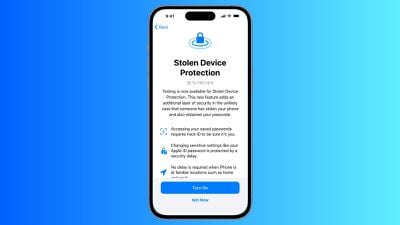
ios stolen device protection
Earlier this year, The Wall Street Journal's Joanna Stern and Nicole Nguyen reported about instances of thieves spying on a victim's iPhone passcode before stealing the device, often in public places like bars. The thief can then reset the victim's Apple ID password, turn off Find My, view passwords stored in iCloud Keychain for banking and email accounts, and more. All in all, the report said thieves can essentially "steal your entire digital life."

When Stolen Device Protection is turned on, Face ID or Touch ID authentication is required for additional actions, including viewing passwords or passkeys stored in iCloud Keychain, applying for a new Apple Card, turning off Lost Mode, erasing all content and settings, using payment methods saved in Safari, and more. No passcode fallback is available in the event that the user is unable to complete Face ID or Touch ID authentication.

For especially sensitive actions, including changing the password of the Apple ID account associated with the iPhone, the feature adds a security delay on top of biometric authentication. In these cases, the user must authenticate with Face ID or Touch ID, wait one hour, and authenticate with Face ID or Touch ID again. However, Apple said there will be no delay when the iPhone is in familiar locations, such as at home or work.

The opt-in feature can be found in the Settings app under Face ID & Passcode → Stolen Device Protection. iPhone users who update to the iOS 17.3 beta will be prompted with the option to test a preview of the feature following installation, but Apple said this screen will not be shown to users who install the public version of iOS 17.3 coming later.

Actions that will require Face ID or Touch ID authentication when the feature is turned on:

  • Viewing/using passwords or passkeys saved in iCloud Keychain
  • Applying for a new Apple Card
  • Viewing an Apple Card virtual card
  • Turning off Lost Mode
  • Erasing all content and settings
  • Taking certain Apple Cash and Savings actions in Wallet
  • Using payment methods saved in Safari
  • Using your iPhone to set up a new device

Actions that will require Face ID or Touch ID authentication and have a one-hour security delay when the feature is turned on:

  • Changing your Apple ID password
  • Updating select Apple ID account security settings, including adding or removing a trusted device, trusted phone number, Recovery Key, or Recovery Contact
  • Changing your iPhone passcode
  • Adding or removing Face ID or Touch ID
  • Turning off Find My
  • Turning off Stolen Device Protection

Apple said it plans to share additional documentation about Stolen Device Protection over time to clarify how the feature works. The option will be available on all iPhone models that are compatible with iOS 17, including the iPhone XS and newer. iOS 17.3 will likely be released to the public in January or February.


Related Forums: iOS 17, iPadOS 17

Popular Stories

iOS 27 on iPhone 17 1

iOS 27 Will Add These New Features to Your iPhone

Saturday May 2, 2026 8:43 am PDT by
Apple is expected to unveil iOS 27 during its WWDC 2026 keynote on June 8, and there are already many rumored features and changes for iPhones. The first developer beta of iOS 27 will likely be available immediately following the keynote, and a public beta typically follows in July. Following beta testing, the software update should be released to all users with a compatible iPhone in...
Apple Event Logo

Apple Just Released a New Accessory

Monday May 4, 2026 8:13 am PDT by
Apple today released a new Pride Edition Sport Loop for the Apple Watch. The band features a rainbow design with 11 colors of woven nylon yarns. The new Pride Edition Sport Loop is available to order now on Apple.com and in the Apple Store app in 40mm, 42mm, and 46mm sizes, and it will be available at Apple Store locations starting later this week. In the U.S., the band costs $49. There...
Apple MacBook Pro M4 hero

Why You Might Want to Wait to Buy a MacBook Pro

Friday May 1, 2026 3:43 pm PDT by
Apple refreshed the 14-inch and 16-inch MacBook Pro with M5 Pro and M5 Max models in March 2026, but depending on your needs and interests, you might want to skip this generation because there's something better in the works. The M5 Pro and M5 Max MacBook Pro models have faster chips, but the same design that Apple has used since 2021. An updated design with new display technology and faster ...

Top Rated Comments

31 months ago
Love this! This is huge! Awesome that Apple keeps looking after our devices and makes sure they don’t get in to the wrong hands.
Score: 35 Votes (Like | Disagree)
Cunir Avatar
31 months ago
good move by apple. i'll be turning it on straight away
Score: 18 Votes (Like | Disagree)
anshuvorty Avatar
31 months ago
This is because of Joanna Stern's awesome reporting! Nice work!

From earlier this year: https://www.wsj.com/video/series/joanna-stern-personal-technology/apples-iphone-passcode-problem-how-thieves-can-take-over-in-minutes/967C3B74-90D3-45EA-BAA4-4ECDBB24715D
Score: 17 Votes (Like | Disagree)
diego.caraballo Avatar
31 months ago
Can we lock ALL SETTINGS behind Face ID?
Score: 17 Votes (Like | Disagree)
Apple_Robert Avatar
31 months ago
This is a solid start in protecting against account take-over. Glad to see Apple finally addressing this aspect.
Score: 15 Votes (Like | Disagree)
31 months ago

Something that is even a bit more morbid is what do you do with someone’s phone after they die or they’re seriously injured. I know of two incidences, where spouses did not share passwords, and after an unexpected death, this sled to major problems.

This new security feature is an important improvement. But the problem of what to do with a deceased property is just going to get worse.
Setting a Legacy Contact ('https://support.apple.com/en-us/HT212360') is the solution.
Score: 12 Votes (Like | Disagree)
Related Apple News: South Africa | Politics | Business | Entertainment | Health
















