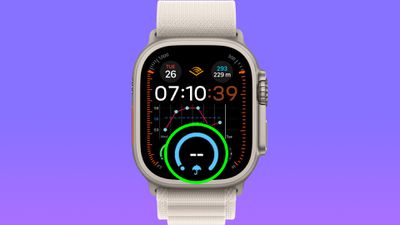
Some Apple Watch users on watchOS 10 have reported experiencing issues with Weather complications failing to display data on the watch face, despite the Weather app itself presenting no such issues.
Apple Watch users have taken to the MacRumors forums, Apple's Support Community, and other platforms to share their experiences. 9to5Mac has highlighted the problem, and some MacRumors staff have seen its occurrence on their own watches.
Affected complications appear blank where weather data should be showing, and yet tapping the complication reveals the expected information in the Weather app. The issue appears to be happening on various models whether they are on watchOS 10.0 or have been updated to the latest watchOS 10.0.1 update.
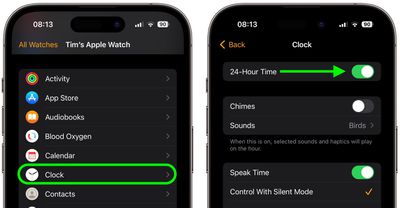
Until Apple issues an update to correct the problem, one temporary workaround that users have had the most success with is to open the Watch app on iPhone and toggle the 24-Hour Time switch in the Clock app settings, wait a few seconds, then toggle it back to its original position. The paired Watch should update, and the affected complications should display weather data again (until they don't again – your mileage may vary).
Has your Apple Watch been affected by the Weather complications issue? Let us know in the comments.
Tuesday April 14, 2026 12:00 pm PDT by Juli Clover
Apple has two new Apple Watch activity challenges coming up, celebrating Earth Day and International Dance Day. The Earth Day activity challenge will launch on Wednesday, April 22, while the Dance Day challenge will take place a week later on Wednesday, April 29.
To complete the Earth Day challenge, Apple Watch owners will need to complete a workout that lasts for 30 minutes or longer.
This ...
Wednesday April 15, 2026 5:36 pm PDT by Juli Clover
Apple retail locations and Apple Authorized Service Providers will soon be able to restore Apple Watch software in-store without needing to send an Apple Watch to a service center, according to a retail source that spoke to MacRumors.
Right now, Apple Watches that can't be restored using an iPhone need to be mailed to an Apple Repair Center for service. There is no in-store repair option, so ...
Thursday April 23, 2026 11:18 am PDT by Tim Hardwick
Apple has published a new ad to appeal to customers in the market for an iPhone and Apple Watch pairing, highlighting the insights it can offer for your health.
Titled simply "Health with iPhone + Apple Watch," the half-minute ad focuses on a woman waiting in line at a cafe who begins receiving unsolicited health and fitness advice from other people in the queue, as well as local residents,...
That's what many users don't understand. They think once a feature is working, it will keep working forever. Meanwhile, they want Feature X, Y and Z added.
Software is not that compartmentalized. It's very interwoven. Adding a new feature can break an old feature.
It's amazing how well Apple devices work given how complex they are.
That means that their software is bad. If the software is complex it's because you have bad architects, bad team leaders and bad tech leads.
And it's not like this is some hidden feature that no one uses. Surely someone at Apple also uses a watch and noticed the things ain't working.
They should concentrate on being a software house, and not a woke PC nest.
That's what many users don't understand. They think once a feature is working, it will keep working forever. Meanwhile, they want Feature X, Y and Z added.
Software is not that compartmentalized. It's very interwoven. Adding a new feature can break an old feature.
It's amazing how well Apple devices work given how complex they are.
Apologies for thinking that a feature will continue to work....
I get where you're coming from as a software writer, but it doesn't inspire much confidence in me as a customer if you think it's amazing that things work because they're complex.
Surely this sort of thing is supposed to be ironed out in the months and months of beta testing, not public releases?
Been posting about this since watch 10 beta launced. Someone on reddit finally found a fix for me. You have to do this Settings > display & brightness > always on > complications data > turn all on.
For some reason watch os 10 turn display complications data off for me.