

Second macOS Sonoma Public Beta and Revised Developer Beta Now Available

Apple today provided the second beta of the upcoming macOS Sonoma update to its public beta testing group, allowing non-developers to test the new operating system ahead of its fall launch. The new beta comes a little over two weeks after Apple released the first beta.
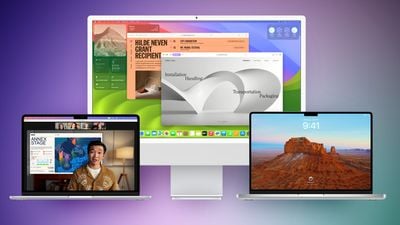
macos sonoma feature purple green
In addition to the new public beta, Apple has also released a revised version of the fourth developer beta, presumably to address issues that were resulting in installation problems for some users following last week's developer release.

Public beta testers can download the macOS 14 Sonoma update from the Software Update section of the System Preferences app after signing up on Apple's beta testing website and opting into the public beta under the Beta Updates section.

macOS Sonoma introduces interactive widgets for the desktop, making widgets more useful and more prominent. You can even use your iPhone widgets on your Mac's desktop through a new Continuity feature.

There are updated screensavers that are similar to the high-resolution animated screensavers available on the Apple TV, and for video calls and presenting, there's a Presenter Overlay option that lets you move, walk, and talk in front of content you're sharing from your Mac.

Safari supports web apps so you can add your favorite websites to your Dock, plus there are new Profiles to separate your work browsing and personal browsing. iCloud Keychain supports sharing passwords with others, and private browsing windows are locked when they are not in use.

Enhanced AutoFill is available for PDFs so you can quickly fill in information like names, addresses, and emails, plus users can collaborate on PDFs and see real-time updates through the Notes app.

For more on what's new in macOS Sonoma, including a new Game mode, we have a detailed macOS Sonoma roundup that highlights all of the features in the update.


Related Forum: macOS Sonoma

Popular Stories

iOS 26

iOS 26.4 and iOS 27 Features Revealed in New Leak

Friday December 12, 2025 10:56 am PST by
Macworld's Filipe Espósito today revealed a handful of features that Apple is allegedly planning for iOS 26.4, iOS 27, and even iOS 28. The report said the features are referenced within the code for a leaked internal build of iOS 26 that is not meant to be seen by the public. However, it appears that Espósito and/or his sources managed to gain access to it, providing us with a sneak peek...
apple beta 26 lineup

Apple Leak Confirms Work on Foldable iPhone, AirTag 2, and Dozens More Devices

Monday December 15, 2025 2:05 pm PST by
Last week, details about unreleased Apple devices and future iOS features were shared by Macworld. This week, we learned where the information came from, plus we have more findings from the leak. As it turns out, an Apple prototype device running an early build of iOS 26 was sold, and the person who bought it shared the software. The OS has a version number of 23A5234w, and the first...
Apple Logo Top Half

Early iOS 26 Software Leak Uncovers Dozens of Upcoming Apple Features

Monday December 15, 2025 3:05 pm PST by
Software from an iPhone prototype running an early build of iOS 26 leaked last week, giving us a glimpse at future Apple devices and iOS features. We recapped device codenames in our prior article, and now we have a list of some of the most notable feature flags that were found in the software code. In some cases, it's obvious what the feature flags are referring to, while some are more...
Apple Foldable Thumb

Leak Reveals Foldable iPhone Details

Monday December 15, 2025 9:09 am PST by
The first foldable iPhone will feature a series of design and hardware firsts for Apple, according to details shared by the Weibo leaker known as Digital Chat Station. According to a new post, via machine translation, Apple is developing what the leaker describes as a "wide foldable" device, a term used to refer to a horizontally oriented, book-style foldable with a large internal display....
iOS 26

Apple Releases iOS 26.2 With Alarms for Reminders, Lock Screen Changes, Enhanced Safety Alerts and More

Friday December 12, 2025 10:10 am PST by
Apple today released iOS 26.2, the second major update to the iOS 26 operating system that came out in September, iOS 26.2 comes a little over a month after iOS 26.1 launched. ‌iOS 26‌.2 is compatible with the ‌iPhone‌ 11 series and later, as well as the second-generation ‌iPhone‌ SE. The new software can be downloaded on eligible iPhones over-the-air by going to Settings >...
iOS 26

iOS 26.2 Coming Soon With These 8 New Features on Your iPhone

Thursday December 11, 2025 8:49 am PST by
Apple seeded the second iOS 26.2 Release Candidate to developers earlier this week, meaning the update will be released to the general public very soon. Apple confirmed iOS 26.2 would be released in December, but it did not provide a specific date. We expect the update to be released by early next week. iOS 26.2 includes a handful of new features and changes on the iPhone, such as a new...
macOS Tahoe 26 Thumb

Apple Releases macOS Tahoe 26.2 With Edge Light

Friday December 12, 2025 10:08 am PST by
Apple today released macOS Tahoe 26.2, the second major update to the macOS Tahoe operating system that came out in September. macOS Tahoe 26.2 comes five weeks after Apple released macOS Tahoe 26.1. Mac users can download the macOS Tahoe update by using the Software Update section of System Settings. macOS Tahoe 26.2 includes Edge Light, a feature that illuminates your face with soft...
airpods max 2024 colors

AirPods Max 2 Likely to Offer These 10 New Features

Monday December 15, 2025 7:41 am PST by
Apple released the AirPods Max on December 15, 2020, meaning the over-ear headphones launched five years ago today. While the AirPods Max were updated with a USB-C port and new color options last year, followed by support for lossless audio and ultra-low latency audio this year, the headphones lack some of the features that have been introduced for newer generations of the regular AirPods and the ...

Top Rated Comments

Johnnyangel Avatar
31 months ago

Rogue Amoeba is the slowest developer. To be fair to them though, they do have to use kernels that could cause problems.
I have no connection to Rogue Amoeba except as a customer, but I think the comment stating that they suck is immature and out of line. (And by the way, it's spelled "populace," not "populous.") I look forward to SoundSource working again too, but no one is forcing any of us to install a beta operating system, and Rogue's position about not releasing SoundSource updates until MacOS releases are final has been clear, consistent, and the same for years now, so it's not like you didn't know.

And yes, they probably have good technical reasons, since some of their other software (i.e. Fission) works on beta OS releases without problems, after issuing a warning.
Score: 13 Votes (Like | Disagree)
PsykX Avatar
31 months ago

The only public beta I did not yet install is Sonoma. If I install Sonoma on my M1 mini the app SoundSource will stop working...until Rogue Ameoba gets off their butts and updates it for Sonoma which will likely be when the general populous version is released. Rogue Ameoba sucks, hip hip hooray \o/
Dude calm down. Sonoma's not even released for the public. They're probably working on it though. Wait til October before criticizing the dev.
Score: 3 Votes (Like | Disagree)
the1bee Avatar
31 months ago
Is anyone else having the wrong time displayed on the login screen and I’m unable to use continuity camera. Help?
Score: 2 Votes (Like | Disagree)
itschris Avatar
31 months ago

?? Hi everyone! I'm new to the forum.

? I just bricked my Intel MBP 2020 two days ago after successfully installing macOS 14 developer beta 4.

⛔️ Now the computer won't boot since it's unable to operate when connected to power. How can I install the revised beta (23A5301h) that supposedly fixes the issue?
Hi, for my case, I unplugged it completely from the power source, then press power key and other random keys and plug my Apple Watch to charge (of course it didn't charge) and wait for a really long while. When your Apple Watch starts to charge, you know your MacBook is back. :D

Hope this will help!

P/S: You may need this: when your MacBook comes back to life, you log in successfully to your desktop. Then don't do anything, just shutdown again. Once it's completely shut down, you plug your power again. This will wake your MacBook up, and charge it as well. Then you can continue to update to latest version but do not unplug it.
Score: 2 Votes (Like | Disagree)
Dog Bone Malone Avatar
31 months ago
All smooth so far on my iMac. I've not seen any lag or juddering that I suffered with the previous version of Sonoma. Early days yet though!
Score: 2 Votes (Like | Disagree)
tagsaid Avatar
31 months ago

Sonoma Beta 4 bricked my MacBook Pro 2020 (intel) due to SMC problem. Could anyone let me know whether this second public beta has addressed that issue yet? Thanks a lot.
I held back on beta 4 after reading all the reports, so I didn’t install beta 4 “version 1”

I installed this one (version 2) on a 14” M1 Pro, so far so good.
Score: 2 Votes (Like | Disagree)
















