

The government of New South Wales in Australia today announced that the Opal ticketing system now supports Express Mode for Apple Pay payments, allowing the fare card to be added to the Wallet app on a compatible iPhone or Apple Watch for tap-and-go payments across the public transport network.

Express Transit mode allows users to pay for rides without having to wake or unlock their iPhone or Apple Watch, or open the Opal app. The mode also bypasses the need to authenticate with Face ID, Touch ID, or a passcode. Users simply need to hold their iPhone or Apple Watch near the contactless payment reader until a checkmark appears on the display.
Transport for NSW undertook a staggered rollout of Express Mode across the 25,000 card readers on the Opal network, starting with ferries and light rail, then train stations, and then the thousands of Opal readers on buses, which finished this week.
"Commuters in the Hunter, Illawarra, Blue Mountains and everywhere in between will benefit from being the first public transport users in Australia to benefit from the mass roll out of this initiative," said NSW transport minister Jo Haylen. "It will make life so much easier for the almost two million transport passengers who use contactless payments with a digital wallet in NSW."
How to Set Up Express Transit on iPhone
Launch the Settings app on your iPhone.
Tap Wallet & Apple Pay.
Tap Express Transit Card.
Tap one of your cards in the list to use it with Express Transit. A tick will appear next to the card you select. The default option is None.
Authenticate your device using Touch ID or Face ID.
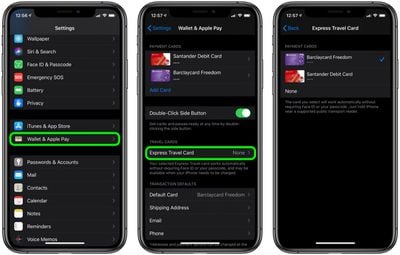
If your bank card doesn't support Express Transit, you'll get an error message telling you that the card is incompatible. If no error message appears, you're good to tap-and-go.
How to Set Up Express Transit on Apple Watch
Launch the Watch app on your iPhone.
Tap Wallet & Apple Pay.
Tap Express Transit Card.
Tap one of your cards in the list to use it with Express Transit. A tick will appear next to the card you select. The default option is None.
Authenticate by entering your passcode on your Apple Watch.
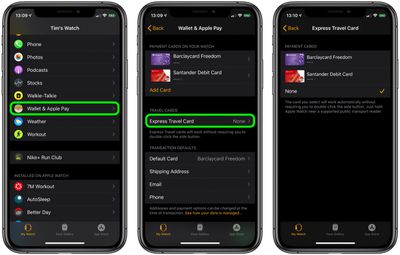
If your bank card doesn't support Express Transit, you'll get an error message telling you that the card is incompatible. If no message appears, you're all set.
Friday December 12, 2025 10:56 am PST by Joe Rossignol
Macworld's Filipe Espósito today revealed a handful of features that Apple is allegedly planning for iOS 26.4, iOS 27, and even iOS 28.
The report said the features are referenced within the code for a leaked internal build of iOS 26 that is not meant to be seen by the public. However, it appears that Espósito and/or his sources managed to gain access to it, providing us with a sneak peek...
Thursday December 11, 2025 8:49 am PST by Joe Rossignol
Apple seeded the second iOS 26.2 Release Candidate to developers earlier this week, meaning the update will be released to the general public very soon.
Apple confirmed iOS 26.2 would be released in December, but it did not provide a specific date. We expect the update to be released by early next week.
iOS 26.2 includes a handful of new features and changes on the iPhone, such as a new...
Friday December 12, 2025 10:10 am PST by Juli Clover
Apple today released iOS 26.2, the second major update to the iOS 26 operating system that came out in September, iOS 26.2 comes a little over a month after iOS 26.1 launched. iOS 26.2 is compatible with the iPhone 11 series and later, as well as the second-generation iPhone SE.
The new software can be downloaded on eligible iPhones over-the-air by going to Settings >...
Thursday December 11, 2025 11:28 am PST by Juli Clover
Apple today released new firmware designed for the AirPods Pro 3 and the prior-generation AirPods Pro 2. The AirPods Pro 3 firmware is 8B30, up from 8B25, while the AirPods Pro 2 firmware is 8B28, up from 8B21.
There's no word on what's include in the updated firmware, but the AirPods Pro 2 and AirPods Pro 3 are getting expanded support for Live Translation in the European Union in iOS...
Friday December 12, 2025 10:08 am PST by Juli Clover
Apple today released macOS Tahoe 26.2, the second major update to the macOS Tahoe operating system that came out in September. macOS Tahoe 26.2 comes five weeks after Apple released macOS Tahoe 26.1.
Mac users can download the macOS Tahoe update by using the Software Update section of System Settings.
macOS Tahoe 26.2 includes Edge Light, a feature that illuminates your face with soft...
Thursday December 11, 2025 10:31 am PST by Juli Clover
The AirTag 2 will include a handful of new features that will improve tracking capabilities, according to a new report from Macworld. The site says that it was able to access an internal build of iOS 26, which includes references to multiple unreleased products.
Here's what's supposedly coming:
An improved pairing process, though no details were provided. AirTag pairing is already...
Friday December 12, 2025 10:09 am PST by Juli Clover
Apple today released iPadOS 26.2, the second major update to the iPadOS 26 operating system released in September. iPadOS 26.2 comes a month after iPadOS 26.1.
The new software can be downloaded on eligible iPads over-the-air by going to Settings > General > Software Update.
iPadOS 26.2 continues with the multitasking improvements that were added with iPadOS 26.1. You can now drag and...
Friday December 12, 2025 11:11 am PST by Juli Clover
Apple today released iOS 26.2, iPadOS 26.2, and macOS 26.2, all of which introduce new features, bug fixes, and security improvements. Apple says that the updates address over 20 vulnerabilities, including two bugs that are known to have been actively exploited.
There are a pair of WebKit vulnerabilities that could allow maliciously crafted web content to execute code or cause memory...
It's very smart of Apple to do this. They won't make any money from this kind of deal but it eventually locks people into their iPhones further so they can't switch away easily. Use your iPhone as a transit payment method, credit card, driver's license, car key, house key, etc. Suddenly, one day, you depend on your iPhone for pretty much everything and it's impossible to switch.
Luckily, I'm an AAPL shareholder so lock away.
Nope. In NYC, the system works with NFC-enabled credit cards and Android phones with NFC -- as well as the dedicated OMNY card you can buy (with cash, even, for users who don't have access to banks). I'd imagine this Australian system works much the same way, and even just in the article photo you can see the credit card logos above the reader.
So, no, nobody is "locked" into using an Apple device, fortunately. As a transit user and a taxpayer, I'd be rightly pissed if any one company had a monopoly on contactless fares, regardeless of what it means for your stock holdings.

















