New Mac Pro Has Hard Drive Issue, Apple Planning Fix in macOS Update

In a support document published today, Apple said certain SATA hard drives might unexpectedly disconnect from the 2023 Mac Pro after the computer wakes from sleep. Apple said it is "aware of this issue" and will fix it in a "future macOS update."
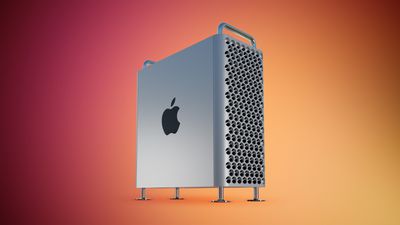
Mac Pro Feature Red
While the Mac Pro is configured with SSD storage, it has SATA ports for connecting internal hard drives, and some can disconnect due to a bug.

"Certain models of internal SATA drives might unexpectedly disconnect from your computer after your Mac wakes from sleep," said Apple. "This can occur if your Mac automatically goes to sleep or if you manually put your Mac to sleep. If you see a message that your disk was not ejected properly, you can restart your Mac to reconnect to the drive."

As a temporary workaround, users can prevent their Mac Pro from automatically going to sleep by opening the System Settings app, clicking on Displays → Advanced…, and turning on "Prevent automatic sleeping when the display is off."

Released on Tuesday, the new Mac Pro features Apple's M2 Ultra chip. The desktop tower has the same design as the Intel-based model from 2019, but lacks graphics card support and user-upgradeable RAM due to Apple silicon's unified architecture. Customers who do not need PCIe expansion should consider the Mac Studio instead.


Related Roundup: Mac Pro
Buyer's Guide: Mac Pro (Neutral)
Related Forum: Mac Pro

Popular Stories

iOS 26

iOS 26.4 and iOS 27 Features Revealed in New Leak

Friday December 12, 2025 10:56 am PST by
Macworld's Filipe Espósito today revealed a handful of features that Apple is allegedly planning for iOS 26.4, iOS 27, and even iOS 28. The report said the features are referenced within the code for a leaked internal build of iOS 26 that is not meant to be seen by the public. However, it appears that Espósito and/or his sources managed to gain access to it, providing us with a sneak peek...
Apple Foldable Thumb

Leak Reveals Foldable iPhone Details

Monday December 15, 2025 9:09 am PST by
The first foldable iPhone will feature a series of design and hardware firsts for Apple, according to details shared by the Weibo leaker known as Digital Chat Station. According to a new post, via machine translation, Apple is developing what the leaker describes as a "wide foldable" device, a term used to refer to a horizontally oriented, book-style foldable with a large internal display....
iOS 26

Apple Releases iOS 26.2 With Alarms for Reminders, Lock Screen Changes, Enhanced Safety Alerts and More

Friday December 12, 2025 10:10 am PST by
Apple today released iOS 26.2, the second major update to the iOS 26 operating system that came out in September, iOS 26.2 comes a little over a month after iOS 26.1 launched. ‌iOS 26‌.2 is compatible with the ‌iPhone‌ 11 series and later, as well as the second-generation ‌iPhone‌ SE. The new software can be downloaded on eligible iPhones over-the-air by going to Settings >...
apple beta 26 lineup

Apple Leak Confirms Work on Foldable iPhone, AirTag 2, and Dozens More Devices

Monday December 15, 2025 2:05 pm PST by
Last week, details about unreleased Apple devices and future iOS features were shared by Macworld. This week, we learned where the information came from, plus we have more findings from the leak. As it turns out, an Apple prototype device running an early build of iOS 26 was sold, and the person who bought it shared the software. The OS has a version number of 23A5234w, and the first...
iOS 26

iOS 26.2 Coming Soon With These 8 New Features on Your iPhone

Thursday December 11, 2025 8:49 am PST by
Apple seeded the second iOS 26.2 Release Candidate to developers earlier this week, meaning the update will be released to the general public very soon. Apple confirmed iOS 26.2 would be released in December, but it did not provide a specific date. We expect the update to be released by early next week. iOS 26.2 includes a handful of new features and changes on the iPhone, such as a new...
macOS Tahoe 26 Thumb

Apple Releases macOS Tahoe 26.2 With Edge Light

Friday December 12, 2025 10:08 am PST by
Apple today released macOS Tahoe 26.2, the second major update to the macOS Tahoe operating system that came out in September. macOS Tahoe 26.2 comes five weeks after Apple released macOS Tahoe 26.1. Mac users can download the macOS Tahoe update by using the Software Update section of System Settings. macOS Tahoe 26.2 includes Edge Light, a feature that illuminates your face with soft...
AirPods Pro Firmware Feature

Apple Releases New Firmware for AirPods Pro 2 and AirPods Pro 3

Thursday December 11, 2025 11:28 am PST by
Apple today released new firmware designed for the AirPods Pro 3 and the prior-generation AirPods Pro 2. The AirPods Pro 3 firmware is 8B30, up from 8B25, while the AirPods Pro 2 firmware is 8B28, up from 8B21. There's no word on what's include in the updated firmware, but the AirPods Pro 2 and AirPods Pro 3 are getting expanded support for Live Translation in the European Union in iOS...
Apple Logo Top Half

Early iOS 26 Software Leak Uncovers Dozens of Upcoming Apple Features

Monday December 15, 2025 3:05 pm PST by
Software from an iPhone prototype running an early build of iOS 26 leaked last week, giving us a glimpse at future Apple devices and iOS features. We recapped device codenames in our prior article, and now we have a list of some of the most notable feature flags that were found in the software code. In some cases, it's obvious what the feature flags are referring to, while some are more...

Top Rated Comments

timborama Avatar
33 months ago
Left out “Affects only small number of users”. Isn't that the standard tagline for every Apple issue?!
Score: 24 Votes (Like | Disagree)
Apple Fan 2008 Avatar
33 months ago

Oh. Well, if you’re spending that much to get that much speed and performance, I don’t see why you wouldn’t use SSD.
To have a back-up drive or storage drive.
Score: 22 Votes (Like | Disagree)
retta283 Avatar
33 months ago

Oh. Well, if you’re spending that much to get that much speed and performance, I don’t see why you wouldn’t use SSD.
Traditional hard drives are still just fine for data storage, when access is irregular enough that the read/write speed is irrelevant. Possibly more reliable in the event of failure as there is higher chance of recovering data from a failing HDD than SSD, unless the tech has gotten more advanced than what I remember.

The term 'spinning rust' is asinine. SSDs are an inherent innovation, but the HDD technology is not outright junk. I have 10MB hard drives that still work, and SSDs bought a few years ago that are unusable, it's always a gamble no matter what the technology is.

Edit: not necessarily disagreeing with your point considering the price of the thing, just some comments. Don't mean to sound condescending with this post.
Score: 20 Votes (Like | Disagree)
PieTunes Avatar
33 months ago

I thought all the configurations were SSD. I’m confused.
It’s regarding SATA hard drives you install yourself.
Score: 18 Votes (Like | Disagree)
Weasel13 Avatar
33 months ago

I thought all the configurations were SSD. I’m confused.
Many SSD are SATA. Many people still use HD because they need more space than is practical with SSD. What if you need 50TB? That's a lot of SSD's... ;)
Score: 17 Votes (Like | Disagree)
persona1138 Avatar
33 months ago
The Mac Pro is the dumbest machine. Just buy a Mac Studio.

PCIe slots are nice and all, if you need a ProTools card or a Blackmagic capture card. But you can get external PCIe card enclosures with Thunderbolt.

And in the film and TV world, trust me, you don’t need BOTH of those cards installed… because the same person who MIXES the movie or TV show isn’t also capturing/editing it. Two different fields. I don’t need a ProTools card AND a capture card in the same machine.

The lack of GPU support means that cards like the ones I mentioned (or extra internal hard drives) is the only real use for the PCIe slots. (And internal third party drives clearly have a temporary problem, as illustrated by this MacRumors article.)

And speaking of storage… Don’t go for internal storage. Just get either a NAS with 10 gig Ethernet or a DAS with Thunderbolt.

The Mac Pro costs about $4000 more than the Mac Studio, which has the exact same specs. (And you should do anything I described above with a Mac Studio.)

Apple couldn’t figure out what the purpose of a modular Mac Pro was with their (excellent) chip architecture, so they just said: “Screw it, let’s throw a Mac Studio in our leftover Intel towers and call it a day.”

Just buy a Mac Studio, if you need that kind of power. It does the same job for $4,000 less.
Score: 14 Votes (Like | Disagree)