

Apple Details What to Do If You Can't Update HomePod When Advanced Data Protection Is Enabled

Apple has published a new support document explaining what to do if users are unable to set up or update a HomePod when Advanced Data Protection for iCloud is enabled.
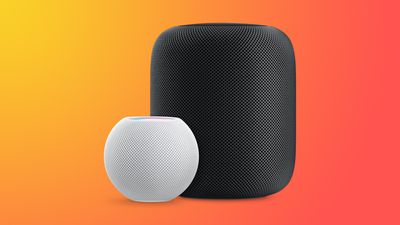
HomePodandMini feature orange
To use Advanced Data Protection for iCloud, all the devices logged into your Apple ID require a minimum software version. That includes HomePod speakers, which must be running at least HomePod software 16.2.

However, according to Bloomberg's Mark Gurman, there is a bug in the Home app that prevents HomePods running older versions of the software from being updated if iCloud end-to-end encryption has been turned on.

This means anyone buying a HomePod that ships with an OS older than 16.2 won't be able to set it up, because doing so first requires an update.

Apple's support document explains what options are available to customers facing this predicament. If the speaker in question is a HomePod mini, users can connect it to a Mac via the USB-C cable and update it through Finder (or iTunes on a PC) by selecting the HomePod in the Finder sidebar and clicking the Restore HomePod option. This will update the speaker to the latest software, after which it can be properly set up.

The full-size first-generation HomePod and the new 2023 HomePod have no USB-C port, so unless Apple includes a fix in iOS 16.3, which is expected to be released next week, owners of these speakers will have to temporarily turn off Advanced Data Protection to update the HomePod software. Apple outlines how to do that in the following way:

  1. Turn off Advanced Data Protection in iCloud settings on your iPhone, iPad, or Mac: In Settings or System Settings, tap your name, then tap iCloud. Scroll to Advanced Data Protection and turn off Advanced Data Protection.
  2. If you received an error message when you previously tried to set up your HomePod, you may need to reset your HomePod. Then set up your HomePod.
  3. Update your HomePod to the latest software using the Home app.
  4. Turn on Advanced Data Protection in iCloud settings on your iPhone, iPad, or Mac: In Settings or System Settings, tap your name, then tap iCloud. Scroll to Advanced Data Protection and turn on Advanced Data Protection.

Apple advises anyone who temporarily turns off Advanced Data Protection to turn it back on immediately after their HomePod software is updated.

Related Roundups: HomePod, HomePod mini

Popular Stories

iOS 26

iOS 26.3 and iOS 26.4 Will Add These New Features to Your iPhone

Tuesday February 3, 2026 7:47 am PST by
We are still waiting for the iOS 26.3 Release Candidate to come out, so the first iOS 26.4 beta is likely still at least a week or two away. Following beta testing, iOS 26.4 will likely be released to the general public in March or April. Below, we have recapped known or rumored iOS 26.3 and iOS 26.4 features so far. iOS 26.3 iPhone to Android Transfer Tool iOS 26.3 makes it easier...
Apple Logo Black

Apple's Next Launch is 'Imminent'

Sunday February 1, 2026 12:31 pm PST by
The calendar has turned to February, and a new report indicates that Apple's next product launch is "imminent," in the form of new MacBook Pro models. "All signs point to an imminent launch of next-generation MacBook Pros that retain the current form factor but deliver faster chips," Bloomberg's Mark Gurman said on Sunday. "I'm told the new models — code-named J714 and J716 — are slated...
iOS 26 Home Feature

Apple Gives Final Warning to Home App Users

Tuesday February 3, 2026 8:55 am PST by
In 2022, Apple introduced a new Apple Home architecture that is "more reliable and efficient," and the deadline to upgrade and avoid issues is fast approaching. In an email this week, Apple gave customers a final reminder to upgrade their Home app by February 10, 2026. Apple says users who do not upgrade may experience issues with accessories and automations, or lose access to their smart...
Aston Martin CarPlay Ultra Screen

Apple's CarPlay Ultra to Expand to These Vehicle Brands Later This Year

Sunday February 1, 2026 10:08 am PST by
Last year, Apple launched CarPlay Ultra, the long-awaited next-generation version of its CarPlay software system for vehicles. Nearly nine months later, CarPlay Ultra is still limited to Aston Martin's latest luxury vehicles, but that should change fairly soon. In May 2025, Apple said many other vehicle brands planned to offer CarPlay Ultra, including Hyundai, Kia, and Genesis. In his Powe...
imac video apple feature

Apple Makes Its Second-Biggest Acquisition Ever

Tuesday February 3, 2026 12:45 pm PST by
Apple recently acquired Israeli startup Q.ai for close to $2 billion, according to Financial Times sources. That would make this Apple's second-biggest acquisition ever, after it paid $3 billion for the popular headphone maker Beats in 2014. This is also the largest known Apple acquisition since the company purchased Intel's smartphone modem business and patents for $1 billion in 2019....

Top Rated Comments

cashville2400 Avatar
40 months ago
This is ridiculously embarrassing! I miss the old Apple.
Score: 16 Votes (Like | Disagree)
contacos Avatar
40 months ago
It just works …

if you research. That value preposition of Apple is long gone unfortunately
Score: 15 Votes (Like | Disagree)
mystery hill Avatar
40 months ago

The full-size first-generation HomePod and the new 2023 HomePod have no USB-C port
Why don’t they just standardize on USB-C?

The product lineup is becoming too fragmented.
Score: 13 Votes (Like | Disagree)
jk111 Avatar
40 months ago
Oops. But I'm not surprised. This is the new Apple.
Score: 12 Votes (Like | Disagree)
MacWiz_007 Avatar
40 months ago
Here's what I'll do, I won't buy a HomePod...for the second time around.
Score: 7 Votes (Like | Disagree)
Menel Avatar
40 months ago

It just works …

if you research. That value preposition of Apple is long gone unfortunately
It's an optional security layer.
The more security layers you heap on, the more issues you're going to have, in general.
Score: 6 Votes (Like | Disagree)
















