iOS 16.2 for iPhone Expected to Launch in December With These 8 New Features

Apple plans to release iOS 16.2 in December, according to Bloomberg's Mark Gurman and a report about the update enabling 5G support in India. The update remains in beta testing for now, with many new features and changes already uncovered.
General iOS 16 Feature Yellow
iOS 16.2 introduces a number of new features, including Apple's new whiteboard app Freeform, two new Lock Screen widgets for Sleep and Medications, the ability to hide the wallpaper and notifications on the iPhone 14 Pro's always-on display, Live Activities enhancements, a rearchitected Home app, and more.

Freeform App
Freeform App Icon
iOS 16.2 includes Apple's new digital whiteboard app Freeform on the iPhone. The app provides an infinite canvas for you to draw on and insert sticky notes, text boxes, shapes, photos, videos, links, PDFs, and more. The app is also available on the iPad and the Mac, and you can collaborate with others in real time via FaceTime and iMessage.

Freeform is more useful on the iPad given the device supports the Apple Pencil, but you can still use a capacitive stylus on the iPhone.

Two New Lock Screen Widgets
iOS 16 2 Medications Widget
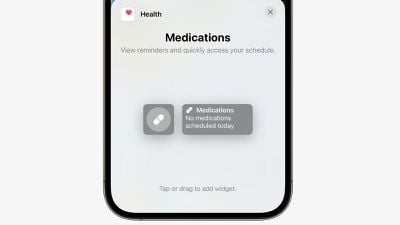
There are two new Lock Screen widgets for Sleep and Medications on iOS 16.2. With the Sleep widget, you can view your most recent sleep session and sleep stages, while the Medications widget can let you quickly access your medication schedule.

New Always-On Display Options
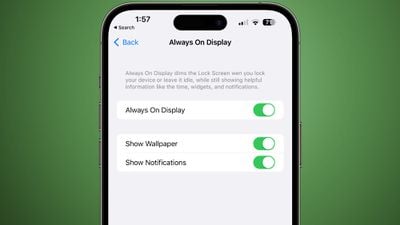
always on display options
Starting with iOS 16.2, you can hide the wallpaper and notifications in always-on display mode on the iPhone 14 Pro and iPhone 14 Pro Max. This results in the Lock Screen having a solid black, minimal appearance in always-on mode, similar to Android.

The new "Show Wallpaper" and "Show Notifications" toggles are located in the Settings app under Display & Brightness → Always On Display.

Live Activities: Sports Scores via Apple TV App
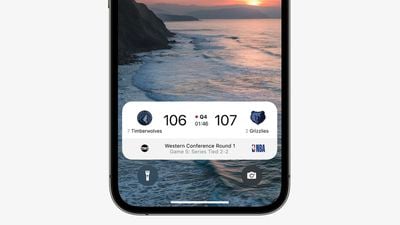
nba live activities ios 16
iOS 16.2 adds Live Activities support for sports scores via the Apple TV app. The feature allows iPhone users to view live scores of MLB, NBA, and Premier League games at a glance on the Lock Screen, and in the Dynamic Island on iPhone 14 Pro models.

During a Premier League match, for example, the Dynamic Island shows a live-updating scoreboard with the number of goals scored by each club. When long pressed, the Dynamic Island expands to show the time elapsed and play-by-play action. When an iPhone 14 Pro is locked, and on all other iPhone models, the score is shown in a Lock Screen banner.

To test the feature with an iPhone on the iOS 16.2 beta, open the TV app and tap on the "Follow" button for a supported game. Apple says the feature is available for NBA and Premier League games for users in the U.S. and Canada, and for MLB games for users in the U.S., Canada, Australia, U.K., Brazil, Mexico, Japan, and South Korea.

Live Activities: More Frequent Updates
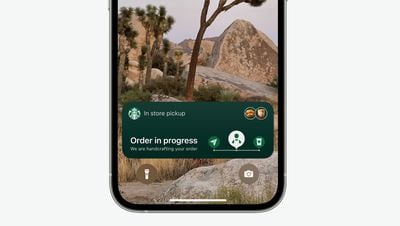
ios 16 live activities starbucks
Live Activities will update more frequently on iOS 16.2 when a new "More Frequent Updates" option is enabled, allowing users to view more up-to-date information, but Apple warns this setting can drain your iPhone's battery faster.

It's unclear what the refresh interval is for Live Activities currently, but the new option will be even faster, which would be useful for tracking the arrival of an Uber vehicle or a Starbucks delivery order once those apps support the feature.

New Home App Architecture
homekit showdown
After updating to iOS 16.2 and opening the Home app, an update to the app is available with new underlying architecture. Apple says the new architecture improves the app's performance, efficiency, and reliability for controlling smart home accessories. This comes after the Home app gained support for Matter accessories in iOS 16.1.

Unintentional Emergency SOS Call Reporting

If you accidentally trigger an Emergency SOS phone call, iOS 16.2 lets you report the incident to Apple and share iPhone diagnostics.

5G in India

iOS 16.2 will enable support for 5G networks in India on the iPhone 12 and newer, starting with carriers Airtel and Reliance Jio.


Related Forum: iOS 16

Popular Stories

iOS 26

iOS 26.3 and iOS 26.4 Will Add These New Features to Your iPhone

Tuesday February 3, 2026 7:47 am PST by
We are still waiting for the iOS 26.3 Release Candidate to come out, so the first iOS 26.4 beta is likely still at least a week or two away. Following beta testing, iOS 26.4 will likely be released to the general public in March or April. Below, we have recapped known or rumored iOS 26.3 and iOS 26.4 features so far. iOS 26.3 iPhone to Android Transfer Tool iOS 26.3 makes it easier...
Apple Logo Black

Apple's Next Launch is 'Imminent'

Sunday February 1, 2026 12:31 pm PST by
The calendar has turned to February, and a new report indicates that Apple's next product launch is "imminent," in the form of new MacBook Pro models. "All signs point to an imminent launch of next-generation MacBook Pros that retain the current form factor but deliver faster chips," Bloomberg's Mark Gurman said on Sunday. "I'm told the new models — code-named J714 and J716 — are slated...
iOS 26 Home Feature

Apple Gives Final Warning to Home App Users

Tuesday February 3, 2026 8:55 am PST by
In 2022, Apple introduced a new Apple Home architecture that is "more reliable and efficient," and the deadline to upgrade and avoid issues is fast approaching. In an email this week, Apple gave customers a final reminder to upgrade their Home app by February 10, 2026. Apple says users who do not upgrade may experience issues with accessories and automations, or lose access to their smart...
Aston Martin CarPlay Ultra Screen

Apple's CarPlay Ultra to Expand to These Vehicle Brands Later This Year

Sunday February 1, 2026 10:08 am PST by
Last year, Apple launched CarPlay Ultra, the long-awaited next-generation version of its CarPlay software system for vehicles. Nearly nine months later, CarPlay Ultra is still limited to Aston Martin's latest luxury vehicles, but that should change fairly soon. In May 2025, Apple said many other vehicle brands planned to offer CarPlay Ultra, including Hyundai, Kia, and Genesis. In his Powe...
Apple Foldable Thumb

First Foldable iPhone Design Details Revealed

Monday February 2, 2026 7:19 am PST by
Apple's first foldable iPhone will feature relocated volume buttons, an all-black camera plateau, a smaller Dynamic Island, and more, according to design leaks from a known Weibo leaker. The user known as "Instant Digital" today claimed to share several key details about the design of the foldable iPhone: The volume buttons will be located on the top edge of the device, aligned to the...

Top Rated Comments

TheYayAreaLiving ?️ Avatar
42 months ago
Excited about the New Always on Display customization options. Wish it was released when iOS was first dropped to the public. Better late than never :).

[MEDIA=twitter]1592672855543537664[/MEDIA]
Score: 10 Votes (Like | Disagree)
BeyondtheTech Avatar
42 months ago
Customizing or choosing a specific Lock Screen should be done from Settings, not the actual Lock Screen. Or at least lock it down for when you don't want it to be changed.

I can't tell you how many times I've triggered the customization mode when I'm just trying to grip my iPhone or clear all notifications with that circled X button.
Score: 8 Votes (Like | Disagree)
Ashbash75 Avatar
42 months ago
Yey, Homekit gets a fresh coat of lipstick
Score: 2 Votes (Like | Disagree)
macsplusmacs Avatar
42 months ago

Excited about the New Always on Display customization options. Wish it was released when iOS was first dropped to the public. Better late than never :).

[MEDIA=twitter]1592672855543537664[/MEDIA]
Ignore the flames. I just like the dog.

Attachment Image
Score: 2 Votes (Like | Disagree)
sjsharksfan12 Avatar
42 months ago

Live Activities will update more frequently on iOS 16.2 when a new "More Frequent Updates" option ('https://www.macrumors.com/2022/10/26/live-activities-update-more-frequently-ios-16-2/') is enabled, allowing users to view more up-to-date information, but Apple warns this setting can drain your iPhone's battery faster.
That doesn't make it live activities then. Basically what I've seen is it's just another widget for the lockscreen. Live is supposed to mean live.
Score: 1 Votes (Like | Disagree)
lazyrighteye Avatar
42 months ago
Free Form, always on options and any additional Lock Screen widgets are welcome.
Score: 1 Votes (Like | Disagree)