Live Activities to Get More Frequent Updates Option in iOS 16.2 - MacRumorsOpen MenuShow RoundupsShow Forums menuVisit ForumsOpen Sidebar
Skip to Content

Live Activities to Get More Frequent Updates Option in iOS 16.2

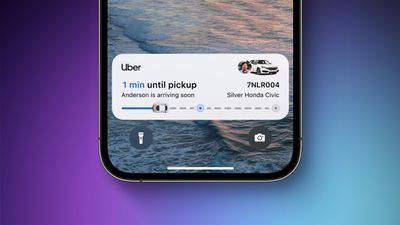
Apple released iOS 16.1 earlier this week and introduced Live Activities – lingering interactive notifications that stay up to date, allowing you to keep an eye on things happening right from the Lock Screen. Since then, Apple has released the first iOS 16.2 beta to developers, and evidence has been found that Apple is working on a way for Live Activities to update more frequently.
ios 16 live activities feature
According to inactive code in iOS 16.2 beta 1 discovered by 9to5Mac, Apple will provide users with an option for "More Frequent Updates" for Live Activities, although the setting will also drain an iPhone battery faster, warns the following unearthed message:

More Frequent Updates

Allowing more frequent updates lets you see more real time information, but can drain your battery faster.

Despite the increased battery usage, the upcoming option in the Settings app is likely to be a welcome addition for users relying on third-party apps that use Live Activities to relay information about travel times, such as Flight tracking app Flighty.

Since the release of iOS 16.1, several third-party apps have been updated to support Live Activities on iPhone Lock Screens. The ‌Dynamic Island‌ component requires an ‌iPhone 14 Pro‌ or ‌iPhone 14 Pro‌ Max.

In addition to the additional Live Activities option, the first iOS 16.2 beta includes other extras including the new Freeform App, Stage Manager External Display Support, Accidental Emergency SOS Reports and More


Popular Stories

imac video apple feature

Apple Released Yet Another New Product Today

Friday March 20, 2026 2:39 pm PDT by
Apple has unveiled a whopping nine new products so far this March, including an iPhone 17e, iPad Air models with the M4 chip, MacBook Air models with the M5 chip, MacBook Pro models with M5 Pro and M5 Max chips, the all-new MacBook Neo, an updated Studio Display, a higher-end Studio Display XDR, AirPods Max 2, and now the Nike Powerbeats Pro 2. iPhone 17e features the same overall design as...
ios 26 4 pastel

iOS 26.4: Top 10 New Features Coming to Your iPhone

Friday March 20, 2026 2:44 pm PDT by
iOS 26.4 isn't the major update with new Siri features that we hoped for, but there are some useful quality of life improvements, and a little bit of fun with an AI playlist generator and new emoji characters. Playlist Playground - Apple Music has a Playlist Playground option that lets you generate playlists from text-based descriptions. You can include moods, feelings, activities, or...
iPhone 18 Pro Deep Red Feature

iPhone 18 Pro Launching Later This Year With These 12 New Features

Wednesday March 18, 2026 7:39 am PDT by
While the iPhone 18 Pro and iPhone 18 Pro Max are not expected to launch for another six months or so, there are already plenty of rumors about the devices. It was initially reported that the iPhone 18 Pro models would have fully under-screen Face ID, with only a front camera visible in the top-left corner of the screen. However, the latest rumors indicate that only one Face ID component...

Top Rated Comments

45 months ago

So „Live“ activities aren’t actually Live right now?
Trust me, I'm an engineer: there's a big difference (performance, data transfer and battery wise) between updating the state of the UI every 10 seconds and doing it every 1 second, but both would be considered live updates.

In general, almost always when something happens "live" in code it's actually some sort of "are we there yet?" running on a timer, either pushed to the device by the server or pulled by the device from the server. This applies to notifications, live chats and any other UI that constantly refreshes its own state.

As a programmer you need to balance the need for "liveness" of the updates with the drawback/cost to you and the end user (data transfer, battery life, server resources).
Score: 12 Votes (Like | Disagree)
ProfessionalFan Avatar
45 months ago
It will make it much more useful yes. Need to see how much of a battery drain we're talking about here though.
Score: 4 Votes (Like | Disagree)
45 months ago
What is the refresh rate now and what will it be with this on?
Score: 3 Votes (Like | Disagree)
The Game 161 Avatar
45 months ago

What does this app do that CBS Sports app or The Score app can't do? Show a score on the lock screen? And do they just show one game or an entire scoreboard for multiple leagues? I mean for me, it's two taps to open CBS Sports or The Score to get to all the scores for all the leagues I have set up as favorites. I'm just trying to understand. Thanks.
will be on the lockscreen and the island. It will show the score and the time left. Sure it's a couple of clicks away but you don't need to do anything it will be on the bottom of your lock screen. You don't need to go into the app to go in touch with games. Even better on 14 pros AOD as well

sports alerts is my go to sports app as will have all my favourite sports with one swipe.
Score: 3 Votes (Like | Disagree)
Kylo83 Avatar
45 months ago
But isn’t the whole idea of live activities means it’s live and always updating live, so does this mean now they don’t update live in real time?
Score: 3 Votes (Like | Disagree)
45 months ago
Great to hear this. Hope battery does not take a huge hit.
Score: 2 Votes (Like | Disagree)
Related Apple News: Lifestyle | Culture | Technology | Local News | Entertainment