Apple Explains Why Duplicates Album in Photos Not Showing for Some Users - MacRumorsOpen MenuShow RoundupsShow Forums menuVisit ForumsOpen Sidebar
Skip to Content

Apple Explains Why Duplicates Album in Photos Not Showing for Some Users

Apple today explained why iPhone users who recently updated to iOS 16 may not see the new Duplicates album in its stock Photos app, and what they can do about it.
photos duplicates
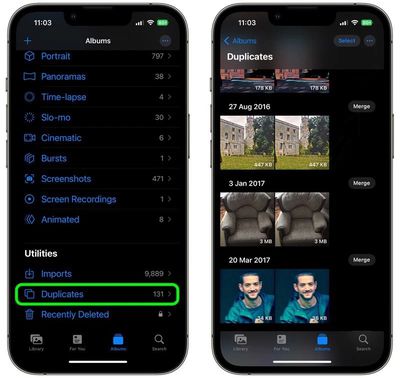
New to iOS 16, the Photos app will automatically detect any duplicate photos and videos in users' libraries and collate them together in a Duplicates album for inspection, giving users the option to merge duplicate sets and delete redundant media.

However, many users have been in touch to say the Duplicates album has not been showing up for them after updating their iPhone software, leading them to wonder if they are doing something wrong.

In a new support document, Apple has clarified that for the Duplicates album to appear, your iPhone has to first index the photo library and find duplicates, but that this detection process requires your iPhone to be locked and connected to power.

"Depending on what tasks are running in the background and the size of your photo library, the process could happen quickly or take up to a few days to complete," adds Apple.

Bear in mind that if you don't have any duplicates in your library, then the Duplicates album won't show up under the "Utilities" section of the Photos app until such a time when you do.

Related Forum: iOS 16

Popular Stories

iphone 17 pro orange

Apple Highlights Photos Shot on iPhone During NASA's Mission to Moon

Saturday April 11, 2026 8:17 am PDT by
As we previously reported, astronauts aboard NASA's Orion spacecraft used the iPhone 17 Pro Max to take selfies of themselves with the Earth in the background during the Artemis II mission around the far side of the Moon last week. Now that the crew members have safely returned to Earth, Apple's CEO Tim Cook and marketing chief Greg Joswiak have both turned to social media to congratulate...
google photos wardrobe

Google Photos to Get AI 'Wardrobe' Feature

Wednesday April 29, 2026 3:50 pm PDT by
Google Photos is getting a new wardrobe planning feature that will help you decide what to wear. AI will pull in images of clothing from the Google Photos library, organizing clothing items into a digital closet. You will be able to put items together to create outfits, and even virtually try them with a digital avatar on to see how they'll look. The Google Photos app will show all items of...
iOS 27 on iPhone 17 1

iOS 27 Will Add These New Features to Your iPhone

Saturday May 2, 2026 8:43 am PDT by
Apple is expected to unveil iOS 27 during its WWDC 2026 keynote on June 8, and there are already many rumored features and changes for iPhones. The first developer beta of iOS 27 will likely be available immediately following the keynote, and a public beta typically follows in July. Following beta testing, the software update should be released to all users with a compatible iPhone in...


Top Rated Comments

47 months ago
Why not show the duplicates folder with a message indicating it won't be indexed until plugged in? Would've saved a lot of Apple support inquires.
Score: 13 Votes (Like | Disagree)
47 months ago
Had to wait for this myself back when I updated.

Worked well, though I do wish they had an option or folder for photos that are very similar but aren't 1:1 duplicates -- like the times I take a back-to-school pic of my kids and snap off 15 hoping to get one good shot and then I forget to delete 14 others!
Score: 8 Votes (Like | Disagree)
vtuberalpha Avatar
47 months ago
The stupid indexing and background processes myth bogging down the battery is no more, thanks Apple for disspelling that nonsense.

Included a screenshot of my own to prove it even more.


Attachment Image
Score: 5 Votes (Like | Disagree)
JosephAW Avatar
47 months ago
It should still show the word "duplicates" with a zero or pending grayed out. o_O
Score: 4 Votes (Like | Disagree)
orbital~debris Avatar
47 months ago

It picked up a RAW and JPEG as being duplicates. It doesn’t give you any clue as to which it prefers to save on a ‘merge’.
From Apple's iPhone User Guide:

"Merging combines the highest quality version and all of the relevant data across the duplicates, and keeps that one in your library. The remaining duplicates are moved to the Recently Deleted album."

https://support.apple.com/en-gb/guide/iphone/iph1978d9c23/ios
Score: 4 Votes (Like | Disagree)
lynxwildcat Avatar
47 months ago
I am really intrigued whether this new 'duplicates' feature is a remnant or precursor of CSAM scanning. The fact this capability picks up images that are not 100% perfect duplicates (minor differences) and needs to catalogue your entire library.

I dunno, this seems related to CSAM, it's created some sort of hash that it's comparing between images. Turning on CSAM later based on the work done for duplicates would seem easier.

I haven't seen any news or analysis digging into why duplicates came this year (after CSAM was shelved) and why we haven't had duplicates as a feature well before now. This seems like a precursor or remnant.
Score: 3 Votes (Like | Disagree)
Related Apple News: Iphone | Mac | Buyers Guide | Lifestyle | Culture