Apple Watch Series 8 Takes Five Nights to Establish Baseline Wrist Temperature - MacRumorsOpen MenuShow RoundupsShow Forums menuVisit ForumsOpen Sidebar
Skip to Content

Apple Watch Series 8 Takes Five Nights to Establish Baseline Wrist Temperature

Apple today published a new support document with additional details about the new wrist temperature sensing feature available on Apple Watch Series 8 and Apple Watch Ultra models, and it turns out the feature requires users to wear their watch for five nights before it can detect a baseline temperature.
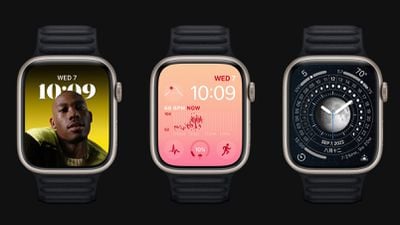
apple watch series 8 trio
Apple Watch Series 8 and Apple Watch Ultra have two temperature sensors — one on the back crystal, near your skin, and another just under the display. While the wearer sleeps, Apple Watch samples wrist temperature every five seconds. This design improves accuracy by reducing bias from the outside environment, according to Apple.

Your body temperature naturally fluctuates and can vary each night due to your diet and exercise, alcohol consumption, sleep environment, or physiological factors such as menstrual cycles and illness. After about 5 nights, your Apple Watch will determine your baseline wrist temperature and look for nightly changes to it.

Apple says that Sleep must be set up with "Track Sleep with Apple Watch" enabled, and Sleep Focus must be enabled for at least four hours a night for about five nights. After that, users can check Body Measurements -> Wrist Temperature in the Health app for recorded measurements.

Apple cautions that the feature isn't a medical-grade device and shouldn't be used for any medical purpose, nor is it a thermometer, and it cannot provide measurements on demand. A loose-fitting Apple Watch can also impact wrist temperature data.

Apple is marketing the feature in promotional materials for the new Apple Watch models as a way to improve period predictions and retrospective ovulation estimates, but the support document suggests that tracking nightly temperature changes while sleeping can give anyone insight into their "overall well-being."

For those who have no use for the feature, Wrist Temperature can be turned off in the Watch app on iPhone, under Privacy -> Turn off Wrist Temperature.

Related Forum: Apple Watch

Popular Stories

earth day 2025 apple watch

Apple Watch Earth Day and International Dance Day Activity Challenges Launching Later This Month

Tuesday April 14, 2026 12:00 pm PDT by
Apple has two new Apple Watch activity challenges coming up, celebrating Earth Day and International Dance Day. The Earth Day activity challenge will launch on Wednesday, April 22, while the Dance Day challenge will take place a week later on Wednesday, April 29. To complete the Earth Day challenge, Apple Watch owners will need to complete a workout that lasts for 30 minutes or longer. This ...
apple watch series 11 spring

Apple Stores Will Soon Be Able to Restore Apple Watch Software In-House

Wednesday April 15, 2026 5:36 pm PDT by
Apple retail locations and Apple Authorized Service Providers will soon be able to restore Apple Watch software in-store without needing to send an Apple Watch to a service center, according to a retail source that spoke to MacRumors. Right now, Apple Watches that can't be restored using an iPhone need to be mailed to an Apple Repair Center for service. There is no in-store repair option, so ...
youtube iphone apple watch health ad 2026

New Apple Ad Sells the iPhone and Apple Watch Health Pairing

Thursday April 23, 2026 11:18 am PDT by
Apple has published a new ad to appeal to customers in the market for an iPhone and Apple Watch pairing, highlighting the insights it can offer for your health. Titled simply "Health with iPhone + Apple Watch," the half-minute ad focuses on a woman waiting in line at a cafe who begins receiving unsolicited health and fitness advice from other people in the queue, as well as local residents,...

Top Rated Comments

Le0M Avatar
48 months ago
Honest question:
If I wear the watch all day, and put it into charge before going to sleep, how can I possibly be wearing it at night?
Score: 10 Votes (Like | Disagree)
48 months ago

Honest question:
If I wear the watch all day, and put it into charge before going to sleep, how can I possibly be wearing it at night?
Because there's quick charging on the newer ones which means that 15-30 minutes of charging in the evening will get you through the night and 15-30 minutes of charging in the morning (while showering for example) will get you through a day (because it will still be pretty charged from that evening 15-30 minute charge).

Added bonus of that is that's very good for your battery health.
Score: 9 Votes (Like | Disagree)
48 months ago
I just wish it could last 5 nights on a single charge… 🤔
Score: 9 Votes (Like | Disagree)
whoknows2597 Avatar
48 months ago

Came here to ask this as well. I dont sleep with mine on because obviously it has to get charged at some point and a watch doesnt do me much good on a charger during the day?!
What I do, take off my watch an hour or so before my bedtime then do my evening routine. After that time, it should be 80% to 100% charged then I wear my watch when sleeping. In the morning, I place it on the charger and leave it there before I head out to work.
Score: 7 Votes (Like | Disagree)
48 months ago
So it won’t alert me if I have a fever?
Score: 7 Votes (Like | Disagree)
performa_6400 Avatar
48 months ago
For those that wear your watch overnight, when do you charge it?
Score: 5 Votes (Like | Disagree)
Related Apple News: Reviews | News | Business | Iphone | Travel