

Apple Seeds Fourth Public Beta of macOS 13 Ventura

Apple today seeded the fourth beta of macOS Ventura to its public beta testing group, allowing non-developers to test the new macOS Ventura operating system ahead of its release. The fourth beta comes two weeks after the third public beta and it corresponds with the sixth developer beta that came out earlier this week.
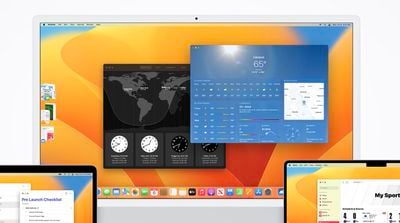
clock weather macos ventura
Public beta testers can download the macOS 13 Ventura update from the Software Update section of the System Preferences app after installing the proper profile from Apple's beta software website.

macOS Ventura introduces Stage Manager, a new multi-tasking option for focusing on a task while having other apps waiting in the wings. ‌Stage Manager‌ puts your main app front and center, tucking your other apps to the side for quick access.

Continuity Camera allows you to use your iPhone as a webcam for your Mac, offering much better camera quality than the built-in Mac camera. Apple is building special stands to hold the ‌iPhone‌ with a Mac, and there are neat features like Desk View, which uses the Ultra Wide lens.

Handoff now works with FaceTime so you can answer calls on the Mac and then transfer them over to another device, and Messages is gaining undo, edit, and mark as unread features. SharePlay now works in Messages in addition to ‌FaceTime‌, and the Mail app has been overhauled. Search is more relevant, emails can be scheduled, and there's even an option to undo an email for up to 10 seconds after it's sent.

Apple brought the Weather and Clock apps to the Mac, redesigned System Preferences and renamed it System Settings, and added support for Shared Tab Groups. Passwords are being replaced with more secure Passkeys in iOS 16 and macOS Ventura, and there are updates to Spotlight, Visual Lookup, Live Text, and more.

There are a ton of other features in macOS Ventura, and we have a full rundown available in our dedicated macOS Ventura roundup.


Related Forum: macOS Ventura

Popular Stories

Aston Martin CarPlay Ultra Screen

Apple's CarPlay Ultra to Expand to These Vehicle Brands Later This Year

Sunday February 1, 2026 10:08 am PST by
Last year, Apple launched CarPlay Ultra, the long-awaited next-generation version of its CarPlay software system for vehicles. Nearly nine months later, CarPlay Ultra is still limited to Aston Martin's latest luxury vehicles, but that should change fairly soon. In May 2025, Apple said many other vehicle brands planned to offer CarPlay Ultra, including Hyundai, Kia, and Genesis. In his Powe...
Apple Logo Black

Apple's Next Launch is 'Imminent'

Sunday February 1, 2026 12:31 pm PST by
The calendar has turned to February, and a new report indicates that Apple's next product launch is "imminent," in the form of new MacBook Pro models. "All signs point to an imminent launch of next-generation MacBook Pros that retain the current form factor but deliver faster chips," Bloomberg's Mark Gurman said on Sunday. "I'm told the new models — code-named J714 and J716 — are slated...
iOS 26

iOS 26.3 and iOS 26.4 Will Add These New Features to Your iPhone

Tuesday February 3, 2026 7:47 am PST by
We are still waiting for the iOS 26.3 Release Candidate to come out, so the first iOS 26.4 beta is likely still at least a week or two away. Following beta testing, iOS 26.4 will likely be released to the general public in March or April. Below, we have recapped known or rumored iOS 26.3 and iOS 26.4 features so far. iOS 26.3 iPhone to Android Transfer Tool iOS 26.3 makes it easier...
Apple MacBook Pro M4 hero

New MacBook Pros Reportedly Launching Alongside macOS 26.3

Sunday February 1, 2026 5:42 am PST by
Apple is planning to launch new MacBook Pro models with M5 Pro and M5 Max chips alongside macOS 26.3, according to Bloomberg's Mark Gurman. "Apple's faster MacBook Pros are planned for the macOS 26.3 release cycle," wrote Gurman, in his Power On newsletter today. "I'm told the new models — code-named J714 and J716 — are slated for the macOS 26.3 software cycle, which runs from...
iOS 26 Home Feature

Apple Gives Final Warning to Home App Users

Tuesday February 3, 2026 8:55 am PST by
In 2022, Apple introduced a new Apple Home architecture that is "more reliable and efficient," and the deadline to upgrade and avoid issues is fast approaching. In an email this week, Apple gave customers a final reminder to upgrade their Home app by February 10, 2026. Apple says users who do not upgrade may experience issues with accessories and automations, or lose access to their smart...

Top Rated Comments

gccumber Avatar
45 months ago
I’ve honestly never understood peoples vehement hatred for Safari — personally its the only browser I use. In the past I’ve tried FF, Chrome, Brave, Opera and probably others but the syncing and integration is too good to abandon Safari. I work mostly for tech startups and to my recollection haven‘t had any major issues. Chrome on a Mac on the other hand… chewing through CPU/GPU. No thanks.
Score: 15 Votes (Like | Disagree)
Realityck Avatar
45 months ago
You want to upgrade to beta 6 because it fixed the powerd and mds_stores (spotlight) hogging CPU issues on my M1 based Macs.
Score: 6 Votes (Like | Disagree)
AstroRexaur Avatar
45 months ago
Is stable?
Score: 6 Votes (Like | Disagree)
Realityck Avatar
45 months ago

Is stable?
Yes, been using it since yesterday. (M1 24" iMac and 16" M1 Max MBP). Not having to do a daily sudo pmset command for powerd is great. (fixed for M1 based Macs)
Score: 6 Votes (Like | Disagree)
TonyM42 Avatar
45 months ago

Not having to do a daily sudo pmset command for powerd is great. (fixed for M1 based Macs)
Worth the update just for that!
Score: 6 Votes (Like | Disagree)
J InTech82 Avatar
45 months ago
So I am finally using the latest public beta on my MacBook M1 Air with 8 GBs of memory. The performance is how I feel this machine should have felt when I first purchased this machine. Everything is wicked snappy, apps load almost instantly and nothing feels sluggish. Let's see how performance holds up over the coming weeks and months but I am very impressed so far.
Score: 4 Votes (Like | Disagree)
















