

Apple Removes Network Locations Feature in macOS Ventura

In addition to redesigning the System Settings app on macOS Ventura, Apple has removed the app's longstanding Network Locations feature, as noted by Jason Snell at Six Colors. The feature allowed users to quickly switch between different sets of Wi-Fi, Ethernet, and other network settings depending on their location, such as home or work.
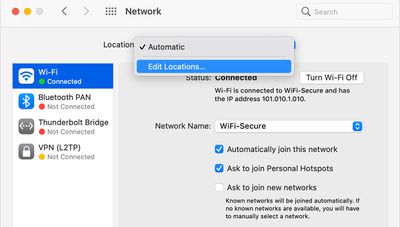
macos ventura network locations
Given that macOS Ventura is still in beta, there is always a chance that Network Locations could return at some point, but this seems unlikely given that Apple marked Tyler Loch's bug report about the feature's absence as "works as currently designed."

In a support document, Apple says the Network Locations feature could be useful in circumstances such as those listed below:

- You use the same type of network (such as Ethernet) at work and at home, but the settings you use at work don't allow your Mac to automatically connect to the same type of network at home.

- Your Mac connects to more than one type of network service (such as both Wi-Fi and Ethernet) at work and at home, but at work you want your Mac to try connecting to the Ethernet network first, and at home you want your Mac to try connecting to the Wi-Fi network first. In other words, you want to set a different service order for each location.

- Your Mac isn't connecting to your network and you want to quickly reset your network settings for testing purposes, without losing your current network settings.

Snell says Apple's command-line tool "networksetup" is still present in the latest macOS Ventura beta, so a third-party developer could step in and release an app to replace the Network Locations functionality removed in the System Settings app.


Related Forum: macOS Ventura

Popular Stories

Aston Martin CarPlay Ultra Screen

Apple's CarPlay Ultra to Expand to These Vehicle Brands Later This Year

Sunday February 1, 2026 10:08 am PST by
Last year, Apple launched CarPlay Ultra, the long-awaited next-generation version of its CarPlay software system for vehicles. Nearly nine months later, CarPlay Ultra is still limited to Aston Martin's latest luxury vehicles, but that should change fairly soon. In May 2025, Apple said many other vehicle brands planned to offer CarPlay Ultra, including Hyundai, Kia, and Genesis. In his Powe...
iOS 26

iOS 26.3 and iOS 26.4 Will Add These New Features to Your iPhone

Tuesday February 3, 2026 7:47 am PST by
We are still waiting for the iOS 26.3 Release Candidate to come out, so the first iOS 26.4 beta is likely still at least a week or two away. Following beta testing, iOS 26.4 will likely be released to the general public in March or April. Below, we have recapped known or rumored iOS 26.3 and iOS 26.4 features so far. iOS 26.3 iPhone to Android Transfer Tool iOS 26.3 makes it easier...
Apple Logo Black

Apple's Next Launch is 'Imminent'

Sunday February 1, 2026 12:31 pm PST by
The calendar has turned to February, and a new report indicates that Apple's next product launch is "imminent," in the form of new MacBook Pro models. "All signs point to an imminent launch of next-generation MacBook Pros that retain the current form factor but deliver faster chips," Bloomberg's Mark Gurman said on Sunday. "I'm told the new models — code-named J714 and J716 — are slated...
Apple MacBook Pro M4 hero

New MacBook Pros Reportedly Launching Alongside macOS 26.3

Sunday February 1, 2026 5:42 am PST by
Apple is planning to launch new MacBook Pro models with M5 Pro and M5 Max chips alongside macOS 26.3, according to Bloomberg's Mark Gurman. "Apple's faster MacBook Pros are planned for the macOS 26.3 release cycle," wrote Gurman, in his Power On newsletter today. "I'm told the new models — code-named J714 and J716 — are slated for the macOS 26.3 software cycle, which runs from...
iOS 26 Home Feature

Apple Gives Final Warning to Home App Users

Tuesday February 3, 2026 8:55 am PST by
In 2022, Apple introduced a new Apple Home architecture that is "more reliable and efficient," and the deadline to upgrade and avoid issues is fast approaching. In an email this week, Apple gave customers a final reminder to upgrade their Home app by February 10, 2026. Apple says users who do not upgrade may experience issues with accessories and automations, or lose access to their smart...

Top Rated Comments

temende Avatar
46 months ago

Pardon my ignorance on this matter, but how was this used? I mean you would connect to a different network depending on where you were, wouldn't you?
You could basically have your Mac adjust your network configuration for you based on your WiFi network, e.g. automatically use a different DNS server at home vs work.

It was a niche feature for sure but I also don't see why it needs to be removed. Part of what made macOS special was a lot of these little "nice touches" that came built in to the OS.
Score: 55 Votes (Like | Disagree)
RoboCop001 Avatar
46 months ago

My guess is they will bring it back in a few years as a "new feature" like they are doing with the battery percentage.
Battery Percentage. Network Location. And Mobile Home Folders.
Battery Percentage! Network Location!! And Mobile Home Folders!!

BATTERY PERCENTAGE! NETWORK LOCATION!! ... Are you getting it yet???

These are not 3 separate updates!!!

Introducing.... iosOSmacOS

:D
Score: 36 Votes (Like | Disagree)
NMBob Avatar
46 months ago
Well, no one comes into work at Apple, so they don't need it and we are expected to just follow suit.
Score: 33 Votes (Like | Disagree)
macduke Avatar
46 months ago
Everyone: We want iPadOS to be more like macOS.

Apple: We made macOS more like iPadOS.


Attachment Image
Score: 24 Votes (Like | Disagree)
temende Avatar
46 months ago
My guess is they will bring it back in a few years as a "new feature" like they are doing with the battery percentage.
Score: 23 Votes (Like | Disagree)
coolfactor Avatar
46 months ago

Pardon my ignorance on this matter, but how was this used? I mean you would connect to a different network depending on where you were, wouldn't you?
I haven't used it recently, but in the past I'd use it to switch Network settings as I moved to different locations. This really was a more advanced feature that the average user would never use, and I suspect that they are removing it because it was lightly-used. Dumbing down the system. Not happy about that, if true.
Score: 23 Votes (Like | Disagree)
















