Pixelmator Pro 2.4 Adds New Layer Types, Vector Shapes, M1 Ultra Support, More - MacRumorsOpen MenuShow RoundupsShow Forums menuVisit ForumsOpen Sidebar
Skip to Content

Pixelmator Pro 2.4 Adds New Layer Types, Vector Shapes, M1 Ultra Support, More

Pixelmator Pro 2.4 "Odesa" went live on the Mac App Store today, and the latest major update to the popular image editing app brings new layer types, new vector shapes, enhanced support for Apple’s M1 Ultra chip, and other notable additions.
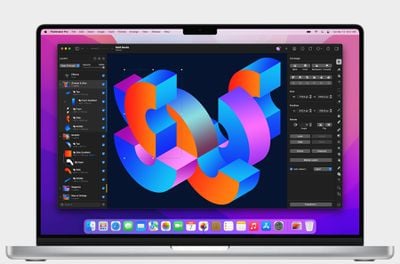
Pixelmator Pro 2

The new color adjustments and effects layers let users nondestructively adjust colors and apply effects to entire layered compositions. With a single color adjustments layer, users can now change the look of a composition no matter how many layers the picture has.

The new layer types work just like other layers, and can be masked, hidden, rearranged, and more. It's also possible to apply selective edits by using colors adjustments and effects layers with masks.

"One of the things that users love most about Pixelmator Pro is how it makes advanced layer-based image editing incredibly easy," said Simonas Bastys, lead developer at the Pixelmator Team. "And with the addition of color adjustments and effects layers, layer-based editing in Pixelmator Pro becomes even more powerful, enabling all-new workflows, such as advanced selective editing of photos."
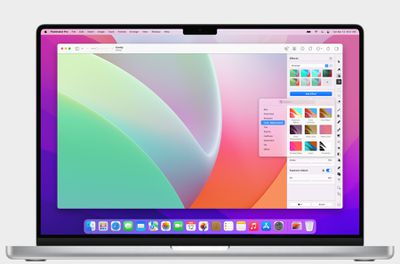
Pixelmator Pro 2

To accommodate the new layer types, the layers sidebar has been redesigned and given a fresh new look. Different layer types, such as images, shapes, text, RAW layers, groups, and other layers, are now more easily recognizable. In addition, layers now also feature informative subtitles that show the most relevant information about a layer at a glance.

Elsewhere, Pixelmator Pro 2.4 also adds over 200 new, artist-designed vector shapes in categories like science, activities, and symbols. The vector shapes are resolution-independent, so they can be used freely in any design or illustration, and their vector points align to pixel boundaries, eliminating any unwanted blurring that can often be found when using vector elements in pixel designs.

This update also includes support for Apple's ‌M1 Ultra‌ processor and machine learning model optimizations, making automatic background removal, super resolution, and photo enhancement up to 1.7 times faster on ‌M1 Ultra‌ compared to M1 Max, according to the developers.
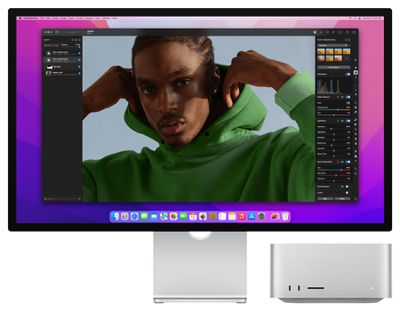
Pixelmator Pro 2

Other new features include a Scrubby Zoom mode, the ability to unlink layer masks, and a wide range of smaller improvements. Pixelmator Pro 2.4 Odesa is available from the Mac App Store as a free update for existing users and $39.99 for everyone else.
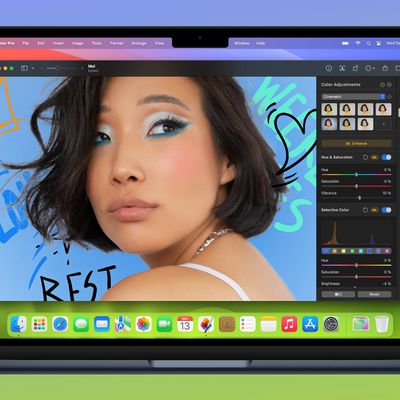

Popular Stories

imac video apple feature

Apple Released Yet Another New Product Today

Friday March 20, 2026 2:39 pm PDT by
Apple has unveiled a whopping nine new products so far this March, including an iPhone 17e, iPad Air models with the M4 chip, MacBook Air models with the M5 chip, MacBook Pro models with M5 Pro and M5 Max chips, the all-new MacBook Neo, an updated Studio Display, a higher-end Studio Display XDR, AirPods Max 2, and now the Nike Powerbeats Pro 2. iPhone 17e features the same overall design as...
iPhone 18 Pro Deep Red Feature

iPhone 18 Pro Launching Later This Year With These 12 New Features

Wednesday March 18, 2026 7:39 am PDT by
While the iPhone 18 Pro and iPhone 18 Pro Max are not expected to launch for another six months or so, there are already plenty of rumors about the devices. It was initially reported that the iPhone 18 Pro models would have fully under-screen Face ID, with only a front camera visible in the top-left corner of the screen. However, the latest rumors indicate that only one Face ID component...
ios 26 4 pastel

iOS 26.4: Top 10 New Features Coming to Your iPhone

Friday March 20, 2026 2:44 pm PDT by
iOS 26.4 isn't the major update with new Siri features that we hoped for, but there are some useful quality of life improvements, and a little bit of fun with an AI playlist generator and new emoji characters. Playlist Playground - Apple Music has a Playlist Playground option that lets you generate playlists from text-based descriptions. You can include moods, feelings, activities, or...

Top Rated Comments

Sandstorm Avatar
52 months ago
Love the version name Odesa 🇺🇦
Score: 7 Votes (Like | Disagree)
nortonandreev Avatar
52 months ago
I'm glad they're making improvements to the Layers (such as the addition of the new Add Empty Layer button, among others). Pixelmator is a great piece of software and I always give it as an example what one could achieve by following the best practices and utilising Apple SDKs and frameworks provided to the developers.
Score: 5 Votes (Like | Disagree)
bchery21 Avatar
52 months ago
Great app, use it frequently.
Score: 3 Votes (Like | Disagree)
quatermass Avatar
52 months ago
Love Pixelmator more and more as they update it - which is pretty frequently. I now only open Photoshop for a couple of filters and plugins, as PMP is now superior for everything else I do. Get this and Affinity Designer, and you're sorted!

Odessa - spot on! 🇺🇦
Score: 2 Votes (Like | Disagree)
49 months ago
FYI - Pixelmator Pro has been discounted down to $19.99.
Score: 1 Votes (Like | Disagree)
HobeSoundDarryl Avatar
52 months ago

So apps have to be recompiled for each variant? What happens if it’s not recompiled?
It runs as it has been running, but not necessarily taking advantage of whatever a new compile might do... and not delivering new features associated with the new version. For example, I just migrated from a aging Intel Mac to a new Mac Studio Ultra. I still had Pixelmator "1" on that Intel Mac and it moved to the Ultra (running in Rosetta 2). It runs as it did on the Intel Mac even without being native.

Yes, I'll upgrade it to this native "pro" version soon- just haven't got there yet.
Score: 1 Votes (Like | Disagree)
Related Apple News: Sport | Entertainment | Motoring | Iphone | Mac