DisplayLink Manager Now Supports External Display Rotation on M1 Macs

Synaptics today released a new beta version of DisplayLink Manager for macOS with long-awaited support for external display rotation on M1 Macs. A company representative said a final release is planned by late December provided that beta testing is successful.
macos external displays displaylink
DisplayLink adapters have proven popular with M1 models of the MacBook Air and 13-inch MacBook Pro, as they allow for multiple external displays to be connected, despite Apple's tech specs indicating that the notebooks only support one external display. DisplayLink Manager helps with setting up external displays via DisplayLink.

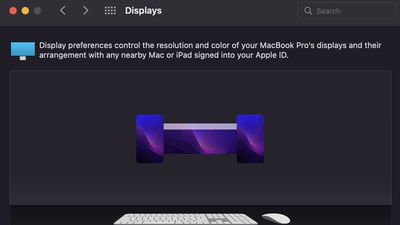
As seen in the above screenshot shared on Reddit, the new version of DisplayLink Manager allows for external displays connected to an M1 Mac with DisplayLink adapters or docks to be used in both landscape and portrait orientations.

DisplayLink Manager 1.6 beta is compatible with all macOS Monterey and macOS Big Sur versions and is free to download on the Synaptics website.

The new 14-inch and 16-inch MacBook Pro models officially support up to two external displays with the M1 Pro chip, or up to four external displays with the M1 Max chip, without the use of DisplayLink adapters or other workarounds.

Related Forums: macOS Monterey, macOS Big Sur

Popular Stories

Aston Martin CarPlay Ultra Screen

Apple's CarPlay Ultra to Expand to These Vehicle Brands Later This Year

Sunday February 1, 2026 10:08 am PST by
Last year, Apple launched CarPlay Ultra, the long-awaited next-generation version of its CarPlay software system for vehicles. Nearly nine months later, CarPlay Ultra is still limited to Aston Martin's latest luxury vehicles, but that should change fairly soon. In May 2025, Apple said many other vehicle brands planned to offer CarPlay Ultra, including Hyundai, Kia, and Genesis. In his Powe...
Apple Logo Black

Apple's Next Launch is 'Imminent'

Sunday February 1, 2026 12:31 pm PST by
The calendar has turned to February, and a new report indicates that Apple's next product launch is "imminent," in the form of new MacBook Pro models. "All signs point to an imminent launch of next-generation MacBook Pros that retain the current form factor but deliver faster chips," Bloomberg's Mark Gurman said on Sunday. "I'm told the new models — code-named J714 and J716 — are slated...
iOS 26

iOS 26.3 and iOS 26.4 Will Add These New Features to Your iPhone

Tuesday February 3, 2026 7:47 am PST by
We are still waiting for the iOS 26.3 Release Candidate to come out, so the first iOS 26.4 beta is likely still at least a week or two away. Following beta testing, iOS 26.4 will likely be released to the general public in March or April. Below, we have recapped known or rumored iOS 26.3 and iOS 26.4 features so far. iOS 26.3 iPhone to Android Transfer Tool iOS 26.3 makes it easier...
Apple MacBook Pro M4 hero

New MacBook Pros Reportedly Launching Alongside macOS 26.3

Sunday February 1, 2026 5:42 am PST by
Apple is planning to launch new MacBook Pro models with M5 Pro and M5 Max chips alongside macOS 26.3, according to Bloomberg's Mark Gurman. "Apple's faster MacBook Pros are planned for the macOS 26.3 release cycle," wrote Gurman, in his Power On newsletter today. "I'm told the new models — code-named J714 and J716 — are slated for the macOS 26.3 software cycle, which runs from...
iOS 26 Home Feature

Apple Gives Final Warning to Home App Users

Tuesday February 3, 2026 8:55 am PST by
In 2022, Apple introduced a new Apple Home architecture that is "more reliable and efficient," and the deadline to upgrade and avoid issues is fast approaching. In an email this week, Apple gave customers a final reminder to upgrade their Home app by February 10, 2026. Apple says users who do not upgrade may experience issues with accessories and automations, or lose access to their smart...

Top Rated Comments

Mick-Mac Avatar
55 months ago
I remember trying my best to work with displaylink a few year back - it was never quite right and there was always something broken. I just gave up on it. Frankly, I'm kind of amazed it's still a thing.
Score: 4 Votes (Like | Disagree)
audioadrenaline Avatar
55 months ago
We wouldn't have to screw with this if Apple would just support Multi-Stream Transport.
Score: 4 Votes (Like | Disagree)
colinsky Avatar
55 months ago
I'm running an LG 5K Ultrafine and two Dell U2715 2560x1440s on my m1 Mini with DisplayLink. Eager to see if the DisplayLink Manager update resolves my wake-from-sleep problem--all the windows in all the monitors re-collect in the center monitor upon waking from sleep.

Sigh, nope, still all collected in the center monitor. If I restart, the windows stay in their proper places.
Score: 3 Votes (Like | Disagree)
chrizel Avatar
55 months ago
Bought a DisplayLink dock in August with one of the newer DisplayLink chips which support 4K/60. Using it at home with my 13” M1 work MBP and my personal M1 MBA to drive an LG 5k and a Dell monitor. Besides some rare situations when connecting the device where the screen won’t turn on (which can be fixed by reconnecting the cable) - I’m satisfied with DisplayLink. Can recommend. But do your research and buy one of the newer devices with the 4K/60 chip.

What I really like: the DisplayLink dock is connected to the LG 5k, so to the MacBooks I still have one single cable that provides power, all screens, networking, usb devices etc.
Score: 3 Votes (Like | Disagree)
AppleTO Avatar
55 months ago
I hope these new drivers work better than DisplayLink used to years ago.
Score: 3 Votes (Like | Disagree)
saudor Avatar
55 months ago

I hope these new drivers work better than DisplayLink used to years ago.
yeah it's substantially smoother these days. The update during the mojave era was a big improvement where for basic tasks, it became super smooth

EDIT: should also add that these things are useful even for intel. Radeon dGPUs are dumb in the sense that as soon as you connect a different display to it, it never properly enters an idle state even without load. The memory clock and sometimes the core clock (depending on the differing resolutions, refresh rates, and scaling factor) gets stuck at higher/max and pumps a ton of heat.

Things like displaylink and sidecar (depending on the Mac) partially uses the iGPU/T2 for hardware acceleration so the dGPU doesn’t freak out and the system remains much cooler
Score: 3 Votes (Like | Disagree)




















