

Apple's MagSafe Battery Pack Unlocks Long Rumored Reverse Charging Feature - MacRumorsOpen MenuShow RoundupsShow Forums menuVisit ForumsOpen Sidebar
Skip to Content

Apple's MagSafe Battery Pack Unlocks Long Rumored Reverse Charging Feature

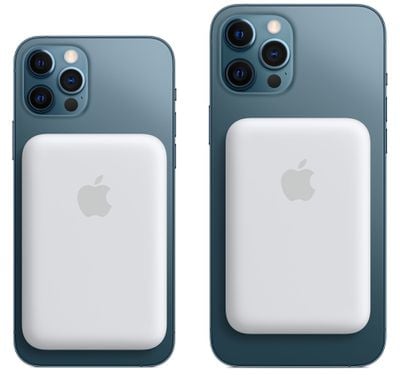
Apple's MagSafe Battery Pack designed for the iPhone 12 models has a unique feature that's long been rumored but never introduced in an Apple product -- reverse wireless charging.
magsafe battery pack 2
When attached to an iPhone that's charging via Lightning, the iPhone can deliver power to the MagSafe Battery Pack, which is the first instance of an iPhone being able to route power to an accessory device.

We've long heard rumors of reverse wireless charging capabilities for the iPhone, a feature that's been talked about as a possibility for both the iPhone 11 and the iPhone 12. Apple hasn't actually implemented reverse wireless charging until now, and the way that it works with the ‌MagSafe Battery Pack‌ is limited in scope.

With the ‌MagSafe Battery Pack‌, the iPhone has to be plugged in for the charging feature to work, but it's certainly a step in the right direction and hints at more expansive reverse wireless charging capabilities in the future. Given the ‌MagSafe Battery Pack‌'s reverse wireless charging feature, it seems technically possible that an iPhone 12 could deliver power to the AirPods or AirPods Pro, but Apple has not yet implemented this feature.

Apple has suggested that ‌MagSafe Battery Pack‌ users might want to use the iPhone passthrough charging feature when the iPhone is connected to a power source like wired CarPlay and is able to charge both accessories.


Popular Stories

iPhone 18 Pro Deep Red Feature

iPhone 18 Pro Launching Later This Year With These 12 New Features

Wednesday March 18, 2026 7:39 am PDT by
While the iPhone 18 Pro and iPhone 18 Pro Max are not expected to launch for another six months or so, there are already plenty of rumors about the devices. It was initially reported that the iPhone 18 Pro models would have fully under-screen Face ID, with only a front camera visible in the top-left corner of the screen. However, the latest rumors indicate that only one Face ID component...
imac video apple feature

Apple Released Yet Another New Product Today

Friday March 20, 2026 2:39 pm PDT by
Apple has unveiled a whopping nine new products so far this March, including an iPhone 17e, iPad Air models with the M4 chip, MacBook Air models with the M5 chip, MacBook Pro models with M5 Pro and M5 Max chips, the all-new MacBook Neo, an updated Studio Display, a higher-end Studio Display XDR, AirPods Max 2, and now the Nike Powerbeats Pro 2. iPhone 17e features the same overall design as...
ios 26 4 pastel

iOS 26.4: Top 10 New Features Coming to Your iPhone

Friday March 20, 2026 2:44 pm PDT by
iOS 26.4 isn't the major update with new Siri features that we hoped for, but there are some useful quality of life improvements, and a little bit of fun with an AI playlist generator and new emoji characters. Playlist Playground - Apple Music has a Playlist Playground option that lets you generate playlists from text-based descriptions. You can include moods, feelings, activities, or...

Top Rated Comments

szw-mapple fan Avatar
61 months ago
Does this mean I can eventually use the iPhone mini as a MagSafe Battery for a Pro Max? :p
Score: 15 Votes (Like | Disagree)
61 months ago
I’m surprised the rumors were actually true. Hopefully they enable reverse charging for AirPods though I’m not holding my breath.
Score: 11 Votes (Like | Disagree)
arn Avatar
61 months ago

I knew it. This thing has no port.
no, you can plug the battery into the Battery Pack and charge it that way too. And it will also charge the iPhone at the same time. so it goes both ways.

https://support.apple.com/en-us/HT212174

Charge your MagSafe Battery Pack

Before you use your MagSafe Battery Pack for the first time, fully charge it using a Lightning to USB cable with a 20W or higher power adapter.

1. Plug one end of a Lightning to USB cable into the Lightning connector on your MagSafe Battery Pack.
2. Plug the other end of the cable into a 20W or higher USB power adapter, then plug the adapter into a power outlet.
3. You'll see an amber status light while your MagSafe Battery Pack is charging. When the MagSafe Battery Pack is fully charged, you'll briefly see a green status light.
Score: 10 Votes (Like | Disagree)
macsplusmacs Avatar
61 months ago
and the "bulge" is the easiest bulge to put on and take off ever.

if you have plenty of charge in your iphone, don't put it on.

if you are running out of power. put it on.

in this respect much more flexible than the smart case from apple which i loved on my iphone 11.
Score: 9 Votes (Like | Disagree)
61 months ago
$100 for a bulge that has less than half the phone’s capacity.

much less money can buy high quality battery packs with substantially higher capacity, and will charge other things
Score: 9 Votes (Like | Disagree)
Black.Infinity Avatar
61 months ago
As always Apple limits things by its software. Unfortunately I still love iOS.
Score: 7 Votes (Like | Disagree)
Related Apple News: Entertainment | Sport | World News | Opinion | Business














