Apple Makes New On-Screen Game Controller Available to Developers on iOS 15 and iPadOS 15 - MacRumorsOpen MenuShow RoundupsShow Forums menuVisit ForumsOpen Sidebar
Skip to Content

Apple Makes New On-Screen Game Controller Available to Developers on iOS 15 and iPadOS 15

During the Platforms State of the Union at WWDC this week, Apple unveiled a new API for iOS 15 and iPadOS 15 that enables developers to implement an on-screen virtual game controller in their iPhone and iPad games with just a few lines of code.
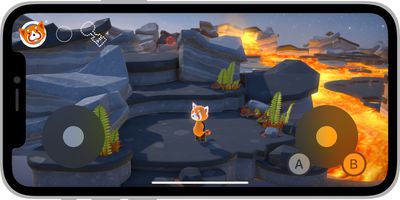
apple virtual game controller ios 15
While many iPhone and iPad games already offer on-screen controls, Apple's new virtual game controller is available to all developers, easy to add, and can be customized on a per-game basis. Apple said the on-screen controller can be adjusted to a variety of layouts, with up to four buttons and a thumbstick, d-pad, or touchpad available per left and right side.

"These new on-screen controls for iPhone and iPad look amazing, and they're carefully tuned for grip locations across hand sizes and for a great responsiveness and feel," said Nat Brown, an Apple engineer working on Game Technologies.

Apple offers a WWDC session and developer documentation with more details.

Related Forum: iOS 15

Popular Stories

iOS 27 on iPhone 17 1

iOS 27 Will Add These New Features to Your iPhone

Saturday May 2, 2026 8:43 am PDT by
Apple is expected to unveil iOS 27 during its WWDC 2026 keynote on June 8, and there are already many rumored features and changes for iPhones. The first developer beta of iOS 27 will likely be available immediately following the keynote, and a public beta typically follows in July. Following beta testing, the software update should be released to all users with a compatible iPhone in...
Apple Event Logo

Apple Just Released a New Accessory

Monday May 4, 2026 8:13 am PDT by
Apple today released a new Pride Edition Sport Loop for the Apple Watch. The band features a rainbow design with 11 colors of woven nylon yarns. The new Pride Edition Sport Loop is available to order now on Apple.com and in the Apple Store app in 40mm, 42mm, and 46mm sizes, and it will be available at Apple Store locations starting later this week. In the U.S., the band costs $49. There...
Apple Announces 2026 Pride Band Watch Face and iPhone Wallpaper Article 2

iOS 26.5 Coming Soon With These New Features

Monday May 4, 2026 8:40 am PDT by
iOS 26.5 is expected to be released next week, following more than a month of beta testing. The update is relatively minor, but there are a couple of new features and changes across the operating system that we have recapped below. iOS 26.5 lays the groundwork for end-to-end encryption for RCS in the Messages app and ads in the Apple Maps app, and it will include a new Pride wallpaper and a...


Top Rated Comments

dannyyankou Avatar
64 months ago
On screen game controllers have never worked and will never work. It’s very difficult to keep your eyes on the gameplay and controls at the same time. You need physical buttons.
Score: 25 Votes (Like | Disagree)
TheDailyApple Avatar
64 months ago
I find the best on screen controllers are the ones designed from the ground up for touch screen instead on those trying to replicate standard game controls.
Score: 10 Votes (Like | Disagree)
TheDailyApple Avatar
64 months ago

On screen game controllers have never worked and will never work. It’s very difficult to keep your eyes on the gameplay and controls at the same time. You need physical buttons.
While I tend to agree with you, this could help with that. If multiple games share the same on screen controls then it will be easier to memorize button location and placement. Similar to how I can type on the 12.9” iPad’s software keyboard without looking just like I do on a real one (albeit more slowly) because the key placement is the same.

Obviously a heavy gamer should buy a real controller just as a coder or writer should buy a real keyboard. But as light/infrequent gamers are unlikely to invest in one, it’s worth optimizing the on screen interface.
Score: 9 Votes (Like | Disagree)
64 months ago

On screen game controllers have never worked and will never work. It’s very difficult to keep your eyes on the gameplay and controls at the same time. You need physical buttons.
I don’t know, Caster (http://www.elecorn.com/caster3d/) largely nailed the core aspects of it in 2009 by just using the position of your thumb from the first point it hits the screen. It is entirely possible to use the orientation of your character or vehicle as a visual cue for where you need to go to next. Controlling a camera using the same method is no different to using a mouse.

Meteor Blitz (https://toucharcade.com/2009/09/16/meteor-blitz-dual-stick-space-shooting-goodness/) also showed how you can use orientation and visual cues to make up for a lack of buttons. Geometry Wars 3 on iOS was and still is a fantastic port.

Where touchscreen controls do fall down is when devs tried to port over console titles to a phone and have to shoehorn touchscreen controls into games not designed for them. This does not work.

There are exceptions, for example games with a largely static camera like FFVII but this pales in comparison to proper ports like FFIX which have been redesigned with the host platform in mind. See also titles like Horizon Chase and Oceanhorn 1.
Score: 7 Votes (Like | Disagree)
BulkSlash Avatar
64 months ago
Personally I prefer games that centre the virtual left stick on the place where I place my thumb. It takes a bit of adjustment to not keep your thumb on the screen but I find it’s the best way of avoiding the situation you get in many iOS games where your character doesn’t move as expected because you didn’t put your thumb in the right place.
Score: 5 Votes (Like | Disagree)
ArPe Avatar
64 months ago
Hope this means finally FIFA and racing games with classic joypad controls not the swiping stroking flicking stuff.
Score: 5 Votes (Like | Disagree)
Related Apple News: Buyers Guide | South Africa | Education | Culture | Sport


















